









As an Amazon Associate I earn from qualifying purchases.
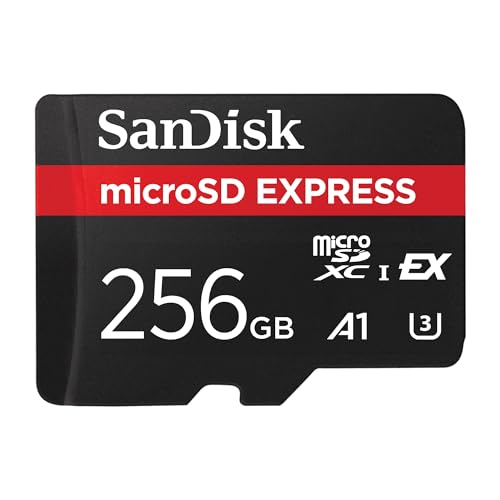
Quick answer: our top pick is SanDisk microSD Express 256 GB (256 GB · microSD Express · up to 880 MB/s).
Which microSD card to buy on Black Friday?
If you are looking for a card for the Nintendo Switch 2 console, buy exclusively a microSD Express model, as it is the only one that will let you install new games. For action cameras and drones, you need a card with a V30 rating, which can handle sustained 4K video recording. For smartphones, tablets, or the Steam Deck console, a standard UHS-I card with an A1 or A2 rating will be more than enough.
Choosing the wrong storage media is the most common mistake during sales. The Switch 2 will not save games onto a regular card, and a card without a V30 class may not keep up with 4K video recording. However, just checking a few markings on the casing is enough to choose the right gear for your needs.
Match the card to your device
For Nintendo Switch 2 owners, the only right choice is a microSD Express card, such as the SanDisk microSD Express 256 GB or the Lexar Play PRO microSD Express 1 TB. Tests by Deku Deals have shown that different Express cards load games on this console almost identically, with differences of about a second. Therefore, you can safely focus on capacity and price, choosing, for example, the Samsung microSD Express 256 GB Nintendo Edition.
If you plan to record video with a drone or an action camera, choose a card with a V30 video class, such as the SanDisk Extreme 1 TB. The V30 class means a minimum write speed of 30 MB/s, which is required for recording high-resolution video. It will also work in the Steam Deck, and the A2 class speeds up app and game loading.
For simple use cases, such as expanding phone storage, a tablet, or an older Nintendo Switch console, the SanDisk Ultra 512 GB is more than enough. It is a UHS-I standard card with an A1 rating, which stores photos, videos, and app data very well. However, do not use it in advanced cameras, as it lacks V30 certification.
Fun fact: The Switch 2 supports Express cards up to 2 TB in capacity, although the largest available storage of this type in stores is currently 1 TB.
Below are popular cards matched to these devices.
Our Black Friday picks: microSD cards

1. SanDisk microSD Express 256 GB
256 GB · microSD Express · up to 880 MB/s
A microSD Express card, the only card type Switch 2 uses to save games. SanDisk lists it as compatible with Nintendo Switch 2, with read speeds up to 880 MB/s.

2. Samsung microSD Express 256 GB (Nintendo Edition)
256 GB · microSD Express
Samsung microSD Express card in the Nintendo Edition, made specifically for Nintendo Switch 2. A good pick if you prefer a card with official Nintendo branding.
See Samsung microSD Express 256 GB (Nintendo Edition) on Amazon →

3. Lexar Play PRO microSD Express 1 TB
1 TB · microSD Express · up to 900 MB/s
A 1 TB microSD Express card with read speeds up to 900 MB/s and write speeds up to 600 MB/s according to Lexar. One of the largest Express cards you can buy today.
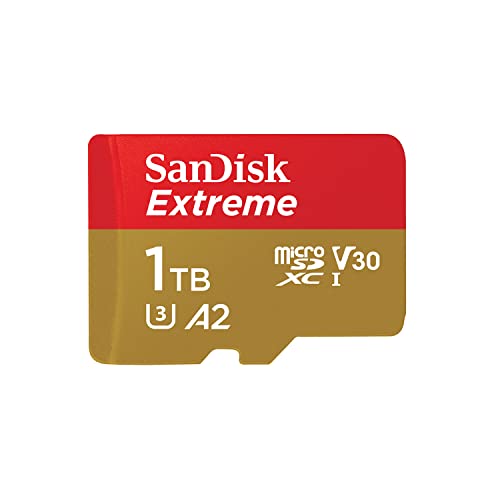
4. SanDisk Extreme 1 TB
1 TB · UHS-I · A2, U3, V30 · up to 190 MB/s
SanDisk Extreme with 1 TB capacity, featuring A2 and V30 ratings. It holds a large game library or many hours of footage.

5. SanDisk Ultra 512 GB
512 GB · UHS-I · A1, U1 · up to 150 MB/s
The best-selling microSD card on Amazon, more affordable than the Extreme series. Rated A1 and U1, so it works for games and files, but not for cameras requiring V30.
What to look for in the specifications to avoid mistakes
The most important difference lies in the distinction between microSD Express cards and traditional UHS-I cards. A standard UHS-I card has a hardware bus limitation of up to 104 MB/s, according to the SD Association. Even if the manufacturer advertises transfer speeds of around 190 MB/s, the speed in a UHS-I slot in a phone or Steam Deck will not exceed this limit anyway.
microSD Express cards offer significantly higher transfer speeds, as confirmed by a TechRadar test where the SanDisk Express 256 GB model achieved approximately 894 MB/s read and 674 MB/s write. However, Dexerto reminds that an Express card inserted into a traditional card reader without support for this technology will slow down to that port's limit. Buying an expensive Express card for an older phone or the original Switch is therefore pointless.
Also pay attention to application performance and write speed class symbols. The A2 rating means more efficient handling of random operations than A1, which speeds up loading installed apps. Meanwhile, the V30 symbol indicates a guaranteed minimum sustained write speed of 30 MB/s. Also watch out for suspiciously cheap deals, as Dexerto warns against counterfeit cards present at almost every retailer.
Fun fact: A microSD Express card works in the original Nintendo Switch model, but it transfers data only at the standard speed of a regular card.
What the price relationships look like between cards
Analyzing the market from October 2026, clear relationships between individual memory categories can be observed. A 256 GB microSD Express card costs about the same as a standard SanDisk Extreme 256 GB card. This means that adopting the new standard for the console does not require a huge surcharge for base capacities.
The situation is different with the largest variants. The 1 TB Lexar Express costs roughly four times as much as a 256 GB Express card. If you need massive storage space, you must expect a significantly higher expense.
In the traditional UHS-I card segment, gear labeled as Ultra remains the most cost-effective. The SanDisk Ultra 512 GB is usually noticeably cheaper than the SanDisk Extreme of the same capacity. If you do not need V30-level write speeds, the basic series will save you a lot of money.
How to spot a fake deal during sales
Black Friday 2026 falls on November 27, and Cyber Monday on November 30. During this period, it is easy to fall for the illusion of massive discounts, so it is worth knowing the applicable law. According to the CJEU ruling C-330/23 of September 26, 2024, in the Aldi Süd case, a retailer advertising a percentage discount must calculate it based on the lowest price from at least 30 days before the reduction. The case concerned bananas offered for 1.29 euros with a strikethrough price of 1.69 euros, even though the lowest price in the preceding month was precisely 1.29 euros.
A study by the British consumer organization Which? from November 25, 2025, showed that sales rarely bring record deals. By monitoring 175 products across 8 major retailers, the organization found that 83% of items were just as cheap or cheaper outside the promotional period, and not a single product reached its lowest price of the year on Black Friday itself. In the case of Amazon, as many as 88% of items could be bought cheaper or at the same price in other months, and 63% were cheaper outside the sale.
Which? also described a case of an inflated reference price, where a toothbrush was advertised with an old price of 50 pounds, even though it had only cost that much for 13 days over the course of six months. Before buying a memory card, follow a few simple steps:
- Check price history on services like PriceRunner or camelcamelcamel to assess the real discount.
- Compare the offer to the lowest price from the last 30 days, not to the crossed-out initial price.
- Make sure the deal does not apply to an older generation of the card or a slower variant with an inferior write class.
- Pay attention to who the actual seller and dispatcher of the package are to avoid cheap counterfeits.
Remember that a good price is one you would accept without hesitation even without a huge banner advertising a sale. Since storage media can be cheaper long before the November shopping peak, you do not have to put off a necessary purchase until the last minute.
Frequently asked questions about buying a microSD card
Is it worth buying a microSD card on Black Friday?
It is, as long as you verify its price history before adding the product to your cart. Data from the Which? organization shows that most consumer electronics can be bought at similar or lower prices outside the sales period. If you find a deal with a genuine discount compared to the last 30 days, the purchase will be fully justified.
Which microSD card for Nintendo Switch 2?
For Nintendo Switch 2, you must exclusively choose a microSD Express standard card. The console requires this format to install and run games. Good choices include SanDisk microSD Express models, Samsung Nintendo Edition, or the high-capacity Lexar Play PRO.
Will a regular microSD card work in Switch 2?
A standard UHS-I card will work in the new console only to a very limited extent. Nintendo only allows viewing previously saved screenshots and videos on it. You will not be able to install any new games designed for Switch 2 on such media.
Which microSD card for a 4K camera?
For stable 4K video recording, you need media rated V30. This class designates a minimum sustained write speed of 30 MB/s. A great example of such memory is the SanDisk Extreme.
How to check if a microSD card deal is genuine?
First and foremost, check the lowest price from the last 30 days, which EU stores must display alongside any advertised discount. It is also worth using third-party tools that track price history, such as camelcamelcamel or PriceRunner. Additionally, check whether the seller is offering a slower card variant under the guise of an attractive discount.
Guides for specific models
- Best microSD card for Nintendo Switch 2 - only microSD Express works
- Best microSD card for Steam Deck - capacity matters more than speed
- Best microSD card for ROG Ally X - UHS-II or a regular UHS-I card
- Best microSD card for DJI Osmo Pocket 3 - cards from DJI's list
- Best microSD card for GoPro HERO13 Black - V30 and A2 per GoPro
- Best microSD card for Insta360 X5 - UHS-I V30, not UHS-II
- Best microSD card for DJI Osmo Action 5 Pro - cards from DJI's list
- Best microSD card for DJI Mini 4 Pro - cards from DJI's list
- Best microSD card for Tapo camera - up to 512GB, High Endurance
- Best microSD card for Raspberry Pi 5 - A2 class and at least 32GB
- Best microSD card for DJI Mini 5 Pro - cards from DJI's list
- Best microSD card for DJI Osmo Pocket 4 - cards from DJI's list
- Best microSD card for DJI Osmo Action 4 - up to 512GB
- Best microSD card for Nintendo Switch OLED and Lite - not Express
- Best microSD card for Samsung Galaxy Tab A9+ - up to 1TB
Sources
- Nintendo Support: microSD and microSD Express card compatibility with Nintendo Switch 2 - manufacturer page (nintendo.com)
- SD Association: Bus Speed (UHS-I, UHS-II, SD Express) - industry article (sdcard.org)
- TechRadar: SanDisk microSD Express Card for Nintendo Switch 2 review - industry article (techradar.com)
- Deku Deals: The Best Switch 2 microSD Cards - industry article (dekudeals.com)
- Dexerto: Best microSD card for Steam Deck - industry article (dexerto.com)
- Court of Justice of the EU: Case C-330/23 Aldi Süd, press release 152/24 - industry article (curia.europa.eu)
- Which?: Most Black Friday deals the same price or cheaper at other times of the year - industry article (which.co.uk)

Leave a comment
This site is protected by hCaptcha and the hCaptcha Privacy Policy and Terms of Service apply.