









As an Amazon Associate I earn from qualifying purchases.
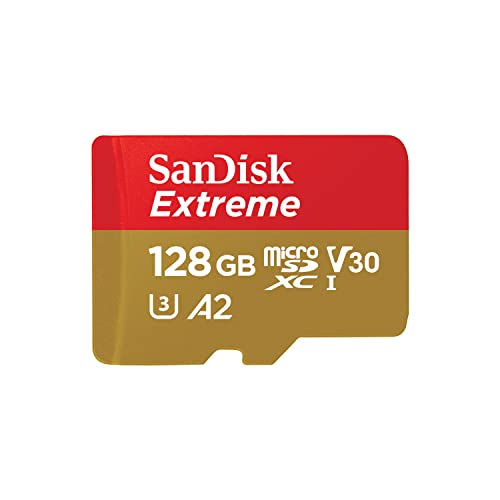
Quick answer: our top pick is SanDisk Extreme 128 GB (128 GB · UHS-I · A2, U3, V30 · up to 190 MB/s).
Best microSD card for Raspberry Pi 5?
For the Raspberry Pi 5, choose an A2 and V30 class microSD card with a capacity of 64 GB or 128 GB. If you plan to install a desktop operating system, 32 GB is the absolute minimum. This choice will ensure smooth operation of the desktop environment and a safe margin of space for future packages and user files.
All models since the Raspberry Pi Model B+ have a built-in microSD slot and boot from a memory card by default. While the Raspberry Pi 5 offers alternative boot methods, microSD media remains the simplest and most universal way to get started.
Why the A2 class and random parameters are the most important
High transfer speed numbers on the card packaging refer to sequential read and write speeds, which are mainly useful in digital cameras. An operating system works differently, continuously reading and writing hundreds of small files scattered across the storage. That is why random operation performance, guaranteed by the A2 application class, matters most in a single-board computer.
The Raspberry Pi 5 supports SDR104 mode and command queueing. Official A2 class Raspberry Pi cards achieve 5000 IOPS in 4 KB random read tests on the Raspberry Pi 5 in SDR104 mode, compared to 3200 IOPS on the Raspberry Pi 4 in DDR50 mode. For 4 KB random writes, the results are 2000 IOPS on the newer board and 1200 IOPS on the older model, respectively.
When choosing media, also look for the C10, U3, and V30 ratings, which confirm stable operational performance. Keep in mind the upper limit of storage capacity as well. The card must have a capacity of less than 2 TB, as larger media exceed the limitations of the MBR partition table used in the boot process.
Fun fact: The official Raspberry Pi card delivers 5000 random reads per second on the Pi 5, significantly higher than the 3200 on the Pi 4.
When selecting cards for this roundup, we focused on models meeting the A2 and V30 class requirements that offer high random performance and stable operation under an operating system.
Recommended microSD cards for Raspberry Pi 5

1. SanDisk Extreme 128 GB
128 GB · UHS-I · A2, U3, V30 · up to 190 MB/s
SanDisk Extreme 128 GB with A2 and V30 classes, one of the best-selling microSD cards.

2. SanDisk Extreme 64 GB
64 GB · UHS-I · A2, U3, V30 · up to 170 MB/s
SanDisk Extreme 64 GB with A2 and V30 classes and read speeds up to 170 MB/s.

3. Samsung PRO Plus 128 GB
128 GB · UHS-I · A2, U3, V30 · up to 180 MB/s
Samsung PRO Plus 128 GB with A2 and V30 classes.

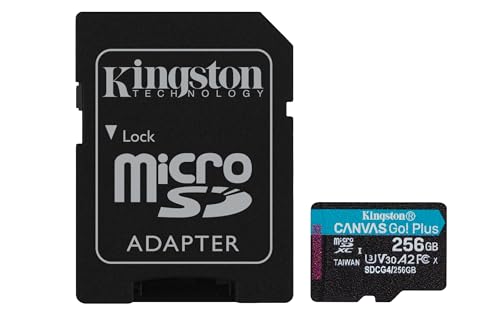
4. Kingston Canvas Go! Plus 128 GB
128 GB · UHS-I · A2, U3, V30 · up to 200 MB/s
Kingston Canvas Go! Plus (Gen4) in a 128 GB capacity, with A2 and V30 ratings. An affordable option for shorter trips.
Selecting Capacity for a Specific System and Tasks
Storage space requirements depend on the selected operating system variant. The Raspberry Pi documentation provides specific guidelines for the official software that are worth following when shopping.
For Raspberry Pi OS Lite, which lacks a graphical user interface and is operated solely from the command line, the minimum recommended card capacity is 8 GB. This version works well for simple network projects or headless setups. On the other hand, Raspberry Pi OS editions with a standard desktop and the Raspberry Pi OS Full version require a card of at least 32 GB.
The manufacturer recommends choosing storage with some headroom, making 64 GB and 128 GB variants the most practical choices today. Larger capacity allows for easy installation of additional tools and downloading data without the risk of quickly running out of space.
SSD via PCIe, High Endurance Cards, and Counterfeit Risks
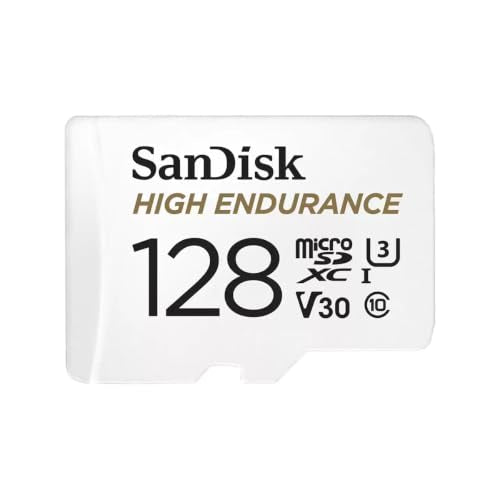
If you plan to run your single-board computer 24/7, a standard consumer card may wear out faster. Websites like Microcontrollers Lab and raspberry.tips recommend High Endurance cards in such conditions, as they offer increased durability for continuous data writing.
For tasks requiring heavy database operations or server applications, booting the system from an SSD is a better solution. Newer Raspberry Pi models can boot over a network, from a USB port, and Raspberry Pi 5 also enables direct booting from an NVMe drive via the PCIe connector. The Raspberry Pi SSD kit via PCIe tested by CNX Software is a proven route for anyone who outgrows the limits of a microSD card.
When buying a microSD card, always use reliable retail sources. It is easy to find counterfeits on the market with fake capacity and degraded performance, which leads to system errors, corrupted files, or boot failures.
Fun fact: Raspberry Pi cannot handle cards of 2 TB or larger due to the limitations of the MBR partition table.
Frequently Asked Questions About Memory Cards
Which microSD card for Raspberry Pi 5?
A card with an A2 performance class and V30 rating, with a capacity of 64 GB or 128 GB, works best. Official recommendations point to cards with these specifications due to their support for SDR104 mode and command queuing. For continuous 24/7 operation, consider a High Endurance series card.
How many GB card for Raspberry Pi OS?
For Raspberry Pi OS with desktop and Raspberry Pi OS Full, the recommended minimum is 32 GB. If you are installing Raspberry Pi OS Lite without a desktop environment, a card of at least 8 GB is sufficient. In both cases, choosing a larger card is recommended to ensure extra free space.
Is an A2 card faster in Raspberry Pi 5?
Yes, the A2 class ensures higher random read and write operations per second (IOPS). In Raspberry Pi 5, thanks to SDR104 mode support, official A2 cards reach up to 5000 IOPS for reads and up to 2000 IOPS for 4 KB sample writes. This directly translates to faster application startup and smoother system performance.
What is the maximum card capacity for Raspberry Pi 5?
A card used in Raspberry Pi 5 must have a capacity under 2 TB. Media of 2 TB or larger are not supported due to MBR partition table limitations. In practice, capacities ranging from 32 GB to 128 GB are most commonly chosen.
Can Raspberry Pi 5 boot from an SSD?
Yes, Raspberry Pi 5 supports booting from an NVMe SSD connected directly via the PCIe connector. The board also allows booting from USB storage or over a network, making it a great alternative to a microSD card for demanding server projects.
Sources
- Raspberry Pi Documentation: Getting started (storage requirements) - manufacturer page (raspberrypi.com)
- Raspberry Pi: Raspberry Pi SD Cards - manufacturer page (raspberrypi.com)
- Microcontrollers Lab: Best microSD cards for Raspberry Pi - industry article (microcontrollerslab.com)
- CNX Software: Raspberry Pi SSD kit and Class A2 microSD cards review with Raspberry Pi 5 - industry article (cnx-software.com)
- raspberry.tips: The best SD card for Raspberry Pi - industry article (raspberry.tips)

Leave a comment
This site is protected by hCaptcha and the hCaptcha Privacy Policy and Terms of Service apply.