









As an Amazon Associate I earn from qualifying purchases.
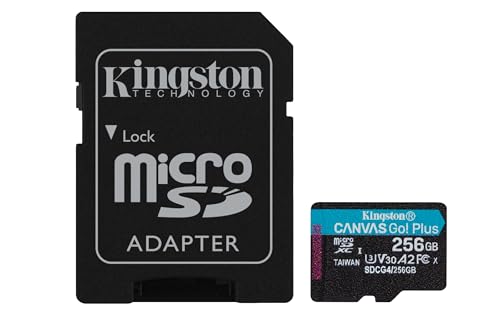
Quick answer: our top pick is Kingston Canvas Go! Plus 256 GB (256 GB · UHS-I · A2, U3, V30 · up to 200 MB/s).
Best microSD card for DJI Osmo Action 5 Pro? Short answer
For the DJI Osmo Action 5 Pro camera, you need a microSD memory card with a U3 and V30 speed class that supports the exFAT file system. The maximum supported capacity is 1 TB, giving you complete freedom when choosing storage size.
The easiest and most reliable choice is the Kingston Canvas Go! Plus series. It is the only card lineup on the official DJI recommendation list available in every size from 64 GB up to 1 TB.
Camera requirements, the DJI list, and card markings
The camera records video at a maximum bitrate of 120 Mb/s. The V30 rating on a card guarantees a minimum sustained write speed of 30 MB/s, which converts to 240 Mb/s. A V30 card therefore offers twice the bandwidth required by the Osmo Action 5 Pro at its highest settings.
Only a few specific models are featured on the DJI recommended list. These are the SanDisk Extreme PRO 32 GB U3 A1 V30, the Kingston Canvas Go! Plus in versions from 64 GB to 1 TB U3 A2 V30, and the Lexar Professional 1066x in 64 GB and 512 GB U3 A2 V30 versions.
The Have Camera Will Travel website notes that any UHS-I V30 card from a reputable manufacturer will work well in this camera. Choosing a specific model from this group brings no real gains in image quality, so card availability should be the main deciding factor.
There is also no need to pay extra for more expensive V60 or V90 cards. The camera will not utilize their performance during video recording, so purchasing a faster card will not improve the device's performance.
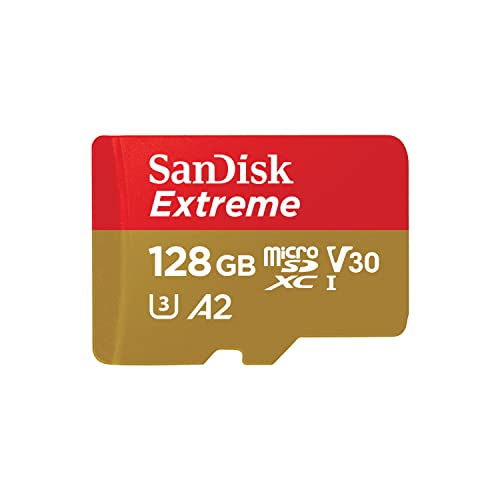
Fun fact: The only SanDisk card on the official DJI list is the 32 GB Extreme PRO. It is also the smallest storage option among all cards tested and recommended by the camera manufacturer.
Below you will find an overview of cards from the officially recommended series, selected to fit various needs and trip lengths.
Recommended microSD cards for DJI Osmo Action 5 Pro

1. Kingston Canvas Go! Plus 256 GB
256 GB · UHS-I · A2, U3, V30 · up to 200 MB/s
The newer Gen4 version of the Kingston Canvas Go! Plus card, with read speeds up to 200 MB/s, A2, and V30. The series is on camera makers' recommended lists.

2. Kingston Canvas Go! Plus 512 GB
512 GB · UHS-I · A2, U3, V30 · up to 200 MB/s
Kingston Canvas Go! Plus (Gen4) in 512 GB capacity, with A2 and V30 classes and read speeds up to 200 MB/s. This version is sold without an SD adapter.

3. Kingston Canvas Go! Plus 1 TB
1 TB · UHS-I · A2, U3, V30 · up to 200 MB/s
Kingston Canvas Go! Plus (Gen4) with 1 TB capacity, with A2 and V30 classes, bundled with an SD adapter.

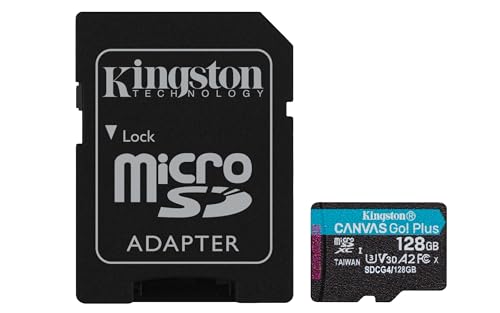
4. Kingston Canvas Go! Plus 128 GB
128 GB · UHS-I · A2, U3, V30 · up to 200 MB/s
Kingston Canvas Go! Plus (Gen4) in a 128 GB capacity, with A2 and V30 ratings. An affordable option for shorter trips.
47 GB built-in storage vs. an external card: which to choose
DJI Osmo Action 5 Pro comes equipped with 64 GB of internal storage. Exactly 47 GB of free space is available to the user, allowing you to start recording right out of the box.
Fun fact: Osmo Action 5 Pro has 47 GB of free built-in storage, so it will record footage even if you forget to insert a microSD card into the slot.
While the built-in memory comes in handy in emergencies, you need a microSD card for regular work. You can easily expand the camera's storage with a card up to 1 TB.
A 128 GB capacity is a good choice if you are looking for a more affordable solution for shorter, day-to-day outings. It works well for those who transfer footage directly to a computer drive after returning home.
The 256 GB and 512 GB variants are the most versatile capacities for longer trips. They give you great recording freedom without the need to constantly monitor remaining storage space.
A 1 TB card is the maximum size supported by the device. Choose it when heading out on an extended journey without access to a computer and you want to keep all your files directly on the camera.
In-camera formatting and media preparation
Format every new memory card directly in the Osmo Action 5 Pro camera menu before you start recording. The device prepares the card using the exFAT file system, which prevents write errors during long recording takes.
Formatting directly inside the camera also removes unnecessary folders and organizes the partition structure. Simply open the device settings and confirm the storage wipe.
Carrying a second microSD card with you is a good habit. If the first card fills up or encounters an unexpected error in the field, you can simply insert the spare card and keep shooting.
FAQ: Memory cards for Osmo Action 5 Pro
What is the maximum microSD card for Osmo Action 5 Pro?
The camera supports microSD memory cards up to 1 TB. The device operates with media formatted in the exFAT file system. To record footage without interruption, choose models with U3 and V30 speed classes.
Can Osmo Action 5 Pro record without a card?
Yes, this camera can record video without an inserted microSD card. The device features 64 GB of built-in storage, with 47 GB fully available to the user. You can expand this space with an external card at any time.
Is it worth buying a V60 or V90 card for Osmo Action 5 Pro?
It is not worth overpaying for V60 or V90 cards for this specific model. The camera's maximum video bitrate is 120 Mb/s, while a standard V30 card provides a sustained write speed of 240 Mb/s. More expensive cards offer no additional benefits in this device.
Which cards does DJI recommend for Osmo Action 5 Pro?
The manufacturer recommends selected cards from SanDisk, Lexar, and Kingston in its official specifications. The list includes the SanDisk Extreme PRO 32 GB, Lexar Professional 1066x in 64 GB and 512 GB versions, as well as the Kingston Canvas Go! Plus in all capacities from 64 GB to 1 TB.
What card capacity should I choose for Osmo Action 5 Pro?
The choice depends on how often you transfer files to a computer. A 128 GB card is sufficient for short recordings, while 256 GB and 512 GB options are ideal for longer vacation trips. If you need maximum storage without having to clear the card while traveling, go for a 1 TB card.
Sources
- DJI: Osmo Action 5 Pro specs (supported and recommended microSD cards) - manufacturer page (dji.com)
- Have Camera Will Travel: Best SD cards for DJI Osmo Action 4, 5 Pro and 6 - industry article (havecamerawilltravel.com)
- ProjectGo.Pro: Best SD card for DJI Osmo Action 5 Pro - industry article (projectgo.pro)
- Lexar: Best microSD cards for action cameras and drones - industry article (americas.lexar.com)

Leave a comment
This site is protected by hCaptcha and the hCaptcha Privacy Policy and Terms of Service apply.