









As an Amazon Associate I earn from qualifying purchases.
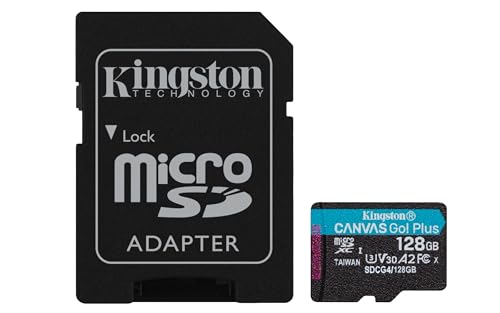
Quick answer: our top pick is Kingston Canvas Go! Plus 128 GB (128 GB · UHS-I · A2, U3, V30 · up to 200 MB/s).
Best microSD card for DJI Mini 4 Pro? Quick and risk-free choice
For DJI Mini 4 Pro, it is best to choose a microSD card from the official list recommended by DJI, marked with U3 and V30 ratings, with a capacity from 128 GB to 512 GB. Such media will easily handle 4K video recording at 100 frames per second and will not stop recording mid-flight.
The drone has only 2 GB of built-in storage, so buying a card is the first step after unboxing the device. If you buy a model with too low of a speed class, the drone may report a write error or freeze the recording at the best moment.
Fun fact: Mini 4 Pro has only 2 GB of built-in storage, so without an additional card, it will only record a short clip.
Speed ratings and the DJI list in practice
DJI Mini 4 Pro records video using H.264 and H.265 codecs with a maximum bitrate reaching 150 Mb/s. For the storage to keep up with such an amount of data, it requires an adequate sustained write speed. Reviewers from Dronesgator point out that a card of at least V30 or U3 class is essential for smooth 4K recording.
The V30 class guarantees a minimum sustained write speed of 30 MB/s. When converted to megabits, this equals 240 Mb/s, which leaves plenty of headroom compared to the drone's maximum bitrate of 150 Mb/s. A standard card without these ratings might have high peak transfer speeds, but it will slow down during longer shots and interrupt recording.
Many pilots ask about the popular gold-and-red SanDisk Extreme card. The standard SanDisk Extreme is not included on the official DJI list for Mini 4 Pro. The manufacturer only listed the SanDisk Extreme PRO variant in a small 32 GB capacity. Therefore, it is safer to pick models that DJI has actually tested and approved.
On the official list, you will find the Lexar 1066x series in capacities ranging from 64 GB to 512 GB with V30, U3, and A2 ratings. DJI also includes Kingston Canvas GO! Plus in 64 GB and 128 GB versions, as well as Kingston Canvas React Plus in 64 GB, 128 GB, and 256 GB variants with the ultra-fast V90 class. The list concludes with Samsung EVO Plus in the 512 GB version.
We have selected proven memory cards from the official DJI list and their direct, newer versions that will easily handle the full capabilities of your drone's camera.
Recommended microSD cards for DJI Mini 4 Pro

1. Kingston Canvas Go! Plus 128 GB
128 GB · UHS-I · A2, U3, V30 · up to 200 MB/s
Kingston Canvas Go! Plus (Gen4) in a 128 GB capacity, with A2 and V30 ratings. An affordable option for shorter trips.

2. Kingston Canvas Go! Plus 64 GB
64 GB · UHS-I · A2, U3, V30 · up to 200 MB/s
The lowest capacity Kingston Canvas Go! Plus (Gen4) card, with A2 and V30 classes. Great as a backup card.

3. Samsung EVO Plus 512 GB
512 GB · UHS-I · A2, U3, V30 · up to 130 MB/s
Samsung EVO Plus in 512 GB capacity, with A2 and V30 classes and read speeds up to 130 MB/s.
Matching card capacity to your flying style
DJI does not specify a maximum allowed card capacity for the Mini 4 Pro, but the largest officially recommended model is 512 GB. In practice, the choice depends on how often you transfer files to a computer and how much footage you plan to record during a single outing.
A 64 GB card is a good option if you fly occasionally and transfer your footage to a drive right after returning home. It also works well as a backup in your backpack. However, with longer 4K recording sessions, free space can run out quickly.
Capacities of 128 GB and 256 GB are the most versatile choice for most users. They allow you to record freely at high frame rates without constantly checking the remaining memory. If you are planning a trip and do not want to bring a laptop to offload data, this size will give you complete peace of mind.
The 512 GB card is intended for those who record large amounts of 4K footage at 100 frames per second or rarely clear their storage media. This is the maximum capacity directly recommended by DJI in its specifications. It offers the greatest freedom, although it means keeping all your shots on a single card.
Fun fact: The largest card recommended by DJI for the Mini 4 Pro is the Samsung EVO Plus 512 GB.
In-drone formatting and travel safety
Always format the card directly in the drone before your first takeoff. The DJI Mini 4 Pro uses the exFAT file system, which handles large video files without splitting them into small parts. Formatting through the drone app menu creates a directory structure perfectly tailored to the camera software.
Never remove the card from the slot while the drone is processing data or when the LEDs indicate file writing. A sudden power cut can damage the exFAT file structure and lead to footage loss. After landing, always turn off the drone power first, and only then remove the memory card.
It is good practice to carry a second, smaller card as a backup. If your main card fills up on a trip or an unexpected media error occurs, a spare 64 GB or 128 GB unit will let you finish recording. Two smaller cards also reduce the risk of losing all footage from an entire trip.
Memory card FAQ
Does the DJI Mini 4 Pro record without a microSD card?
The drone has 2 GB of built-in storage, so it can record short footage without an inserted card. However, this space is only sufficient for a quick equipment test or an emergency short clip. Purchasing a microSD card is necessary for standard filming and photography.
Which cards does DJI recommend for the Mini 4 Pro?
DJI recommends media meeting the V30 and U3 standards, including the Lexar 1066x series with capacities from 64 GB to 512 GB and the Kingston Canvas GO! Plus 64 GB and 128 GB. The list also includes the Kingston Canvas React Plus from 64 GB to 256 GB in the V90 class, as well as the Samsung EVO Plus 512 GB. From the SanDisk brand lineup, the manufacturer lists only the Extreme PRO 32 GB model.
Does the SanDisk Extreme fit the DJI Mini 4 Pro?
The popular SanDisk Extreme is not on the DJI list for the Mini 4 Pro. The manufacturer has only included the SanDisk Extreme PRO 32 GB model on the official list. It is safer to choose officially recommended storage, such as the Kingston Canvas GO! Plus or Samsung EVO Plus.
What card capacity for the DJI Mini 4 Pro?
The most versatile choice is cards ranging from 128 GB to 256 GB, which provide the freedom to record in high resolution. Those who fly less frequently can choose the 64 GB version, while creators who shoot intensively without offloading data can opt for the 512 GB model. DJI does not state a maximum capacity, but 512 GB is the largest card on the official list.
What card class for 4K drone recording?
Smooth 4K video recording at the drone bitrate of up to 150 Mb/s requires a card of at least V30 or U3 class. The V30 rating guarantees a minimum sustained write speed of 30 MB/s, which equals 240 Mb/s. This provides a safe speed margin, ensuring the drone will not interrupt recording mid-flight.
Sources
- DJI: Mini 4 Pro specs (recommended microSD cards) - manufacturer page (dji.com)
- Dronesgator: Best SD card for DJI Mini 4 Pro - industry article (dronesgator.com)
- Drone and Cam: Best SD cards for DJI Mini 4 Pro - industry article (droneandcam.com)
- BestElectronic: Best micro SD card for DJI Mini 4 Pro - industry article (bestelectronic.org)

Leave a comment
This site is protected by hCaptcha and the hCaptcha Privacy Policy and Terms of Service apply.