









As an Amazon Associate I earn from qualifying purchases.
Quick answer: our top pick is Lexar Professional SILVER PLUS 256 GB (256 GB · UHS-I · A2, U3, V30 · up to 205 MB/s).
Best microSD card for DJI Mini 5 Pro? Quick answer
For the DJI Mini 5 Pro drone, it is best to choose media from the manufacturer's official list, namely Lexar SILVER PLUS or Kingston Canvas Go! Plus. The card must have a V30 or U3 speed class rating to reliably record high-resolution video footage.
The most versatile choice is the 256 GB capacity, which represents a sweet spot between storage space for footage and convenience. The drone also supports capacities up to 1 TB, so you can choose storage that fits your exact needs.
By purchasing a proven model from DJI's recommendation list, you can be sure that video recording will not be abruptly interrupted during flight. This choice helps prevent write errors and the loss of valuable shots.
Technical requirements of the drone and the official DJI list
The maximum video bitrate in DJI Mini 5 Pro is 130 Mb/s for H.264 and H.265 codecs. This bitrate is also used when recording 4K video at 120 frames per second in the D-Log M profile.
The drone requires a card capable of sustaining a constant write speed of at least 30 MB/s. This is precisely what the V30 class, or Video Speed Class 30, guarantees. It indicates a minimum sustained write speed of 30 MB/s, which translates to 240 Mb/s. This value exceeds the 130 Mb/s generated by the drone's camera with plenty of headroom.
Many pilots look for SanDisk products in stores, but you will not find them on the official DJI list for Mini 5 Pro. The manufacturer tested and recommended only selected series from two brands for this model: Lexar SILVER PLUS and Kingston Canvas Go! Plus.
Fun fact: There is not a single SanDisk model on the list of recommended cards prepared by DJI for Mini 5 Pro. It includes exclusively selected cards from Lexar and Kingston.
Below, we have compiled storage cards taken directly from DJI's official compatibility list for this drone.
Recommended microSD cards for DJI Mini 5 Pro

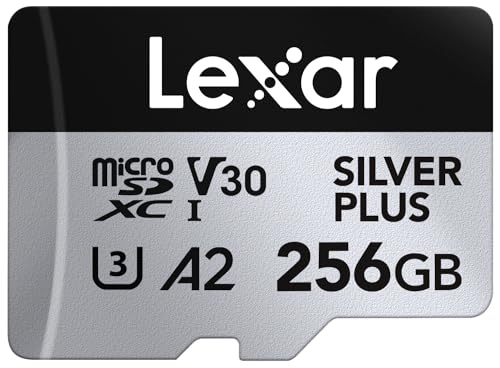
1. Lexar Professional SILVER PLUS 256 GB
256 GB · UHS-I · A2, U3, V30 · up to 205 MB/s
A Lexar card with read speeds up to 205 MB/s, A2, and V30 ratings. One of the bestsellers among microSD cards.

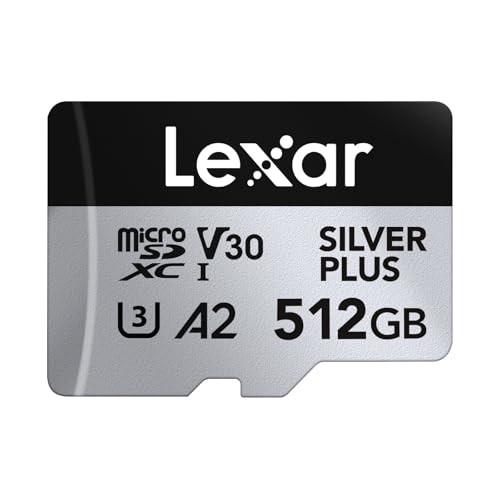
2. Lexar Professional SILVER PLUS 512 GB
512 GB · UHS-I · A2, U3, V30 · up to 205 MB/s
Lexar SILVER PLUS in a 512 GB capacity, with read speeds up to 205 MB/s, A2, and V30 ratings.

3. Lexar Professional SILVER PLUS 1 TB
1 TB · UHS-I · A2, U3, V30 · up to 205 MB/s
Lexar SILVER PLUS with 1 TB capacity, read speeds up to 205 MB/s, A2, and V30 ratings.

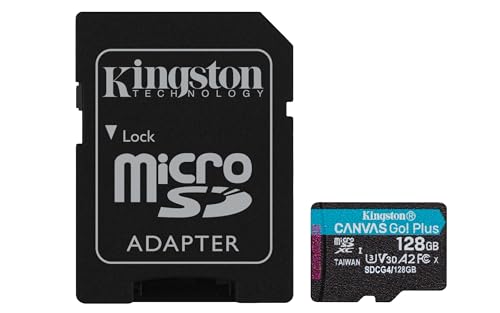
4. Kingston Canvas Go! Plus 256 GB
256 GB · UHS-I · A2, U3, V30 · up to 200 MB/s
The newer Gen4 version of the Kingston Canvas Go! Plus card, with read speeds up to 200 MB/s, A2, and V30. The series is on camera makers' recommended lists.

5. Kingston Canvas Go! Plus 512 GB
512 GB · UHS-I · A2, U3, V30 · up to 200 MB/s
Kingston Canvas Go! Plus (Gen4) in 512 GB capacity, with A2 and V30 classes and read speeds up to 200 MB/s. This version is sold without an SD adapter.
42 GB built-in storage and choosing the right capacity
DJI Mini 5 Pro comes with 42 GB of built-in storage. This is a great safeguard in case you forget to insert a microSD card into the slot before heading out into the field.
Fun fact: Mini 5 Pro has as much as 42 GB of built-in storage, while its direct predecessor, DJI Mini 4 Pro, offered users just 2 GB of internal space.
Despite the generous onboard storage, buying a microSD card is essentially a must for regular flying. You have several capacity options to choose from, depending on how you use your drone:
- 64 GB and 128 GB: The basic choice for those who fly occasionally and transfer files to a computer right after returning home.
- 256 GB: The most recommended capacity for this drone. It offers plenty of freedom and lets you record without constantly worrying about remaining space.
- 512 GB and 1 TB: A solution for demanding users who shoot a lot of 4K footage and do not want to offload data after every flight. The largest card on the DJI list is the Lexar SILVER PLUS 1 TB. According to Dronesgator, Mini 5 Pro is the first drone in the Mini series to officially support 1 TB cards.
Formatting the card in the drone and keeping a spare in your bag
Always format a new microSD card directly in the drone's menu before your first takeoff. The device then creates the correct file system and optimal folder structure, which prevents write errors during video recording.
It is a good idea to reformat the card in the drone regularly, after transferring footage to your computer.
Carrying a second, spare microSD card in your case is a great habit for every pilot. It is easy to leave such a small card in the computer's card reader after copying files from the previous day. A backup card in your bag saves the entire trip and lets you take off without issues.
Frequently asked questions about memory cards for DJI Mini 5 Pro
Which cards does DJI recommend for Mini 5 Pro?
DJI recommends two memory card lines rated A2 and V30: Lexar SILVER PLUS with capacities of 64, 128, 256, 512 GB, and 1 TB, as well as Kingston Canvas Go! Plus with capacities of 64, 128, 256, and 512 GB. Choosing a model from this list guarantees full compatibility with the drone.
Does DJI Mini 5 Pro support 1 TB cards?
Yes. The largest card on DJI's list is the Lexar SILVER PLUS 1 TB, and according to Dronesgator, Mini 5 Pro is the first drone in the Mini series to officially support 1 TB cards.
Does Mini 5 Pro record without a microSD card?
Yes, the drone can record video without a microSD card inserted because it has 42 GB of built-in flash storage. This allows you to easily capture footage if you forget your card, although using a removable memory card is more convenient for everyday use.
Does SanDisk Extreme work with DJI Mini 5 Pro?
There are no SanDisk cards on the official list of recommended media published by DJI for Mini 5 Pro. The manufacturer only lists Lexar SILVER PLUS and Kingston Canvas Go! Plus models, making them the safest choice.
What card capacity is best for DJI Mini 5 Pro?
The most recommended capacity for DJI Mini 5 Pro is 256 GB, as it provides an excellent balance between storage space and convenience. If you plan to record a lot of footage in top quality without frequently transferring data, you can opt for the 512 GB or 1 TB version.
Sources
- DJI: Mini 5 Pro specs (recommended microSD cards) - manufacturer page (dji.com)
- Dronesgator: Best SD card for DJI Mini 5 Pro - industry article (dronesgator.com)
- Drone and Cam: Best SD cards for DJI Mini 5 Pro - industry article (droneandcam.com)
- Dronesgator: Best SD card for DJI Mini 4 Pro - industry article (dronesgator.com)

Leave a comment
This site is protected by hCaptcha and the hCaptcha Privacy Policy and Terms of Service apply.