









As an Amazon Associate I earn from qualifying purchases.
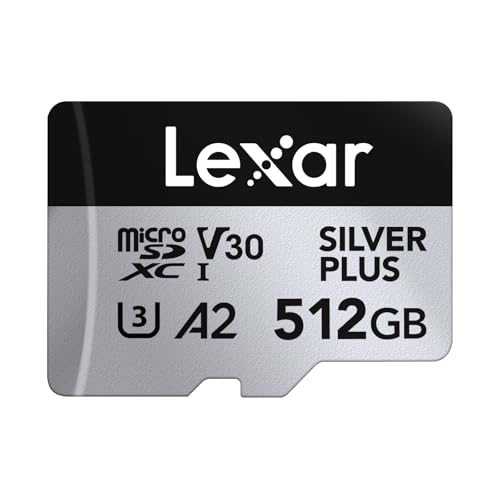
Quick answer: our top pick is Lexar Professional SILVER PLUS 512 GB (512 GB · UHS-I · A2, U3, V30 · up to 205 MB/s).
Best microSD card for DJI Osmo Pocket 3?
It is best to buy a microSD card from the official list recommended by DJI that carries a U3 or V30 speed class rating. A capacity between 256 GB and 1 TB is a solid and convenient choice for everyday use. DJI Osmo Pocket 3 easily supports storage media with capacities up to 1 TB, so you can choose a large memory card without worrying about compatibility issues.
The pocket-sized DJI camera records high-resolution video footage, which generates a steady, dense data stream. If the card cannot keep up with the write speed, the device will stop recording at a random moment. By choosing a card that meets the manufacturer's requirements, you will avoid surprises while recording important moments.
Memory cards recommended by the manufacturer
DJI has tested and officially listed specific memory card models that guarantee full operational stability. The list of recommended accessories includes selected series from three well-known manufacturers: SanDisk, Kingston, and Lexar.
Among Kingston cards, the manufacturer lists the Kingston Canvas Go! Plus series in 64, 128, 256, and 512 GB UHS-I U3 capacities. For those looking for even faster memory, the list includes the Kingston Canvas React Plus series in 64, 128, and 256 GB UHS-II U3 variants. Both series guarantee performance that is fully sufficient for trouble-free camera operation.
The Lexar brand is represented by the Lexar Pro SDXC UHS-I V30 model designated as 1066x in 256 and 512 GB versions. DJI also recommends the newer Lexar SILVER PLUS microSDXC UHS-I series in 64 GB, 512 GB, and 1 TB variants. Interestingly, the 256 GB variant from this series is not on the list, so it is safer to choose the officially tested versions.
Fun fact: The only SanDisk card on the DJI list is Extreme Pro 32 GB, which is the smallest capacity recommended by the manufacturer.
All models listed by DJI share one important rating, namely the U3 speed class. It indicates a guaranteed minimum sustained write speed of 30 MB/s. It is precisely this value that prevents video stuttering and interruptions when shooting highly detailed footage.
We have selected proven storage media from the DJI recommendation list that offer the right capacity and will easily handle your camera's demands.
Recommended microSD cards for DJI Osmo Pocket 3

1. Lexar Professional SILVER PLUS 512 GB
512 GB · UHS-I · A2, U3, V30 · up to 205 MB/s
Lexar SILVER PLUS in a 512 GB capacity, with read speeds up to 205 MB/s, A2, and V30 ratings.

2. Lexar Professional SILVER PLUS 1 TB
1 TB · UHS-I · A2, U3, V30 · up to 205 MB/s
Lexar SILVER PLUS with 1 TB capacity, read speeds up to 205 MB/s, A2, and V30 ratings.

3. Kingston Canvas Go! Plus 256 GB
256 GB · UHS-I · A2, U3, V30 · up to 200 MB/s
The newer Gen4 version of the Kingston Canvas Go! Plus card, with read speeds up to 200 MB/s, A2, and V30. The series is on camera makers' recommended lists.

4. Kingston Canvas Go! Plus 128 GB
128 GB · UHS-I · A2, U3, V30 · up to 200 MB/s
Kingston Canvas Go! Plus (Gen4) in a 128 GB capacity, with A2 and V30 ratings. An affordable option for shorter trips.
Which card capacity will work best
The choice of capacity mainly depends on your habits and how you plan to use the device. If you mostly record short updates, daily walks, and regularly transfer files to your computer drive, a capacity of 128 GB or 256 GB will be a good starting point. It allows you to freely record daily footage without constantly checking the remaining free space.
For longer trips, vacations, or expeditions where you do not take a laptop with you, 512 GB or 1 TB variants are a much safer choice. Such a reserve of space allows you to focus on your shots instead of deleting earlier takes in the camera menu. A large card also works well when you use the storage medium as portable storage for the entire trip.
Fun fact: DJI added the 1 TB Lexar SILVER PLUS model to its list of recommended media, so Pocket 3 can easily handle a card with such large capacity.
Remember that it is always worth keeping a spare card handy in your case or backpack. Accidents happen, and running out of storage during an interesting event should not stop you from continuing to record.
Cards outside the official list and formatting
You may wonder what happens if you insert a card outside the DJI list into Pocket 3. If the storage medium meets the U3 or V30 standard, it will most often work in the device. However, keep in mind that DJI tested only the items listed in the specification for stability.
If the device suddenly reports write errors, slows down, or stops video recording, the memory card is the first thing to check. Many inexpensive models struggle to maintain a constant write speed over longer periods, which leads to buffer errors in the camera.
Formatting the storage medium directly in the DJI Osmo Pocket 3 menu is also an important practice. Perform this operation right after purchasing a new card and after each time you back up all footage to a secure external drive. Formatting in the device prepares the optimal file system and reduces the risk of errors while working in the field.
Questions and answers
What is the maximum microSD card for DJI Osmo Pocket 3?
DJI Osmo Pocket 3 officially supports microSD cards up to 1 TB. The manufacturer tested and confirmed the stable operation of media of this size by including the Lexar SILVER PLUS 1 TB card on the list of recommended models. Therefore, you can easily use a card of the maximum available size.
Will every microSD card work in Osmo Pocket 3?
Not every card will ensure the proper operation of the camera. Cards with low write speeds, such as those labeled Class 10 or U1, can cause errors and stop recording. For stable recordings, the media must offer a speed class of at least U3 or V30.
Is Lexar SILVER PLUS 256 GB on the DJI list?
No, this specific capacity variant is not on the official DJI list. The manufacturer lists 64 GB, 512 GB, and 1 TB capacities from this series in its specification. If you are looking for a 256 GB capacity, it is safer to choose a model from the Kingston Canvas Go! Plus series, which is on the DJI list.
What card capacity for 4K recording?
High-resolution footage takes up a lot of space, which is why it is most convenient to choose a card with a capacity from 256 GB to 1 TB for such recordings. Smaller capacities, such as 64 GB or 128 GB, require frequent file offloading and can fill up quickly while traveling. Larger storage gives you complete freedom during long video sessions.
Is SanDisk Extreme on the DJI list for Pocket 3?
The popular SanDisk Extreme series is not on the manufacturer's official list for this camera. The only card from this brand recommended by DJI in the specification is the SanDisk Extreme Pro 32 GB model. If you want to buy a larger storage card, it is worth choosing recommended models from Kingston or Lexar.
Sources
- DJI: Osmo Pocket 3 specs (supported and recommended microSD cards) - manufacturer page (dji.com)
- Alik Griffin: Best memory card for DJI Osmo Pocket - industry article (alikgriffin.com)
- ProjectGo.Pro: Best SD card for DJI Osmo Pocket - industry article (projectgo.pro)
- BestElectronic: Best SD card for DJI Osmo Pocket 3 - industry article (bestelectronic.org)

Leave a comment
This site is protected by hCaptcha and the hCaptcha Privacy Policy and Terms of Service apply.