









As an Amazon Associate I earn from qualifying purchases.
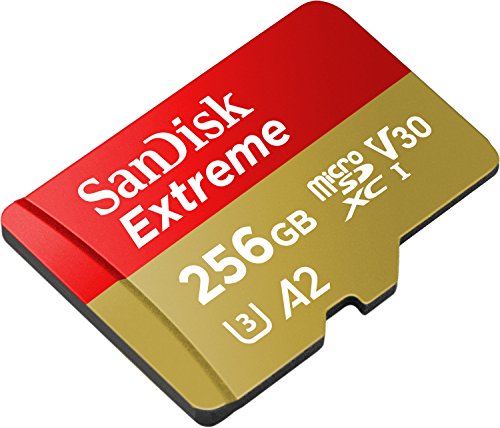
Quick answer: our top pick is SanDisk Extreme 256 GB (256 GB · UHS-I · A2, U3, V30 · up to 190 MB/s).
Best microSD card for GoPro HERO13 Black?
For the GoPro HERO13 Black, you need a brand-name microSDHC or microSDXC card with a V30 (or UHS-3) speed class and an A2 application class. The device easily supports storage capacities up to 1 TB. The best and safest choice is models directly recommended by the manufacturer, which guarantee stable recording under all conditions.
The requirements for this camera are identical to those of the HERO11 and HERO12 Black models. If you already have a proven card from a previous generation, you can safely use it in the new device. Just make sure that the card comes from a reputable manufacturer and meets the minimum write speed standards.
V30 and A2 ratings and the list of recommended cards
The V30 rating specifies a minimum guaranteed sustained video write speed of 30 MB/s. Converted to bits, this provides a transfer rate of 240 Mb/s, which is more than enough for any camera mode. The highest video bitrate on the GoPro HERO13 Black is 120 Mb/s, including settings such as 5.3K60, 4K120, and 1080p240.
Thanks to this, any modern UHS-I V30 card is fast enough for smooth operation with this model. The second class, A2, ensures efficient handling of random operations and fast communication with the camera software. Both of these features ensure that the device does not drop frames or interrupt recording during dynamic shots.
Fun fact: A V30 card writes data at a speed of at least 240 Mb/s, while the HERO13 Black records at a maximum of 120 Mb/s, giving the card twice the required transfer overhead.
GoPro publishes an official list of tested media, making safe purchasing easy. On it, you will find the SanDisk Extreme, Extreme PLUS, and Extreme PRO series in capacities from 64 GB to 1 TB. The list also includes Kingston Canvas Go! Plus cards (64, 128, 256 GB, and 1 TB), PNY PRO Elite (128 GB to 1 TB), as well as Samsung EVO Plus, EVO Select, PRO Plus, and PRO Ultimate (128 GB to 1 TB).
Among the recommended models, you will also find Amazon Basics (64 to 512 GB), selected Gigastone A2 V30 series (128 GB, 256 GB, and 1 TB), and Delkin Drone UHS-I V30 A2 (128 GB to 1 TB). The selection is wide, so you can easily match the storage to your travel plans.
However, it is worth paying attention to the Lexar Professional 1066x SILVER and Professional SILVER PLUS cards. In 64, 128, and 256 GB capacities, these cards are fully recommended by GoPro. However, the 512 GB and 1 TB Lexar versions have been marked by the camera manufacturer as not recommended for the new models.
Fun fact: GoPro advises against Lexar 512 GB and 1 TB cards in the new cameras, even though the exact same Lexar 256 GB model is on the official list of recommended media.
Below, we have compiled tested cards from the official GoPro list that perfectly suit this model. We selected the most popular options from leading memory manufacturers.
Recommended microSD cards for GoPro HERO13 Black

1. SanDisk Extreme 256 GB
256 GB · UHS-I · A2, U3, V30 · up to 190 MB/s
One of the best-selling microSD cards. It features a V30 rating for 4K video recording and an A2 rating for apps and games.

2. SanDisk Extreme 512 GB
512 GB · UHS-I · A2, U3, V30 · up to 190 MB/s
SanDisk Extreme in a 512 GB capacity. The V30 rating handles 4K recording, while A2 speeds up app and game loading times.
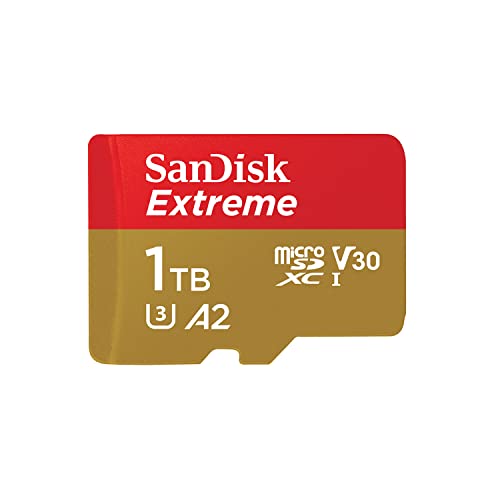
3. SanDisk Extreme 1 TB
1 TB · UHS-I · A2, U3, V30 · up to 190 MB/s
SanDisk Extreme with 1 TB capacity, featuring A2 and V30 ratings. It holds a large game library or many hours of footage.

4. Kingston Canvas Go! Plus 256 GB
256 GB · UHS-I · A2, U3, V30 · up to 200 MB/s
The newer Gen4 version of the Kingston Canvas Go! Plus card, with read speeds up to 200 MB/s, A2, and V30. The series is on camera makers' recommended lists.

5. Lexar Professional SILVER PLUS 256 GB
256 GB · UHS-I · A2, U3, V30 · up to 205 MB/s
A Lexar card with read speeds up to 205 MB/s, A2, and V30 ratings. One of the bestsellers among microSD cards.
Matching capacity to your plans
Choosing the right capacity depends mainly on how you plan to use your gear in the field. Smaller capacities, such as 64 GB or 128 GB, work well for single sports activities and short outings. This is a good option if you offload files directly to your computer upon returning home and clear the card before the next day.
Capacities of 256 GB and 512 GB are the most versatile choice for weekend trips and longer vacations. This amount of storage allows you to freely use high-frame-rate modes such as 4K120 or 1080p240. You do not need to bring extra equipment with you for daily footage backups.
1 TB cards are a solution for those heading out on long expeditions far from civilization and power sources. Such media allows you to stop worrying about running out of space and store footage from many days of intensive recording. Before buying a 1 TB version, however, make sure the selected series is on the manufacturer's compatibility list.
Memory card care and footage security
GoPro recommends regularly formatting the card directly within the camera settings. This process refreshes the file system and prevents write errors during subsequent recording sessions. Remember to always transfer all valuable footage to an external drive or cloud storage before formatting.
It is equally good practice to keep a second, spare microSD card in your gear bag. If your primary card fills up during an eventful day, simply insert the second card and keep recording. A spare card also protects you from losing the ability to film if one of your cards suffers accidental mechanical damage while traveling.
Frequently asked questions
Which microSD card for GoPro HERO13 Black?
For the HERO13 Black, it is best to choose a brand-name microSDHC or microSDXC card with a capacity of up to 1 TB that meets V30 and A2 standards. It is safest to opt for models from the official GoPro compatibility list, such as SanDisk Extreme or Kingston Canvas Go! Plus. Such a card will handle any video mode on the camera.
Does GoPro HERO13 support a 1 TB card?
Yes, the GoPro HERO13 Black works seamlessly with cards up to 1 TB in capacity. The only requirement is that the selected 1 TB card meets the V30 and A2 class standards. Compatible models of this size include SanDisk Extreme and Kingston Canvas Go! Plus, among others.
Will Lexar 512 GB work with GoPro HERO13?
GoPro officially lists Lexar Professional 1066x SILVER and Professional SILVER PLUS cards with capacities of 512 GB and 1 TB as not recommended. Although they physically fit into the slot, the manufacturer advises against using them in the HERO13 Black. If you choose Lexar, it is safer to pick an officially recommended 64, 128, or 256 GB version.
What do V30 and A2 mean on a microSD card?
The V30 symbol designates a Video Speed Class that guarantees a sustained minimum write speed of 30 MB/s, or 240 Mb/s. Meanwhile, the A2 designation indicates high card performance in random read and write operations, which is an official requirement for the latest generation of GoPro cameras. Both classes ensure stable recording of high-bitrate footage without stutter or dropped frames.
Does a card for HERO12 fit HERO13?
Yes, a card from the HERO12 Black fits the HERO13 Black without any issues. Both cameras, just like the HERO11 or HERO10 Black models, require the exact same specifications, namely V30 and A2 classes. You can transfer the card from the older device to the new one with confidence.
Sources
- GoPro Support: SD cards that work with GoPro cameras - manufacturer page (community.gopro.com)
- GoPro: HERO13 Black setup basics - manufacturer page (gopro.com)
- Have Camera Will Travel: Best SD cards for GoPro HERO13, HERO12 and HERO11 Black (tested) - industry article (havecamerawilltravel.com)
- Alik Griffin: Best memory cards for GoPro HERO13 Black - industry article (alikgriffin.com)
- SD Association: Bus Speed (UHS-I, UHS-II, SD Express) - industry article (sdcard.org)


Leave a comment
This site is protected by hCaptcha and the hCaptcha Privacy Policy and Terms of Service apply.