









As an Amazon Associate I earn from qualifying purchases.
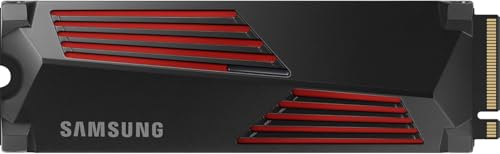
Quick answer: our top pick is Samsung 990 PRO Heatsink (1TB · PCIe 4.0 · up to 7450 MB/s · with heatsink).
Which PS5 SSD to buy on Black Friday?
Buy a fast 1 TB or 2 TB M.2 NVMe PCIe 4.0 drive, preferably equipped with a factory heatsink. Such a drive meets Sony's requirements and will accommodate GTA 6 alongside several other large games.
Pay attention to the dates, because GTA 6 will be released on November 19, 2026, and pre-loading will begin as early as November 12. Black Friday falls on November 27, and Cyber Monday on November 30. If you want to play on launch day, it is worth planning your drive purchase before the official start of the Black Friday sales.
Fun fact: The additional M.2 drive slot in the PS5 console was locked on the day of its market debut. Sony only unlocked this feature via a software update on September 15, 2021, almost a year after the hardware itself launched.
Match the drive to your needs and budget
The choice depends mainly on your gaming habits. If you want to install GTA 6 and keep a few other titles alongside it, a 1 TB drive will be completely sufficient. For an extensive library of games that you constantly return to, the 2 TB variant will be more practical.
If you are looking for complete peace of mind and factory compatibility, go for the officially licensed WD_BLACK SN850P or Samsung 990 PRO Heatsink with built-in cooling. You insert such a model into the console, tighten the screw, and proceed straight to formatting.
On a tighter budget, you can buy a cheaper drive without factory cooling, such as the Samsung 990 EVO Plus or Kingston NV3, and purchase a heatsink separately. Putting such a set together takes just a moment and helps reduce costs.
Below, we have prepared a roundup of proven drives and a matching heatsink that you can successfully install in your console.
Our Black Friday picks: PS5 SSDs

1. Samsung 990 PRO Heatsink
1TB · PCIe 4.0 · up to 7450 MB/s · with heatsink
The factory heatsink version, which Samsung lists as PS5 compatible. 1TB is enough if you keep a few big games installed at a time and delete the rest.
See Samsung 990 PRO Heatsink (1TB) on Amazon → · 2TB version →

2. WD_BLACK SN850P (PS5)
1TB · Sony licensed · PCIe 4.0 · up to 7300 MB/s
An officially licensed PS5 SSD with a heatsink shaped for the console. Insert it, screw it down and format it.

3. Samsung 990 EVO Plus
1TB · PCIe 4.0 x4 · up to 7150 MB/s · no heatsink
A Samsung without DRAM. It beats Sony's recommended speed comfortably, but the PS5 needs a separate heatsink.

4. Kingston NV3
1TB · PCIe 4.0 · up to 6000 MB/s · no heatsink
A budget SSD that meets Sony's recommendation from 1TB up (up to 6000 MB/s). You need to buy a heatsink separately.

5. ICY BOX IB-M2HS-PS5
M.2 2280 heatsink for PS5 · 10 mm
A heatsink for SSDs without factory cooling. It is 10 mm tall and comes with thermal pads.
Technical specifications and requirements set by Sony
PS5, PS5 Slim, and PS5 Pro consoles support M.2 NVMe PCIe 4.0 x4 drives with capacities ranging from 250 GB to 8 TB, and sizes from 2230 to 22110. Sony recommends a read speed of at least 5500 MB/s. Keep in mind that older M.2 SATA drives are not supported at all.
A cooling mechanism in the form of a heatsink or a thermal transfer sheet is required. The entire setup cannot exceed 11.25 mm in thickness, with a maximum of 8 mm extending above the drive's board. Never attach additional cooling to a drive that already has a factory heatsink.
It is also worth knowing how SSDs handle caching. The PS5 does not support HMB, so DRAM-less drives like the Samsung 990 EVO Plus operate in the console without this feature. Meanwhile, the budget Kingston NV3 in the 2 TB version uses QLC flash. Despite these differences, both models meet the recommended read speeds.
When used for the first time, the new drive must be formatted, and the PS5 will measure its read speed. After this step, you can install new games directly to the M.2 drive or transfer already installed games from the console's library.
Rockstar has not announced the official file size for GTA 6, and estimates range from 150 to 300 GB, most often pointing to just under 200 GB. Accounting for space reserved for formatting, a 1 TB drive will hold about 4-5 such titles. Opting for a 2 TB variant will give you room for around 9-10 games of similar scale.
Price ratios between capacities
When choosing a capacity, look at the cost per gigabyte of storage. The 2 TB variant usually costs about 1.5 to 2 times more than the 1 TB version. You get double the space while paying less per unit of capacity.
Models without a factory heatsink, including the Samsung 990 EVO Plus and Kingston NV3, are noticeably cheaper than flagships with a heatsink like the 990 PRO or SN850P. A standalone heatsink is an inexpensive purchase relative to the drive's price, so such a bundle allows for significant savings.
How to spot a fake deal and avoid getting ripped off
Sales come with the risk of encountering artificial deals. According to the CJEU ruling in the Aldi Süd case, a retailer announcing a discount must calculate it based on the lowest price from the last 30 days before the reduction. This regulation prevents raising prices right before Black Friday just to display a high percentage discount.
Fun fact: The EU ruling regarding the 30-day rule originated from a dispute over bananas and pineapples at a German discount chain. A consumer organization challenged an offer where the promotional price of bananas was identical to the lowest regular price from previous weeks, despite calculating the discount from a higher rate.
A study by the British consumer group Which? revealed that 83 percent of analyzed products were just as cheap or cheaper outside the sales period. On Amazon alone, this figure reached 88 percent, with 63 percent of items priced lower in other months. None of the analyzed tech items reached their lowest price of the year on Black Friday itself, and retailers often referred to list prices that had been in effect for only a dozen or so days in a six-month period.
Before buying, check price history on sites like camelcamelcamel or PriceRunner. Make sure the discount does not apply to an older-generation drive or a variant intended for different hardware. A good deal is one you would buy even without the crossed-out price tag, and the gear you need often drops in price well before the end of November.
Frequently asked questions about PS5 SSDs
Is it worth buying an SSD for PS5 on Black Friday?
It is worth it if you do not mind waiting to play GTA 6 from day one. The release is on November 19, and pre-loading starts on November 12, well before Black Friday (November 27), so anyone wanting to play at launch should buy a drive earlier. Many drives reach very good prices in the weeks leading up to Black Friday itself.
What SSD for PS5 is enough for GTA 6?
A 1 TB M.2 NVMe PCIe 4.0 drive with a read speed of at least 5500 MB/s is enough. This amount of space will easily accommodate GTA 6, whose size is estimated at under 200 GB, along with a few other large titles. An efficient heatsink remains an essential requirement.
Does a PS5 SSD need a heatsink?
Yes, Sony's official guidelines strictly require installing a heatsink or a thermal transfer sheet. You can choose a drive with factory cooling or purchase a separate heatsink that meets the console's dimensional requirements. If you buy a drive with a heatsink, do not add a second cooling solution to it.
1 TB or 2 TB for PS5?
Choose 1 TB if you install a few games at a time and regularly delete finished titles. The 2 TB variant is ideal for those who want to keep a sizable collection without having to redownload data constantly. The 2 TB version also typically offers a better cost-per-gigabyte ratio.
How to verify if an SSD deal is genuine?
Compare the current offer to the lowest price from the last 30 days, rather than the crossed-out price suggested by the store. Use third-party tools that track price history, such as PriceRunner or camelcamelcamel. Also, carefully check the manufacturer part number to ensure you are not buying a slower, older-generation model.
Guides for specific models
- Is the Samsung 990 Pro compatible with PS5? What size for GTA 6
- Is the Samsung 990 EVO Plus compatible with PS5? Only with a heatsink
- Is the WD SN850X compatible with PS5? How many games like GTA 6 it holds
- Is the WD SN850P compatible with PS5? How it differs from the SN850X
- Is the Lexar NM790 compatible with PS5? What size for GTA 6
- Is the Kingston Fury Renegade compatible with PS5? Size for GTA 6
- Is the Kingston NV3 compatible with PS5? Is 1TB enough for GTA 6?
- Is the Samsung 980 compatible with PS5? No, it's PCIe 3.0
- Is the Samsung 9100 Pro compatible with PS5? Yes, but you overpay
Sources
- PlayStation: How to add M.2 SSD storage to PS5 consoles - manufacturer page (playstation.com)
- Tom's Hardware: The best PS5 SSDs - industry article (tomshardware.com)
- GamesRadar: What is the GTA 6 GB size going to be? - industry article (gamesradar.com)
- TechRadar: WD Black SN850P review - industry article (techradar.com)
- PCWorld: WD Black SN770 review (PS5 and HMB) - industry article (pcworld.com)
- PlayStation Blog: PS5 September system software update (M.2 expansion) - manufacturer page (blog.playstation.com)
- Court of Justice of the EU: Case C-330/23 Aldi Süd, press release 152/24 - industry article (curia.europa.eu)
- Which?: Most Black Friday deals the same price or cheaper at other times of the year - industry article (which.co.uk)

Leave a comment
This site is protected by hCaptcha and the hCaptcha Privacy Policy and Terms of Service apply.