








As an Amazon Associate I earn from qualifying purchases.
Quick answer: our top pick is Samsung 990 EVO Plus 1 TB (PCIe 4.0 x4 · up to 7150 MB/s · no heatsink).
Is the Samsung 990 EVO Plus compatible with PS5? Quick answer
Yes, the Samsung 990 EVO Plus fits the PS5 console, but you need to purchase a separate heatsink to install it inside the console. The drive achieves read speeds that far exceed Sony's recommendations, but it does not come with the cooling required by the manufacturer out of the box. You should not install it in the console's slot without an additional heatsink.
| Spec | Sony requirement | Samsung 990 EVO Plus | Result |
|---|---|---|---|
| Interface | PCIe 4.0 x4 NVMe | PCIe 4.0 x4 / 5.0 x2 | yes |
| Sequential read | 5500 MB/s or faster recommended | 7150-7250 MB/s | yes |
| M.2 size | 2230 to 22110 | 2280 | yes |
| Heatsink | required | not included, buy one | caution |
The drive's specifications easily meet Sony's requirements, provided you ensure proper heat dissipation.

PCIe 4.0 x4 and PCIe 5.0 x2 interface vs. the console slot
In the Samsung 990 EVO Plus specifications, you will find support for two modes: PCIe 4.0 x4 or PCIe 5.0 x2. This may sound unusual, but in practice, it causes no issues when installing it in the console. The M.2 slot in the PS5 operates on the PCIe 4.0 x4 standard.
The drive automatically adapts to the console's motherboard and runs in PCIe 4.0 x4 mode. This provides high bandwidth, reaching up to 7150 MB/s read speed for the 1 TB version and up to 7250 MB/s for the 2 TB and 4 TB versions. Sony recommends a minimum speed of 5500 MB/s, meaning the drive offers plenty of performance headroom.
Maximum write speeds reach up to 6300 MB/s, which comes in handy when installing games. The drive is single-sided, features a 4-channel controller, and uses TLC V8 memory.
Fun fact: The M.2 slot in the PS5 console was not active on launch day. Sony unlocked the expansion slot for all players only through a system update on September 15, 2021, nearly a year after the console hit the market.

Why the nickel-coated shield is not enough and which heatsink to choose
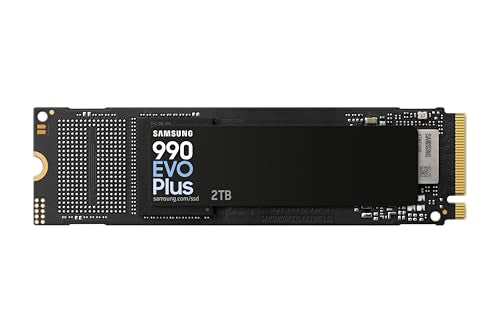
A nickel-coated thermal shield is located on the surface of the Samsung 990 EVO Plus. Keep in mind that this shield does not replace a proper heatsink. Sony clearly states on its support page that any installed M.2 drive requires an effective cooling solution.
Sony prohibits using M.2 drives without a heatsink or a thermal transfer sheet. TweakTown advises purchasing a separate console-dedicated heatsink for drives without built-in cooling. GamesRadar adds that you can find many models in stores, including variants that replace the factory metal slot cover.
When selecting a heatsink, pay attention to Sony's clearance limits. The total thickness of the drive with cooling must not exceed 11.25 mm, with a maximum of 8 mm allowed above the board and up to 2.45 mm below it. The drive itself measures 80.15 x 22.15 x 2.38 mm, leaving plenty of room for a heatsink.
We have selected cooling accessories and capacity options for this drive that meet the needs of console users.

Samsung 990 EVO Plus and a heatsink for PS5

1. Samsung 990 EVO Plus 1 TB
PCIe 4.0 x4 · up to 7150 MB/s · no heatsink
A Samsung without DRAM. It beats Sony's recommended speed comfortably, but the PS5 needs a separate heatsink.

2. Samsung 990 EVO Plus 2 TB
PCIe 4.0 x4 · up to 7250 MB/s · no heatsink
2TB in the slim version without a heatsink. In the PS5 it runs as a PCIe 4.0 x4 SSD; buy the heatsink separately.
3. Samsung 990 EVO Plus 4 TB
PCIe 4.0 x4 · up to 7250 MB/s · no heatsink
Plenty of room for games in a DRAM-less line. Don't forget the heatsink, Sony requires one.

4. SABRENT SB-PSHS
Aluminium heatsink for PS5 · replaces the slot cover
A heatsink for SSDs without factory cooling. It replaces the PS5's expansion slot cover, so the console's own fan cools it.
Buying on Black Friday? Read our guide: best PS5 SSD to buy before GTA 6.
Lack of DRAM and game performance on PS5
The Samsung 990 EVO Plus does not have built-in DRAM. In a computer, the drive copes with this absence using HMB technology, which borrows a small slice of RAM from the motherboard. In a console, the situation is different.
According to information from PCWorld, the PS5 console does not support the HMB feature. This means that a DRAM-less drive operates in the device without such support and may be slower. For this reason, PCWorld advises choosing drives with their own DRAM for the PS5.
On the other hand, tests by TweakTown indicate that although Samsung does not promote the 990 EVO Plus as a console drive, this model performs well in this role. You do not have to worry about compatibility issues, as long as you keep in mind the specifics of the DRAM-less design.
Installing an M.2 SSD in the console according to Sony guidelines
Installing an SSD in the PlayStation 5 chassis is straightforward, but it requires strict adherence to the hardware manufacturer's recommendations:
- Prepare a #1 Phillips screwdriver (a flashlight is optional) and touch a grounded metal object before starting work to discharge static electricity.
- Remove the chassis cover according to the instructions for your model (Sony has prepared separate guidelines for the CFI-1000 group and the CFI-2000/7000 group) and do not turn on the console with the cover removed.
- Install the drive with the purchased heatsink into the M.2 slot, keeping in mind that the console only supports PCIe 4.0 x4 NVMe drives and does not work with M.2 SATA models.
- Screw on the metal bay cover, replace the chassis, turn on the console, and format the drive, which will delete all existing files from it.
- In the storage settings menu, select the M.2 drive as the default installation location for new games or transfer installed titles using the move option from the game library.
Also note two additional rules. You can transfer a drive with saved games to another PS5 console at any time, provided you log in to the same account. However, if you plan to send the console in for service, Sony requires that the M.2 drive be removed beforehand.
Questions and answers
Does the Samsung 990 EVO Plus have a heatsink?
The drive does not come with a factory heatsink. The manufacturer has only equipped it with a thin, nickel-coated heat spreader over the controller, which does not meet Sony's requirements. If you want to install this model in the console, you must purchase a matching heatsink separately.
Will the 990 EVO Plus work in PS5 Slim and PS5 Pro?
Yes, this model works in all versions of the console: the PS5, PS5 Slim, and PS5 Pro. Each of them accepts M.2 NVMe PCIe 4.0 x4 drives with capacities from 250 GB to 8 TB. Just remember to fit the heatsink within the allowed bay dimensions.
Will PCIe 5.0 x2 on the 990 EVO Plus slow down the drive in the PS5?
No, because when installed in the console, the drive operates in PCIe 4.0 x4 mode. The slot in the PS5 is PCIe 4.0 x4, and Samsung's design handles this standard without issue. The drive then reaches up to 7150 MB/s or 7250 MB/s read speeds, depending on the selected capacity.
Which heatsink for the Samsung 990 EVO Plus in the PS5?
The heatsink must fit within the dimensions specified by Sony, which means a maximum total thickness of 11.25 mm including the drive. Up to 8 mm of cooling can extend above the drive board, and up to 2.45 mm below it. A classic screw-on heatsink or a model installed in place of the M.2 slot cover will work well.
Is the DRAM-less 990 EVO Plus suitable for the PS5?
The drive is suitable for use in the console, but you must keep the technology's limitations in mind. The PS5 does not support HMB, so a DRAM-less drive works without this buffer and, according to PCWorld, may be slower. On the other hand, TweakTown assesses that the drive performs well in the console.
More PS5 SSD guides
- Is the Samsung 990 Pro compatible with PS5? What size for GTA 6
- Is the WD SN850X compatible with PS5? How many games like GTA 6 it holds
- Is the WD SN850P compatible with PS5? How it differs from the SN850X
- Is the Lexar NM790 compatible with PS5? What size for GTA 6
- Is the Kingston Fury Renegade compatible with PS5? Size for GTA 6
- Is the Kingston NV3 compatible with PS5? Is 1TB enough for GTA 6?
- Is the Samsung 980 compatible with PS5? No, it's PCIe 3.0
- Is the Samsung 9100 Pro compatible with PS5? Yes, but you overpay
Sources
- Samsung: 990 EVO Plus data sheet - manufacturer page (download.semiconductor.samsung.com)
- Samsung Newsroom: Samsung launches 990 EVO Plus SSD - manufacturer page (news.samsung.com)
- PlayStation: How to add M.2 SSD storage to PS5 consoles - manufacturer page (playstation.com)
- TweakTown: Samsung 990 EVO Plus 2TB SSD review - industry article (tweaktown.com)
- Tom's Hardware: Samsung 990 EVO Plus SSD review - industry article (tomshardware.com)
- XDA: Samsung 990 Evo Plus review - industry article (xda-developers.com)
- PCWorld: WD Black SN770 review (PS5 and HMB) - industry article (pcworld.com)
- GamesRadar: Best PS5 heatsink - industry article (gamesradar.com)
- PlayStation Blog: PS5 September system software update (M.2 expansion) - industry article (blog.playstation.com)


Leave a comment
This site is protected by hCaptcha and the hCaptcha Privacy Policy and Terms of Service apply.