








As an Amazon Associate I earn from qualifying purchases.
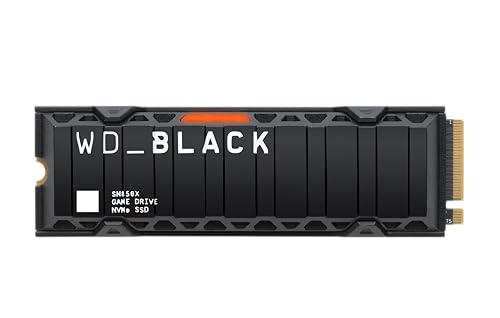
Quick answer: our top pick is WD_BLACK SN850X Heatsink 1 TB (PCIe 4.0 · up to 7300 MB/s · with heatsink).
Is the WD SN850X compatible with PS5?
Yes, the WD_BLACK SN850X fits the PS5 console, provided you choose the version equipped with a factory heatsink. The drive easily meets all of Sony's technical requirements regarding speed and storage form factor. You can install it in the standard PS5, as well as in the refreshed PS5 Slim and the more powerful PS5 Pro.
| Spec | Sony requirement | WD_BLACK SN850X Heatsink | Result |
|---|---|---|---|
| Interface | PCIe 4.0 x4 NVMe | PCIe 4.0 x4 | yes |
| Sequential read | 5500 MB/s or faster recommended | 7300 MB/s | yes |
| M.2 size | 2230 to 22110 | 2280 | yes |
| Height with heatsink | 11.25 mm max | 8.9 mm | yes |
| Heatsink | required | included | yes |
As seen in the summary above, the drive offers significantly higher transfer speeds than the minimum 5500 MB/s recommended by the console manufacturer.

Heatsink vs non-heatsink version and the new store name
When looking for this drive, be sure to pay attention to the product code. The version with a factory heatsink is marked as XHE and has overall dimensions of 80 x 23.4 x 8.9 mm, meaning it fits inside the console bay well below the 11.25 mm thickness limit. The variant without a heatsink carries the X0E designation and is only 2.3 mm high, but it requires purchasing a separate cooling solution, as Sony prohibits using drives without heat dissipation.
While shopping, you might come across an updated name from the manufacturer. Sandisk has taken over WD-branded drives and currently sells the SN850X model under the name SanDisk Optimus GX PRO 850X. According to Sandisk, it is the exact same drive under a new name, so there is no need to look for different hardware.
The version with factory cooling features the exact same heatsink that was installed on the officially PlayStation-licensed WD SN850 drive. Also keep an important installation rule in mind: if you buy a drive with a built-in heatsink, you must not attach any second cooling solution on top of it.
Fun fact: The M.2 expansion slot in the PS5 console was not active on launch day. Sony unlocked the ability to install secondary storage only with the software update on September 15, 2021, nearly a year after the console debuted.

How many games like GTA 6 can you fit on the drive
The release of Grand Theft Auto 6 is scheduled for November 19, 2026, on PS5 and Xbox Series X|S, with the pre-load option starting on November 12. Rockstar has not officially announced the installation size, but industry estimates range from 150 to 300 GB, with just under 200 GB being the most frequently cited figure. The exact size will only be known once pre-loading begins.
Keep in mind the factory capacities of individual console models. The PS5 Slim version comes with a 1 TB built-in drive, while the PS5 Pro model offers 2 TB of storage, with a portion of that space taken up by the operating system itself.
Assuming an estimate of around 200 GB per major game, a 1 TB drive will hold roughly 4-5 such titles. Choosing a 2 TB capacity will allow you to install around 9-10 games, and the largest 4 TB variant will hold about 19-20 titles of similar scale, keeping in mind that drive formatting always claims some of the total capacity.
You can download newly purchased games directly to the installed M.2 drive, which can be configured in the console's storage settings. Titles already on the internal storage can be moved at any time from your library by selecting the option to move games and apps.
We have selected drive versions with a factory heatsink that fully comply with Sony's official console requirements.
WD_BLACK SN850X with heatsink for PS5
1. WD_BLACK SN850X Heatsink 1 TB
PCIe 4.0 · up to 7300 MB/s · with heatsink
The heatsink version (XHE suffix). The heatsink is the same as on WD's PS5-licensed SSD.
2. WD_BLACK SN850X Heatsink 2 TB
PCIe 4.0 · up to 7300 MB/s · 8.9 mm heatsink
2TB with an 8.9 mm heatsink. Newer batches reach stores as the SanDisk Optimus GX PRO 850X.
3. WD_BLACK SN850X Heatsink 4 TB
PCIe 4.0 · up to 7300 MB/s · with heatsink
The largest heatsink version in this list. Good if you have a big game library and don't want to keep moving it around.
Buying on Black Friday? Read our guide: best PS5 SSD to buy before GTA 6.
How to install a drive in the console
Installing an additional drive is identical across all console versions, although Sony has provided separate cover removal instructions for the CFI-1000, CFI-2000, and CFI-7000 series. To complete the task, you need a size #1 Phillips screwdriver, while a flashlight is purely optional.
- Before starting, touch a grounded metal object to safely discharge static electricity from your body.
- Remove the cover panel according to the instructions for your console model, then unscrew the metal drive bay cover.
- Insert the M.2 PCIe 4.0 x4 drive into the slot and tighten the mounting screw, keeping in mind that the console does not support M.2 SATA drives.
- Reattach the metal slot cover and put the cover panel back on, making sure not to turn on the console with the cover removed.
- Turn on the console and format the drive, after which the PS5 system will automatically measure the actual read speed of the installed drive.
The formatting process during the initial startup permanently erases all data previously stored on the drive. If you need to send the console in for service, remember to remove the additional drive beforehand. If needed, you can move the drive with saved games to another PS5, as long as you log in using the same user account.
Questions about expanding PS5 storage
Will the WD SN850X without a heatsink work in the PS5?
The bare drive without a heatsink should not be installed in the console as-is from the factory. Sony requires cooling in the form of a heatsink or heat spreader to prevent overheating. If you buy the X0E version, you need to purchase a compatible heatsink and attach it before inserting the drive into the M.2 slot.
What is the difference between the SN850X and the SanDisk Optimus GX PRO 850X?
According to Sandisk, it is the same drive: Sandisk took over WD drives and sells the SN850X under the name SanDisk Optimus GX PRO 850X. The specifications remain PCIe 4.0 x4, read speeds up to 7300 MB/s, and a 5-year warranty.
Does the SN850X fit the PS5 Pro?
Yes, this model fits the PS5 Pro just like the base PS5 and PS5 Slim. The PS5 Pro console has a built-in 2 TB drive from the factory, but features an identical M.2 NVMe PCIe 4.0 x4 expansion slot. The installation procedure and heatsink size limits remain unchanged for this version.
How much space is needed for GTA 6 on PS5?
The official storage requirements have not yet been announced by Rockstar. Current industry estimates range from 150 to 300 GB, with most suggesting just under 200 GB. We will learn the exact install size on November 12, 2026, when pre-loading begins for the game.
SN850X or the licensed SN850P for PS5?
The SN850P is a version with a Sony license and a heatsink tailored to the console. Tom's Hardware lists the SN850X among the best SSDs for the PS5. If the license is not important to you, the SN850X with a heatsink provides the same experience in the PS5.
More PS5 SSD guides
- Is the Samsung 990 Pro compatible with PS5? What size for GTA 6
- Is the Samsung 990 EVO Plus compatible with PS5? Only with a heatsink
- Is the WD SN850P compatible with PS5? How it differs from the SN850X
- Is the Lexar NM790 compatible with PS5? What size for GTA 6
- Is the Kingston Fury Renegade compatible with PS5? Size for GTA 6
- Is the Kingston NV3 compatible with PS5? Is 1TB enough for GTA 6?
- Is the Samsung 980 compatible with PS5? No, it's PCIe 3.0
- Is the Samsung 9100 Pro compatible with PS5? Yes, but you overpay
See also
Sources
- Sandisk: WD_BLACK SN850X NVMe SSD with Heatsink - manufacturer page (sandisk.com)
- PlayStation: How to add M.2 SSD storage to PS5 consoles - manufacturer page (playstation.com)
- Club386: WD_Black SN850X Heatsink 1TB review - primed for PS5 - industry article (club386.com)
- Tech Advisor: WD Black SN850X review - industry article (techadvisor.com)
- Tom's Hardware: The best PS5 SSDs - industry article (tomshardware.com)
- Kingston: How to install an NVMe SSD in PS5, PS5 Slim and PS5 Pro - industry article (kingston.com)
- PlayStation Blog: PS5 September system software update (M.2 expansion) - industry article (blog.playstation.com)
- IBTimes UK: GTA 6 file size estimates - industry article (ibtimes.co.uk)


Leave a comment
This site is protected by hCaptcha and the hCaptcha Privacy Policy and Terms of Service apply.