









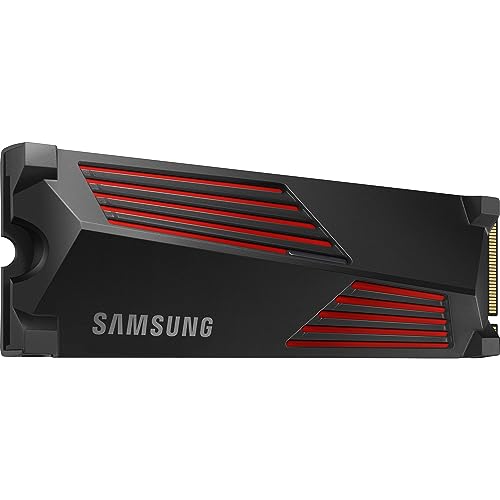
Is the Samsung 990 Pro compatible with PS5?
Yes, the Samsung 990 PRO SSD with a heatsink fits every variant of the PlayStation 5 console. You can easily install it in the standard PS5 (CFI-1000), the refreshed PS5 Slim (CFI-2000), and the PS5 Pro (CFI-7000). The specifications of this drive fully meet Sony's official technical guidelines.
| Spec | Sony requirement | Samsung 990 PRO Heatsink | Result |
|---|---|---|---|
| Interface | PCIe 4.0 x4 NVMe | PCIe 4.0 x4 | yes |
| Sequential read | 5500 MB/s or faster recommended | 7450 MB/s | yes |
| M.2 size | 2230 to 22110 | 2280 | yes |
| Height with heatsink | 11.25 mm max | 8.2 mm | yes |
| Heatsink | required | included | yes |
With read speeds reaching up to 7450 MB/s, it easily exceeds the 5500 MB/s recommended by the console manufacturer.
Heatsink in PS5: why the Heatsink version is the best choice
In its official specifications, Sony clearly requires every drive installed in the M.2 slot to have a cooling structure. This can be a factory heatsink or an aftermarket thermal dissipation sheet. By choosing the factory Samsung 990 PRO Heatsink model, you get a ready-made solution with a thickness of 8.2 mm, which leaves about 3 mm of clearance below the console slot's limit.
Online, you will find reviewers from XDA noting that a heatsink is not always strictly necessary to run the drive. However, Sony sets a strict requirement on this matter. For this reason, it is safer to opt for the version with a factory heatsink and maintain full compliance with the hardware manufacturer's guidelines.
Also keep in mind a simple installation rule highlighted in the manual: you must not add secondary cooling to a drive with a pre-installed factory heatsink.
What drive size to choose for the GTA 6 release
The release of Grand Theft Auto 6 has been announced for November 19, 2026, with pre-loading expected to start on November 12. Rockstar Games has not yet revealed the final file size of the game. Industry estimates from GamesRadar and IBTimes UK range between 150-300 GB, most commonly pointing to just under 200 GB.
The original PS5 has a built-in 825 GB drive, the PS5 Slim comes with 1 TB, and the PS5 Pro offers 2 TB of internal storage. The operating system takes up part of this space for its own needs, so a single large installation will quickly fill up the factory capacity.
If we assume an estimate of around 200 GB per major title, the math becomes very clear. A 1 TB drive will hold roughly 4-5 such games, a 2 TB option will provide room for about 9-10 titles, and a 4 TB version will accommodate around 19-20 games, taking into account the space reserved during formatting. However, we will only know the final game size once pre-loading begins.
Fun fact: The first release of the PS5 console featured an unusual 825 GB storage drive powered by a proprietary 12-channel memory controller developed by Sony engineers.
Below you will find the official versions of the Samsung 990 PRO drive with a factory heatsink that fit into the console slot.
Samsung 990 PRO for PS5: which capacity to choose
As an Amazon Associate I earn from qualifying purchases.

1. Samsung 990 PRO Heatsink 1 TB
PCIe 4.0 · up to 7450 MB/s · with heatsink
The factory heatsink version, which Samsung lists as PS5 compatible. 1TB is enough if you keep a few big games installed at a time and delete the rest.

2. Samsung 990 PRO Heatsink 2 TB
PCIe 4.0 · up to 7450 MB/s · 8.2 mm heatsink
The sensible pick for most players: twice the space of the 1TB model and DRAM cache. The heatsink is 8.2 mm tall, well within Sony's limit.

3. Samsung 990 PRO Heatsink 4 TB
PCIe 4.0 · up to 7450 MB/s · with heatsink
For anyone who doesn't want to keep deleting games. 4TB is several times the built-in storage of the standard PS5 or PS5 Slim.
Installing an SSD in PS5, Slim, and Pro Step by Step
The M.2 SSD installation procedure is very similar across all console versions. Sony has only provided separate instructions for removing the outer covers on the original CFI-1000 series and the newer CFI-2000 and CFI-7000 models.
- Prepare a #1 Phillips screwdriver (optionally a flashlight) and touch a grounded metal object to discharge static electricity from your body.
- Remove the cover panel from the powered-off console, keeping in mind that you must never turn on the device with the cover off.
- Unscrew the metal expansion slot cover, insert the Samsung 990 PRO Heatsink into the M-key connector at an angle, and secure it with the mounting screw.
- Reattach the metal slot cover, replace the console cover, and reconnect the cables.
- Turn on the console and confirm the SSD formatting, which will erase all existing files from it, after which the PS5 will automatically measure its read speed.
Once the installation is complete, you can go to the console's storage settings and set the new M.2 drive as the default download location for games. Games already installed on the console can be easily moved from your library using the move games and apps option. If you ever need to send the console in for service, remember to remove the additional drive beforehand.
Frequently Asked Questions About Console SSDs
Will the Samsung 990 Pro without a heatsink work in a PS5?
The drive will boot up in the slot because it is electrically compliant as a PCIe 4.0 x4 drive. However, Sony clearly requires effective cooling in the form of a heatsink or thermal transfer sheet. XDA reviewers point out that while the drive itself can operate without extra shielding, the factory version with a heatsink remains the safer choice.
Does the Samsung 990 Pro fit the PS5 Slim and PS5 Pro?
Yes, this model fits the CFI-1000, CFI-2000 (Slim), and CFI-7000 (Pro) models. Each of these consoles features an M.2 NVMe PCIe 4.0 x4 slot that supports 2280-length drives. The dimensions of the Samsung with its factory heatsink fit well within Sony's 11.25 mm thickness limit.
How many games will a 2 TB Samsung 990 Pro hold on a PS5?
Assuming an estimated size of around 200 GB for modern, very large titles, a 2 TB drive will allow you to install about 9-10 such games. Keep in mind that formatting takes up a portion of the nominal capacity. The final number always depends on how large the games you choose for your library are.
Is installing an M.2 SSD in a PS5 difficult?
The entire installation is simple and only requires a #1 Phillips screwdriver. All you need to do is remove the outer cover panel, unscrew the slot cover, and seat the drive in the connector. Once powered on, the console will guide you through a quick process to prepare the storage for use.
Will the 990 Pro speed up game loading times on the PS5?
In tests conducted by the XDA editorial team, the Samsung 990 Pro consistently proved noticeably faster than the console's internal storage. The drive achieves sequential read speeds of up to 7450 MB/s, and Tom's Hardware ranks it among the best SSDs for the PlayStation 5.
More PS5 SSD guides
- Is the Samsung 990 EVO Plus compatible with PS5? Only with a heatsink
- Is the WD SN850X compatible with PS5? How many games like GTA 6 it holds
- Is the WD SN850P compatible with PS5? How it differs from the SN850X
- Is the Lexar NM790 compatible with PS5? What size for GTA 6
- Is the Kingston Fury Renegade compatible with PS5? Size for GTA 6
- Is the Kingston NV3 compatible with PS5? Is 1TB enough for GTA 6?
- Is the Samsung 980 compatible with PS5? No, it's PCIe 3.0
- Is the Samsung 9100 Pro compatible with PS5? Yes, but you overpay
Sources
- Samsung: 990 PRO with Heatsink 2TB - specifications - manufacturer page (samsung.com)
- PlayStation: How to add M.2 SSD storage to PS5 consoles - manufacturer page (playstation.com)
- Android Central: Samsung 990 Pro SSD review - a perfect PS5 SSD - industry article (androidcentral.com)
- XDA: Does the Samsung 990 Pro work with the PS5? - industry article (xda-developers.com)
- Tom's Hardware: The best PS5 SSDs - industry article (tomshardware.com)
- Kingston: How to install an NVMe SSD in PS5, PS5 Slim and PS5 Pro - industry article (kingston.com)
- Notebookcheck: The PlayStation 5 SSD comes in an odd capacity - industry article (notebookcheck.net)
- GamesRadar: What is the GTA 6 GB size going to be? - industry article (gamesradar.com)


Leave a comment
This site is protected by hCaptcha and the hCaptcha Privacy Policy and Terms of Service apply.