









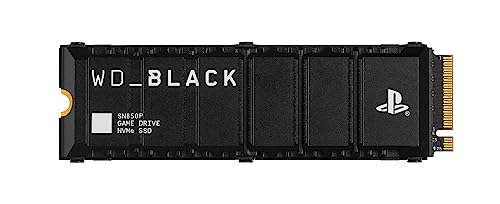
Is the WD SN850P compatible with PS5? Quick answer
Yes, the WD_BLACK SN850P SSD is fully compatible with the PlayStation 5 console and is officially licensed by Sony. It comes with a factory heatsink that easily fits into the console's dedicated slot.
| Spec | Sony requirement | WD_BLACK SN850P | Result |
|---|---|---|---|
| Interface | PCIe 4.0 x4 NVMe | PCIe 4.0 x4 | yes |
| Sequential read | 5500 MB/s or faster recommended | 7300 MB/s | yes |
| M.2 size | 2230 to 22110 | 2280 | yes |
| Height with heatsink | 11.25 mm max | 9.9 mm | yes |
| Heatsink | required | included | yes |
The specifications of this drive completely meet Sony's official requirements for M.2 storage.
Fun fact: The first officially licensed M.2 SSD for the PlayStation 5 console was the earlier WD_BLACK SN850 model.
SN850P vs. SN850X: what the license and heatsink offer
When choosing a drive for your console, you will likely notice two very similar models from the same manufacturer on the shelf. The WD_BLACK SN850P is a variant with the official PlayStation logo and a heatsink designed specifically for the console's expansion slot. The drive uses an M.2 2280 PCIe 4.0 x4 interface, achieves up to 7300 MB/s read and up to 6300 MB/s write speeds in the 1 TB version, and comes with a 5-year manufacturer warranty.
If you are wondering about technical differences, it is worth looking at opinions from industry reviewers. Tom's Hardware explicitly points out that the SN850P is practically a more expensive SN850X with an official console logo added. Meanwhile, GamesRadar found the SN850P somewhat disappointing in terms of value for money.
Sony requires every installed drive to have a heatsink or a thermal transfer sheet, with the total thickness of the entire setup not exceeding 11.25 mm. The SN850P's factory heatsink measures 80 x 24.4 x 9.9 mm, allowing you to install it right out of the box. Also keep in mind Sony's recommendation not to add a second cooling solution to a drive with a pre-installed heatsink.
Console speed tests and step-by-step installation
On the drive's packaging, you will find information about read speeds reaching up to 7300 MB/s, but the console verifies transfer rates using its own benchmark. After installing the drive, the PlayStation 5 performs an automatic read test. In tests conducted by TechRadar, the console's built-in benchmark showed a result of 5966 MB/s on the first launch, and reached 6338 MB/s after reformatting the drive.
The result achieved still clearly exceeds Sony's official recommendation, which suggests drives with read speeds of 5500 MB/s or faster. At the same time, it is worth noting that in the same TechRadar comparison, the competing Kingston Fury Renegade drive reached around 6500 MB/s in the console. Both results are above Sony's recommendation.
The installation process itself requires adhering to basic safety precautions provided by Sony. Here is the installation in five steps:
- Before touching the console, touch a grounded metal object to safely discharge static electricity.
- Remove the outer cover and unscrew the drive bay cover using a #1 Phillips screwdriver, using an optional flashlight if necessary.
- Insert the SN850P drive into the M.2 PCIe 4.0 x4 slot and secure it with the mounting screw, keeping in mind that the slot does not support M.2 SATA drives.
- Screw the metal slot cover back on and replace the outer cover, as Sony strictly forbids turning on the console with the cover removed.
- After turning on the console, format the drive in the system menu, bearing in mind that formatting deletes all existing data from the drive.
It is worth adding that Sony has provided separate cover removal instructions for the launch CFI-1000 console group and the newer CFI-2000 and CFI-7000 models. If you ever need to send the hardware for servicing, remember to remove the extra drive beforehand.
Fun fact: Initially, the PlayStation 5 software only allowed the installation of M.2 drives with a capacity of up to 4 TB. It was not until an official system update in 2023 that this limit was increased to 8 TB.
Available capacities and the new SanDisk Optimus GX PRO name
The SN850P drive comes in 1 TB, 2 TB, 4 TB, and 8 TB versions. Reviewers from TechRadar advise considering mainly the 4 TB and 8 TB capacities in this series, while suggesting buying the smaller 1 TB and 2 TB variants primarily when you find a good discount.
While shopping, you might encounter this product under a different commercial name. Sandisk currently also sells this model under the name SanDisk Optimus GX PRO 850P; according to Sandisk, it is the same drive under a new name.
The installed drive allows you to freely manage your game library. In the storage settings, you can designate the M.2 SSD as the default installation location for newly downloaded games, and easily transfer already installed titles using the move games and apps option. Importantly, if needed, you can remove the drive with saved data and move it to another PS5, as long as you log into the same user account on it.
We have selected capacity variants from this series that meet the requirements set by Sony.
WD_BLACK SN850P and a cheaper alternative
As an Amazon Associate I earn from qualifying purchases.

1. WD_BLACK SN850P 1 TB (PS5)
Sony licensed · PCIe 4.0 · up to 7300 MB/s
An officially licensed PS5 SSD with a heatsink shaped for the console. Insert it, screw it down and format it.

2. WD_BLACK SN850P 2 TB (PS5)
Sony licensed · PCIe 4.0 · up to 7300 MB/s
In TechRadar's test the console measured 5966 to 6338 MB/s: above Sony's recommendation, though below what the maker promises.

3. WD_BLACK SN850P 4 TB (PS5)
Sony licensed · PCIe 4.0 · 4TB
TechRadar suggests focusing on the 4TB and 8TB versions and buying 1TB or 2TB only on sale.

4. WD_BLACK SN850X Heatsink 2 TB
PCIe 4.0 · up to 7300 MB/s · 8.9 mm heatsink
2TB with an 8.9 mm heatsink. Newer batches reach stores as the SanDisk Optimus GX PRO 850X.
WD SN850P SSD Questions and Answers
What is the difference between the WD SN850P and SN850X?
The WD_BLACK SN850P features an official Sony license, the PlayStation logo, and a heatsink tailored specifically for the console's expansion bay. In terms of base hardware design, Tom's Hardware notes that it is practically a more expensive SN850X packaged specifically for PS5 owners.
Does the Sony license change anything in the SN850P?
The license ensures that the heatsink fits the console's bay, meaning you do not have to find a third-party cooler yourself. However, it does not make the drive run noticeably faster in games than its standard, unlicensed counterpart, the SN850X with a heatsink.
What speed does the PS5 show for the SN850P?
In a test published by TechRadar, the console measured a read speed of 5966 MB/s during the initial formatting and 6338 MB/s upon repeating the procedure. This result exceeds Sony's recommended threshold of 5500 MB/s, although it falls short of the 7300 MB/s advertised on the box.
Does the SN850P fit the PS5 Slim and PS5 Pro?
Yes, the drive fits the standard PlayStation 5, as well as the PS5 Slim and PS5 Pro models. Each of these console versions supports M.2 NVMe PCIe 4.0 x4 drives measuring 22 mm in width and 80 mm in length, with a heatsink of up to 11.25 mm in total thickness.
Will the SN850P fit into the PS5 with its heatsink?
Yes, the total dimensions of the drive with the factory heatsink are 80 x 24.4 x 9.9 mm, allowing the metal bay cover to close smoothly. Just keep in mind that the manufacturer prohibits attaching any additional heat spreaders or heatsinks onto the factory-installed cooling solution.
More PS5 SSD guides
- Is the Samsung 990 Pro compatible with PS5? What size for GTA 6
- Is the Samsung 990 EVO Plus compatible with PS5? Only with a heatsink
- Is the WD SN850X compatible with PS5? How many games like GTA 6 it holds
- Is the Lexar NM790 compatible with PS5? What size for GTA 6
- Is the Kingston Fury Renegade compatible with PS5? Size for GTA 6
- Is the Kingston NV3 compatible with PS5? Is 1TB enough for GTA 6?
- Is the Samsung 980 compatible with PS5? No, it's PCIe 3.0
- Is the Samsung 9100 Pro compatible with PS5? Yes, but you overpay
Sources
- Sandisk: WD_BLACK SN850P NVMe SSD for PS5 consoles - manufacturer page (sandisk.com)
- PlayStation: How to add M.2 SSD storage to PS5 consoles - manufacturer page (playstation.com)
- TechRadar: WD Black SN850P review - industry article (techradar.com)
- GamesRadar: WD Black SN850P review - industry article (gamesradar.com)
- Tom's Hardware: WD's PS5-branded SN850P is just an overpriced SN850X - industry article (tomshardware.com)
- Notebookcheck: PS5 gets its first officially licensed M.2 SSD - industry article (notebookcheck.net)
- Tom's Hardware: PlayStation 5 update adds support for 8TB SSDs - industry article (tomshardware.com)


Leave a comment
This site is protected by hCaptcha and the hCaptcha Privacy Policy and Terms of Service apply.