









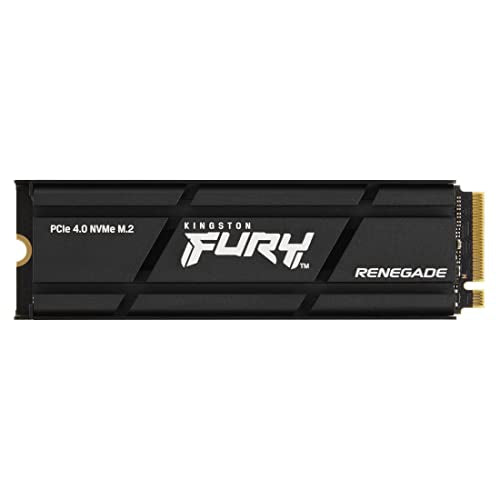
Is the Kingston Fury Renegade compatible with PS5?
Yes, the Kingston FURY Renegade with a factory-fitted heatsink is fully compatible with the PS5 console. The manufacturer designed this version specifically for Sony's console and officially declares it ready for installation in the PlayStation 5. The drive easily exceeds the official technical requirements regarding speed and expansion slot dimensions.
| Spec | Sony requirement | Kingston FURY Renegade Heatsink | Result |
|---|---|---|---|
| Interface | PCIe 4.0 x4 NVMe | PCIe 4.0 x4 | yes |
| Sequential read | 5500 MB/s or faster recommended | 7300 MB/s | yes |
| M.2 size | 2230 to 22110 | 2280 | yes |
| Height with heatsink | 11.25 mm max | 10.5 mm | yes |
| Heatsink | required | included | yes |
All parameters of the Kingston drive meet Sony's guidelines for M.2 storage.
Fun fact: The first PS5 console model was equipped with an internal SSD with an unusual capacity of 825 GB, paired with a proprietary 12-channel controller.
10.5 mm heatsink and fit into the console slot
The Kingston FURY Renegade drive with factory heatsink measures exactly 80 x 23.67 x 10.5 mm. Sony requires the total drive thickness including heatsink not to exceed 11.25 mm. This is the tallest heatsink among the drives we cover, but with 0.75 mm to spare, it fits under the console's metal cover.
Remember that Sony requires a heatsink or thermal transfer sheet with every M.2 drive. Do not add extra cooling to the FURY Renegade with the factory heatsink, as Sony warns this could impair the performance of the built-in heatsink. A version without a heatsink is also available for purchase, which is slightly cheaper, but requires buying and mounting compatible cooling yourself.
Be careful when shopping not to confuse it with the Kingston FURY Renegade G5 model. This is an entirely different drive running on the PCIe 5.0 interface. For the PS5, the standard FURY Renegade with PCIe 4.0 is sufficient, as the console slot operates on this standard anyway.
Drive speed in the PS5 benchmark
Sony officially recommends that an installed M.2 NVMe drive achieve a minimum read speed of 5500 MB/s. On paper, the Kingston FURY Renegade offers sequential read speeds of up to 7300 MB/s. The drive uses TLC flash memory, a Phison E18 controller, and built-in DRAM cache.
Once you install a new drive in the console, the PS5 automatically formats it and measures its read speed. In tests conducted by TechRadar, the drive scored around 6500 MB/s in the PS5 benchmark. That result is higher than that of the officially licensed WD SN850P drive.
TechRadar recognized this drive as one of the best choices for PlayStation 5, and Trusted Reviews described it as a great drive for the console. The 2 TB version with the factory heatsink was also reviewed by TechPowerUp.
Proper installation guidelines for the console
Sony has prepared separate cover removal instructions for the launch CFI-1000 console group and the newer CFI-2000 and CFI-7000 releases. You can perform the installation itself in a few simple steps:
- Prepare a standard #1 Phillips screwdriver, and if you need better lighting inside the bay, you can use a flashlight.
- Touch a grounded metal object immediately before starting work to discharge static electricity from your body.
- Remove the cover panel, unscrew the M.2 expansion slot cover, and insert the Kingston drive into the slot, keeping in mind that you must not install a drive without a heatsink.
- Secure the drive with the mounting screw and close the slot cover, keeping in mind that you must never power on the console with the outer cover removed.
- Turn on the console and confirm formatting, which will erase all previous files from the drive and allow the console to measure its read transfer speed.
What drive size should you choose with GTA 6 in mind?
The release of GTA 6 is scheduled for November 19, 2026, with pre-loading expected to start on November 12. Rockstar has not yet provided official installation size requirements. Industry estimates place the game size between 150 and 300 GB, with IBTimes UK reporting that the most commonly cited figure is just under 200 GB.
Remember that formatting takes up some usable capacity on any drive. Assuming the game takes up about 200 GB, a 1 TB drive will provide free space for about 4-5 such titles. The 2 TB variant will hold about 9-10 games of this size, and the 4 TB version will provide space for roughly 19-20 major releases.
The 1 TB version will suffice for GTA 6 and a few other games, but the 2 TB variant offers plenty of headroom without the need to constantly delete data. The 4 TB version is the top-tier choice, featuring an endurance rating of 4 PB compared to 2 PB for the 2 TB variant and 1 PB for the 1 TB model. Kingston backs all these drives with a 5-year warranty.
After installing the drive, you can go to the console's storage settings and set the M.2 SSD as the default download location for new titles. Games previously installed on the built-in storage can be moved directly from the game library using the move games and apps option. If needed, you can move the drive with downloaded content to another PS5 console signed in to the same account, but remember to remove the drive before sending the console for service.
Below you will find our recommended capacity options for the Kingston FURY Renegade drive with a factory heatsink, which easily fit Sony's console.
Kingston FURY Renegade with heatsink for PS5
As an Amazon Associate I earn from qualifying purchases.

1. Kingston FURY Renegade Heatsink 1 TB
PCIe 4.0 · up to 7300 MB/s · 10.5 mm heatsink
Kingston calls it PS5 ready. It has DRAM and a 10.5 mm heatsink, just under Sony's limit.
2. Kingston FURY Renegade Heatsink 2 TB
PCIe 4.0 · up to 7300 MB/s · 10.5 mm heatsink
In TechRadar's test it scored about 6500 MB/s in the PS5 benchmark, more than the licensed WD SN850P.
3. Kingston FURY Renegade Heatsink 4 TB
PCIe 4.0 · up to 7300 MB/s · 10.5 mm heatsink
4TB with heatsink. Kingston rates it at up to 7000 MB/s writes and 4 PB of total data written.
Frequently Asked Questions about Kingston Fury Renegade for PS5
Will the Kingston Fury Renegade with a heatsink fit in the PS5?
Yes, the drive with the factory heatsink is 10.5 mm thick. Sony's official guidelines allow cooling up to 11.25 mm thick, so the drive fits easily into the console bay. This leaves 0.75 mm of clearance under the slot cover.
What is the difference between Fury Renegade and Fury Renegade G5?
The FURY Renegade model is a PCIe 4.0 x4 NVMe drive compatible with the PS5 console slot. The FURY Renegade G5 version uses a completely different PCIe 5.0 interface. For the PlayStation 5 console, you should choose the version based on PCIe 4.0.
Does Fury Renegade fit PS5 Slim and PS5 Pro?
Yes, this model fits the standard PS5, PS5 Slim, and PS5 Pro. Each of these consoles supports M.2 NVMe PCIe 4.0 x4 drives with capacities from 250 GB to 8 TB and a thickness of up to 11.25 mm including the heatsink. Installation in each of these models follows Sony's guidelines.
Which Fury Renegade capacity to choose for GTA 6?
For comfortable use, the 2 TB variant works best. Industry estimates suggest that GTA 6 may take up nearly 200 GB, so a formatted 1 TB drive will hold only 4-5 games of this size. A 2 TB drive will hold around 9-10 large games, providing plenty of spare space.
Does Fury Renegade have DRAM?
Yes, Kingston FURY Renegade features a dedicated DRAM cache. It works alongside the Phison E18 controller and TLC flash chips. This configuration is responsible for maintaining consistently high transfer speeds during drive operation.
More PS5 SSD guides
- Is the Samsung 990 Pro compatible with PS5? What size for GTA 6
- Is the Samsung 990 EVO Plus compatible with PS5? Only with a heatsink
- Is the WD SN850X compatible with PS5? How many games like GTA 6 it holds
- Is the WD SN850P compatible with PS5? How it differs from the SN850X
- Is the Lexar NM790 compatible with PS5? What size for GTA 6
- Is the Kingston NV3 compatible with PS5? Is 1TB enough for GTA 6?
- Is the Samsung 980 compatible with PS5? No, it's PCIe 3.0
- Is the Samsung 9100 Pro compatible with PS5? Yes, but you overpay
Sources
- Kingston: FURY Renegade PCIe 4.0 NVMe M.2 SSD - manufacturer page (kingston.com)
- PlayStation: How to add M.2 SSD storage to PS5 consoles - manufacturer page (playstation.com)
- TechRadar: Kingston Fury Renegade SSD review - industry article (techradar.com)
- Trusted Reviews: Kingston Fury Renegade SSD review - industry article (trustedreviews.com)
- TechPowerUp: Kingston Fury Renegade Heatsink 2 TB review - industry article (techpowerup.com)
- TechRadar: WD Black SN850P review (PS5 benchmark comparison) - industry article (techradar.com)
- Notebookcheck: The PlayStation 5 SSD comes in an odd capacity - industry article (notebookcheck.net)
- IBTimes UK: GTA 6 file size estimates - industry article (ibtimes.co.uk)


Leave a comment
This site is protected by hCaptcha and the hCaptcha Privacy Policy and Terms of Service apply.