









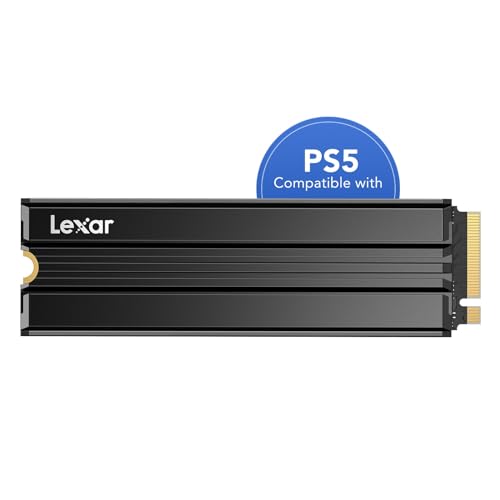
Is the Lexar NM790 compatible with PS5?
Yes, the Lexar NM790 with Heatsink easily fits the PlayStation 5 console. It meets all the technical requirements set by Sony because it uses the PCIe 4.0 x4 interface, and its factory heatsink measures 9.7 mm in thickness, which falls well within the allowed limit of 11.25 mm.
| Spec | Sony requirement | Lexar NM790 Heatsink | Result |
|---|---|---|---|
| Interface | PCIe 4.0 x4 NVMe | PCIe 4.0 x4 | yes |
| Sequential read | 5500 MB/s or faster recommended | 7400 MB/s | yes |
| M.2 size | 2230 to 22110 | 2280 | yes |
| Height with heatsink | 11.25 mm max | 9.7 mm | yes |
| Heatsink | required | included | yes |
The drive reaches sequential read speeds of up to 7400 MB/s, comfortably exceeding the 5500 MB/s recommended by Sony.
The drive's dimensions are 80 x 24 x 9.7 mm, conforming to the standard M.2 2280 form factor. The manufacturer officially declares this model's compatibility with the PS5 and PC computers. The drive is covered by a 5-year manufacturer's warranty with an endurance limit of 1000 TBW for the 1 TB version, 1500 TBW for 2 TB, and 3000 TBW for the 4 TB variant.
Fun fact: Initially, the PlayStation 5 console supported M.2 drives with a capacity of up to 4 TB, but an official system software update in 2023 increased this limit to 8 TB.
No DRAM cache in daily use
The Lexar NM790 is a DRAM-less design. In a PC environment, the drive compensates for this lack using HMB 3.0 technology, which borrows a small portion of the computer's system RAM for efficient data management.
With the console, the situation is different. As PCWorld points out, the PlayStation 5 does not support HMB technology, which means a DRAM-less drive operates in the console bay entirely without such support.
In practice, this does not undermine the drive's usefulness. TechRadar tested the SSD in the console and recorded very good results in the built-in benchmark, where the Lexar outperformed the officially licensed WD SN850P and Seagate Game Drive. After testing, Dexerto called the NM790 a solid drive for the PS5.
However, one should keep in mind the limitations of a DRAM-less design. TechRadar notes that the lack of DRAM may slightly impact performance in the most demanding games and cause occasional stutters. Nevertheless, HMB drives are considered by reviewers to be a good budget choice.
What drive size should you choose for GTA 6?
The release of GTA 6 has been announced for November 19, 2026, with pre-loading expected to start on November 12. Rockstar Games has not yet provided the official installation size, but industry estimates suggest a range of 150 to 300 GB.
GamesRadar points out that the most commonly predicted size is just under 200 GB. Assuming this estimate, you must remember that formatting the drive in the console always reserves a small portion of the declared capacity for system files.
By choosing the 1 TB variant, you will get enough space to download roughly 4-5 such titles. This is an option for players who regularly delete completed games and keep only a few titles installed at a time.
A 2 TB drive will hold about 9-10 games of 200 GB size, offering significantly more freedom. Meanwhile, the 4 TB version accommodates around 19-20 such titles, and according to TechRadar, Lexar's 4 TB variant is notably cheaper than its competitors.
How to properly install an SSD in a PS5
Installing an M.2 drive in the Sony console follows simple guidelines prepared by the hardware manufacturer. Before starting the installation, review the tips below:
- Prepare a #1 Phillips screwdriver, and if you need better visibility, you can optionally illuminate the slot with a flashlight.
- Discharge static electricity from your body before touching the components by touching a grounded metal object.
- Follow Sony's guidelines for your specific hardware version, keeping in mind that the manufacturer provides separate instructions for the CFI-1000 series and the CFI-2000 and 7000 series.
- Never turn on the console with the cover removed.
- Do not add a second heatsink to a drive with a factory heatsink, and do not install a drive without a heatsink or thermal transfer sheet.
Upon the first boot, the console will format the new drive, erasing all data stored on it, and then measure its read speed automatically. In the console's storage settings, you can set the M.2 SSD as the default installation location for new games, and previously downloaded titles can be moved using options in your library. The drive with installed games can also be moved to another PS5 signed in to the same account, provided you remember to remove it before sending the console in for service, if applicable.
What to choose if the NM790 is unavailable?
If the Lexar NM790 with heatsink is sold out or you prefer a drive with DRAM cache, there are alternatives on the market. Excellent options with a factory heatsink that fits the PS5 slot include the Samsung 990 PRO Heatsink and the Kingston FURY Renegade Heatsink.
Both models are PCIe 4.0 x4 drives that meet all of Sony's guidelines regarding dimensions and speed. The DRAM cache helps them maintain consistent performance even in a console that does not support HMB.
For our comparison, we selected devices that easily fit inside the console's expansion bay and offer factory cooling that complies with the manufacturer's requirements.
Lexar NM790 and alternatives with DRAM
As an Amazon Associate I earn from qualifying purchases.

1. Lexar NM790 Heatsink 1 TB
PCIe 4.0 · up to 7400 MB/s · 9.7 mm heatsink
The cheaper DRAM-less route. In TechRadar's test it beat the licensed WD SN850P in the PS5 benchmark.
2. Lexar NM790 Heatsink 2 TB
PCIe 4.0 · up to 7400 MB/s · 9.7 mm heatsink
2TB with a 9.7 mm heatsink. The catch: TechRadar noticed occasional stutters in games, typical of DRAM-less SSDs.

3. Samsung 990 PRO Heatsink 1 TB
PCIe 4.0 · up to 7450 MB/s · with heatsink
The factory heatsink version, which Samsung lists as PS5 compatible. 1TB is enough if you keep a few big games installed at a time and delete the rest.

4. Samsung 990 PRO Heatsink 2 TB
PCIe 4.0 · up to 7450 MB/s · 8.2 mm heatsink
The sensible pick for most players: twice the space of the 1TB model and DRAM cache. The heatsink is 8.2 mm tall, well within Sony's limit.

5. Kingston FURY Renegade Heatsink 2 TB
PCIe 4.0 · up to 7300 MB/s · 10.5 mm heatsink
In TechRadar's test it scored about 6500 MB/s in the PS5 benchmark, more than the licensed WD SN850P.
Frequently Asked Questions
Will the Lexar NM790 without a heatsink work in a PS5?
The drive will be detected by the console, but Sony requires cooling in the form of a heatsink or a thermal transfer sheet. If you buy the version without a heatsink, you must purchase and install a compatible cooling solution yourself, with a total thickness of up to 11.25 mm. Using an M.2 drive without cooling goes against the console manufacturer's instructions.
Does the lack of DRAM in the NM790 cause issues on the PS5?
In everyday use, the lack of DRAM does not prevent a smooth gaming experience, and the drive achieves great results in the console's benchmark. However, reviewers at TechRadar noted that occasional micro-stuttering may occur in the most demanding games. This is due to the fact that the PlayStation 5 console does not support HMB technology, which helps compensate for the lack of DRAM on PCs.
Does the Lexar NM790 fit the PS5 Slim and PS5 Pro?
Yes, this model fits the base PlayStation 5 console, as well as the Slim and Pro versions. All these devices share identical technical requirements for the M.2 PCIe 4.0 x4 slot and a thickness limit of 11.25 mm. The Lexar drive's factory heatsink is 9.7 mm thick, which allows it to fit under the covers of CFI-1000, CFI-2000, and 7000 series consoles.
Which Lexar NM790 capacity should you choose for GTA 6?
The most versatile choice for the upcoming title will be the 2 TB variant, which can hold around 9-10 games with an estimated size of 200 GB. The 1 TB version will only store 4-5 such titles, which will quickly fill up the drive with large updates. The 4 TB variant can accommodate around 19-20 massive games and, according to industry benchmarks, offers a very competitive price compared to rivals.
Is the NM790 faster than the officially licensed WD SN850P?
In a test conducted by TechRadar, the PS5's built-in benchmark recorded a higher read speed for the Lexar NM790 than for the licensed WD SN850P. In terms of the console benchmark score alone, Lexar performs better. However, keep in mind that the WD model features physical DRAM, which the Lexar design lacks.
More PS5 SSD guides
- Is the Samsung 990 Pro compatible with PS5? What size for GTA 6
- Is the Samsung 990 EVO Plus compatible with PS5? Only with a heatsink
- Is the WD SN850X compatible with PS5? How many games like GTA 6 it holds
- Is the WD SN850P compatible with PS5? How it differs from the SN850X
- Is the Kingston Fury Renegade compatible with PS5? Size for GTA 6
- Is the Kingston NV3 compatible with PS5? Is 1TB enough for GTA 6?
- Is the Samsung 980 compatible with PS5? No, it's PCIe 3.0
- Is the Samsung 9100 Pro compatible with PS5? Yes, but you overpay
Sources
- Lexar: NM790 with Heatsink M.2 2280 PCIe Gen 4x4 NVMe SSD - manufacturer page (lexar.com)
- PlayStation: How to add M.2 SSD storage to PS5 consoles - manufacturer page (playstation.com)
- TechRadar: Lexar NM790 with Heatsink review - industry article (techradar.com)
- TechPowerUp: Lexar NM790 4 TB w/ Heatsink review - industry article (techpowerup.com)
- Dexerto: Lexar NM790 4TB review - a solid PS5 SSD - industry article (dexerto.com)
- PCWorld: WD Black SN770 review (PS5 and HMB) - industry article (pcworld.com)
- Tom's Hardware: PlayStation 5 update adds support for 8TB SSDs - industry article (tomshardware.com)
- GamesRadar: What is the GTA 6 GB size going to be? - industry article (gamesradar.com)


Leave a comment
This site is protected by hCaptcha and the hCaptcha Privacy Policy and Terms of Service apply.