









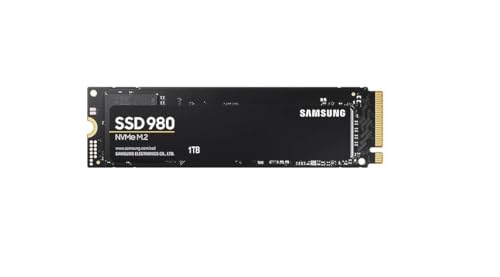
Is the Samsung 980 compatible with PS5?
No, the base Samsung 980 does not fit the PS5, PS5 Slim, or PS5 Pro console. This drive uses the older PCIe 3.0 x4 interface, while Sony requires PCIe 4.0 x4 storage. Even if you install it in the slot, the console will not support it due to hardware limitations.
| Spec | Sony requirement | Samsung 980 | Result |
|---|---|---|---|
| Interface | PCIe 4.0 x4 NVMe | PCIe 3.0 x4 | no |
| Sequential read | 5500 MB/s or faster recommended | 3500 MB/s | no |
| M.2 size | 2230 to 22110 | 2280 | yes |
| Heatsink | required | not included, buy one | caution |
The difference in interface generation means this budget model does not meet the technical requirements set by the console manufacturer.
Differences between the 980 and 980 PRO models
Both drives have almost identical designations, making it very easy to confuse them while shopping. The difference lies in a single suffix in the name, which hides completely different technologies and technical specifications.
The base Samsung 980 is a budget PCIe 3.0 drive without DRAM cache. The 1 TB version achieves read speeds of up to 3500 MB/s and write speeds of up to 3000 MB/s. These values are insufficient for the PlayStation 5, as the console requires the newer Gen4 standard.
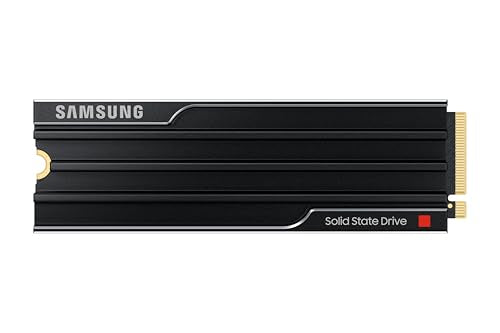
In contrast, the Samsung 980 PRO is a PCIe 4.0 x4 design offering read speeds of up to 7000 MB/s. TechRadar called this variant a great choice for the PlayStation 5. In fact, the manufacturer even prepared a version with a factory heatsink specifically for users of this console.
Fun fact: The M.2 slot in the PS5 did not work on the console's launch day. Sony only unlocked it for everyone with the system update on September 15, 2021, nearly a year after sales began.
What to do with a purchased Samsung 980 drive
If you already have this drive at home or bought it at a discount, you do not have to throw it away. It is a good drive for a traditional desktop PC or a laptop supporting an M.2 NVMe PCIe 3.0 slot.
You can also place it in an external USB enclosure. This way, you will get fast portable storage for documents, photos, or software installers that you can connect to any computer.
This drive was manufactured in 250 GB, 500 GB, and 1 TB capacities. Each of these variants will perform very well as working storage for daily office tasks outside the console environment.
Which drive to buy for PlayStation 5 and how to install it
When choosing additional storage for the PS5, look exclusively for M.2 NVMe PCIe 4.0 x4 drives with an M key. Remember that older drives with an M.2 SATA interface are not supported by the console at all. Sony allows capacities from 250 GB to 8 TB, recommends read speeds of 5500 MB/s or higher, and requires a heatsink for heat dissipation.
From Samsung's lineup, the direct successors compatible with the console are the 990 PRO Heatsink with factory cooling and the 990 EVO Plus. If you choose a drive without a factory heatsink, you must purchase a compatible heatsink and install it before inserting the drive into the console.
Installing the M.2 drive in the console involves several steps outlined by the manufacturer:
- Touch a grounded metal object to discharge static electricity before handling the components.
- Prepare a #1 Phillips screwdriver and optionally a flashlight, then remove the console cover according to the instructions for your CFI-1000 or CFI-2000/7000 model.
- Install the drive along with a heatsink or thermal sheet, remembering not to attach additional cooling if the drive already has a factory heatsink.
- Reattach the console cover, as Sony prohibits turning on the device with the cover removed.
- Turn on the console and format the drive on first use, keeping in mind that this process will erase all data stored on it.
After a successful format, you can go to the console's storage settings and set the M.2 drive as the default installation location for new games. You can easily transfer previously installed titles from console storage through the game library using the move games and apps option. In the future, you can move the drive with installed games to another PS5 console, as long as you log into the same account on it. Also remember to remove the installed drive before sending the console in for service, if applicable.
We have selected drives and dedicated cooling accessories that meet the console manufacturer's official guidelines.
Instead of the Samsung 980: SSDs that fit the PS5
As an Amazon Associate I earn from qualifying purchases.

1. Samsung 990 PRO Heatsink 1 TB
PCIe 4.0 · up to 7450 MB/s · with heatsink
The factory heatsink version, which Samsung lists as PS5 compatible. 1TB is enough if you keep a few big games installed at a time and delete the rest.

2. WD_BLACK SN850X Heatsink 1 TB
PCIe 4.0 · up to 7300 MB/s · with heatsink
The heatsink version (XHE suffix). The heatsink is the same as on WD's PS5-licensed SSD.

3. Samsung 990 EVO Plus 1 TB
PCIe 4.0 x4 · up to 7150 MB/s · no heatsink
A Samsung without DRAM. It beats Sony's recommended speed comfortably, but the PS5 needs a separate heatsink.

4. ICY BOX IB-M2HS-PS5
M.2 2280 heatsink for PS5 · 10 mm
A heatsink for SSDs without factory cooling. It is 10 mm tall and comes with thermal pads.
Frequently asked questions about console storage
Will the Samsung 980 work in a PS5 with a heatsink?
No, installing a heatsink will not change how the drive operates. The base Samsung 980 communicates via the PCIe 3.0 bus, while the console software requires a PCIe 4.0 x4 interface. Because of this, the device will not allow this model to be used.
What is the difference between the Samsung 980 and 980 PRO?
The main differences are the interface generation, architecture, and achievable speeds. The 980 model is a DRAM-less PCIe 3.0 drive with read speeds up to 3500 MB/s, while the 980 PRO runs on a PCIe 4.0 interface and achieves transfer speeds of up to 7000 MB/s. Out of these two variants, only the PRO version meets the criteria required by the PlayStation 5.
Does the Samsung 980 PRO fit the PS5?
Yes, the Samsung 980 PRO fits the console because it supports the required PCIe 4.0 interface. For it to work properly, you must choose the version with a factory heatsink or purchase a separate cooling solution that meets Sony's requirements. A drive without a heatsink is not approved for use in this console.
How to check if an M.2 drive is PCIe 4.0?
You can find information about the interface generation in the data sheet or on the drive packaging. Manufacturers use clear labels in the specifications, such as PCIe 4.0 x4 or Gen4. This designation confirms compatibility with the expansion slot in the PlayStation 5.
Which Samsung fits the PS5 instead of the 980?
Instead of the base 980 model, you can choose the newer Samsung 990 PRO Heatsink, which comes with pre-installed cooling. The 990 EVO Plus model supporting PCIe 4.0 x4 is also a good alternative. Keep in mind, however, that for the EVO Plus version you need to purchase a separate M.2 heatsink.
More PS5 SSD guides
- Is the Samsung 990 Pro compatible with PS5? What size for GTA 6
- Is the Samsung 990 EVO Plus compatible with PS5? Only with a heatsink
- Is the WD SN850X compatible with PS5? How many games like GTA 6 it holds
- Is the WD SN850P compatible with PS5? How it differs from the SN850X
- Is the Lexar NM790 compatible with PS5? What size for GTA 6
- Is the Kingston Fury Renegade compatible with PS5? Size for GTA 6
- Is the Kingston NV3 compatible with PS5? Is 1TB enough for GTA 6?
- Is the Samsung 9100 Pro compatible with PS5? Yes, but you overpay
Sources
- Samsung: 980 NVMe SSD data sheet - manufacturer page (download.semiconductor.samsung.com)
- PlayStation: How to add M.2 SSD storage to PS5 consoles - manufacturer page (playstation.com)
- Tom's Hardware: Samsung 980 M.2 NVMe SSD review - industry article (tomshardware.com)
- TechRadar: The Samsung 980 Pro is now the perfect SSD for PS5 - industry article (techradar.com)
- GamesRadar: PS5 SSD and HDD support explained - industry article (gamesradar.com)
- Android Central: Samsung reveals PS5-compatible 980 Pro SSD with heatsink - industry article (androidcentral.com)
- Android Central: Samsung 990 Pro SSD review - industry article (androidcentral.com)
- PlayStation Blog: PS5 September system software update (M.2 expansion) - manufacturer page (blog.playstation.com)

Leave a comment
This site is protected by hCaptcha and the hCaptcha Privacy Policy and Terms of Service apply.