









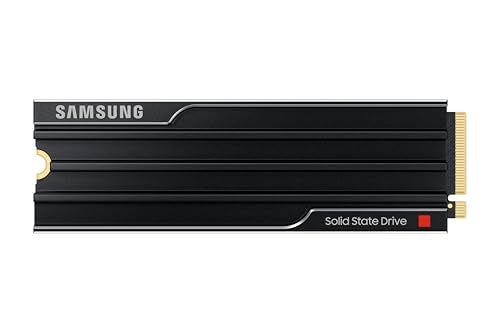
Is the Samsung 9100 Pro compatible with PS5? Short answer
Yes, the Samsung 9100 PRO will work in the console and will easily fit into the expansion slot. However, the PS5, PS5 Slim, and PS5 Pro feature a PCIe 4.0 x4 interface, meaning the console will not utilize the full potential of the newer PCIe 5.0 standard.
| Spec | Sony requirement | Samsung 9100 PRO Heatsink | Result |
|---|---|---|---|
| Interface | PCIe 4.0 x4 NVMe | PCIe 5.0 x4 | caution |
| Sequential read | 5500 MB/s or faster recommended | 14700-14800 MB/s | yes |
| M.2 size | 2230 to 22110 | 2280 | yes |
| Height with heatsink | 11.25 mm max | 8.88 mm | yes |
| Heatsink | required | included | yes |
The drive fits within Sony's limits, but the console will cap its transfer speeds to PCIe 4.0 levels.
Why the console will not utilize the potential of PCIe 5.0
The M.2 NVMe slot in the PS5, PS5 Slim, and PS5 Pro consoles supports only the PCIe 4.0 x4 interface. A PCIe 5.0 drive installed in this slot automatically adapts to the older standard and operates at PCIe 4.0 speeds. Sony recommends drives with read speeds of at least 5500 MB/s, which older models achieve with ease.
On paper, the Samsung 9100 PRO achieves read speeds of up to 14,700 MB/s for the 1 TB version and up to 14,800 MB/s for 2 TB and 4 TB, with write speeds reaching up to 13,400 MB/s. TechRadar described this drive as Samsung's first true PCIe 5.0 SSD, noting the fastest write speeds among the models they tested. In the Sony console, however, these numbers will not provide any additional benefit.
A reviewer for GamesRadar stated plainly that they would not install the 9100 PRO in a PS5 due to the console's lack of PCIe 5.0 support. They titled the entire article with the statement that it is an engineering masterpiece that you probably do not need. Meanwhile, Tom's Hardware reviewed this model separately and still includes PCIe 4.0 designs on its list of recommended PS5 SSDs.
Heatsink dimensions and fitting into the console
Sony requires any drive installed in the console to have a heatsink or a thermal transfer sheet. The total thickness of the drive along with the cooling element must not exceed 11.25 mm. The factory versions of the Samsung 9100 PRO with Heatsink were designed to fit within these limits.
The 1 TB, 2 TB, and 4 TB capacity variants measure 80.15 x 25 x 8.88 mm. The 8.88 mm thickness leaves safe clearance from the cover, and Samsung explicitly declares compatibility with laptops, desktop computers, and the PS5. Remember that you must not add a second cooling element to a drive that already has a factory heatsink.
The 8 TB version is noticeably bulkier and measures exactly 80.15 x 25 x 11.25 mm. This means its height reaches the exact maximum limit set by Sony engineers. However, the manufacturer confirms that even this largest variant fits into the console's bay.
Fun fact: Initially, the PS5 console software allowed for the installation of drives with a maximum capacity of 4 TB. It was not until an official system update in 2023, reported by Tom's Hardware, that this limit was doubled, allowing the console to support drives up to 8 TB.
When buying the 9100 PRO makes sense
Buying the Samsung 9100 PRO makes sense if using it in the PS5 is just a temporary transition for you. If you know that you will eventually move this drive to a modern PC with a motherboard supporting PCIe 5.0, you will then be able to take full advantage of its capabilities.
However, if you are looking for additional storage purely for the console, purchasing the 9100 PRO is an unnecessary expense. This model costs significantly more than PCIe 4.0 drives of the same capacity, and in PS5 games it will offer very similar performance.
For this lineup, we selected drives with factory cooling that fit the console's slot and meet the manufacturer's official recommendations.
Samsung 9100 PRO or a cheaper PCIe 4.0 SSD for PS5
As an Amazon Associate I earn from qualifying purchases.

1. Samsung 990 PRO Heatsink 2 TB
PCIe 4.0 · up to 7450 MB/s · 8.2 mm heatsink
The sensible pick for most players: twice the space of the 1TB model and DRAM cache. The heatsink is 8.2 mm tall, well within Sony's limit.

2. WD_BLACK SN850X Heatsink 2 TB
PCIe 4.0 · up to 7300 MB/s · 8.9 mm heatsink
2TB with an 8.9 mm heatsink. Newer batches reach stores as the SanDisk Optimus GX PRO 850X.

3. Kingston FURY Renegade Heatsink 2 TB
PCIe 4.0 · up to 7300 MB/s · 10.5 mm heatsink
In TechRadar's test it scored about 6500 MB/s in the PS5 benchmark, more than the licensed WD SN850P.

4. Samsung 9100 PRO Heatsink 2 TB
PCIe 5.0 · up to 14800 MB/s · 8.88 mm heatsink
A very fast SSD for PCIe 5.0 PCs. In the PS5 it only runs at PCIe 4.0 speed, so you pay for speed you won't use.
How to properly install an SSD in PS5
Sony has prepared separate disassembly instructions for the CFI-1000, CFI-2000, and CFI-7000 console series. The M.2 SSD installation itself comes down to a few basic rules:
- Prepare a #1 Phillips screwdriver, and optionally, you can use a regular flashlight to help.
- Touch a grounded metal object just before starting work to discharge static electricity.
- Use a drive with a heatsink or thermal transfer sheet, keeping in mind that M.2 SATA drives are not supported.
- Never turn on the console with the cover removed.
- Install the drive, close the cover, and format the drive on first boot, which will erase all data from it.
After installation, you can go to the console's storage settings and set the M.2 SSD as the default storage location for new games. You can move titles previously stored on the console's internal storage directly from your game library using the dedicated move games and apps option.
You can remove the drive with downloaded games at any time and install it in another PS5, as long as you log into the same account on it. Also, keep in mind Sony's recommendation to remove the additional M.2 drive before sending the console in for service.
Frequently Asked Questions
Does PS5 support PCIe 5.0 SSDs?
The PS5 console does not feature a PCIe 5.0 controller, and its slot operates on the PCIe 4.0 x4 standard. A newer drive will work in the console, but it will slow down to the maximum transfer speeds offered by the PCIe 4.0 port.
Will the Samsung 9100 PRO with a heatsink fit in the PS5?
Yes, the 1 TB, 2 TB, and 4 TB drives are 8.88 mm thick. They easily fit into the console bay, which accommodates designs up to 11.25 mm thick.
Does the 9100 PRO 8 TB fit the PS5?
The 8 TB model is exactly 11.25 mm thick, which is the upper limit allowed by Sony. Samsung officially states that this variant is fully compatible with the PS5.
Will the 9100 PRO speed up games on PS5 Pro?
No, the PS5 Pro console uses the same M.2 NVMe PCIe 4.0 x4 slot as older console versions. Because of this, games on a PCIe 5.0 drive will not load any faster.
Which drive instead of the 9100 PRO for PS5?
A better choice would be PCIe 4.0 models with a heatsink, such as the Samsung 990 PRO Heatsink, WD_BLACK SN850X Heatsink, or Kingston FURY Renegade Heatsink. They cost significantly less and deliver performance inside the console that fully meets Sony's expectations.
More PS5 SSD guides
- Is the Samsung 990 Pro compatible with PS5? What size for GTA 6
- Is the Samsung 990 EVO Plus compatible with PS5? Only with a heatsink
- Is the WD SN850X compatible with PS5? How many games like GTA 6 it holds
- Is the WD SN850P compatible with PS5? How it differs from the SN850X
- Is the Lexar NM790 compatible with PS5? What size for GTA 6
- Is the Kingston Fury Renegade compatible with PS5? Size for GTA 6
- Is the Kingston NV3 compatible with PS5? Is 1TB enough for GTA 6?
- Is the Samsung 980 compatible with PS5? No, it's PCIe 3.0
Sources
- Samsung: 9100 PRO with Heatsink data sheet - manufacturer page (download.semiconductor.samsung.com)
- PlayStation: How to add M.2 SSD storage to PS5 consoles - manufacturer page (playstation.com)
- GamesRadar: Samsung 9100 Pro 4TB review - industry article (gamesradar.com)
- TechRadar: Samsung 9100 Pro review - industry article (techradar.com)
- Tom's Hardware: Samsung 9100 Pro SSD review - industry article (tomshardware.com)
- Tom's Hardware: The best PS5 SSDs - industry article (tomshardware.com)
- Tom's Hardware: PlayStation 5 update adds support for 8TB SSDs - industry article (tomshardware.com)

Leave a comment
This site is protected by hCaptcha and the hCaptcha Privacy Policy and Terms of Service apply.