









As an Amazon Associate I earn from qualifying purchases.
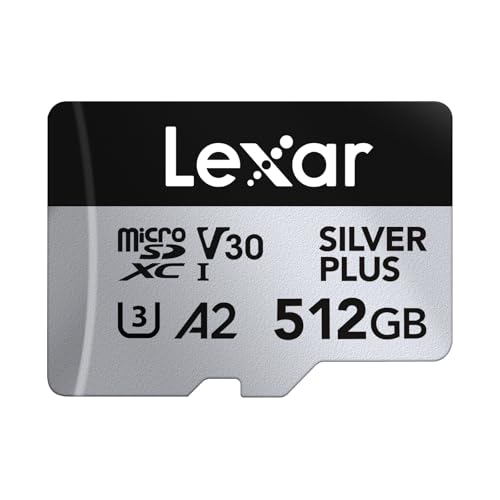
Quick answer: our top pick is Lexar Professional SILVER PLUS 512 GB (512 GB · UHS-I · A2, U3, V30 · up to 205 MB/s).
Best microSD card for DJI Osmo Pocket 4? Short answer
For the DJI Osmo Pocket 4 camera, choose a microSD card with a V30 speed class and a capacity of up to 1 TB. The best and completely safe choice are cards directly recommended by the manufacturer, specifically the Lexar SILVER PLUS and Kingston Canvas Go! Plus series.
Both of these lineups meet the U3, A2, and V30 standards, ensuring trouble-free performance with the camera. If you want stable recording without any surprises while shooting, stick strictly to these models.
Technical requirements, the DJI list, and 180 Mb/s bitrate
The maximum video bitrate of the DJI Osmo Pocket 4 is 180 Mb/s. To ensure the camera can smoothly write such a data stream, it requires media with a guaranteed minimum speed. That is precisely why the V30 class is required.
The V30 class means a minimum sustained write speed of 30 MB/s, which converts to 240 Mb/s. This gives you a safe margin over the 180 Mb/s generated by the camera. A card with lower specifications will not be able to keep up with incoming footage.
According to card manufacturer Lexar, using media below the V30 class comes with significant risk. It can lead to recording interruptions, stuttering footage, and in some situations, even forced resolution drops by the device.
Compared to the Osmo Pocket 3, the official DJI list for the Pocket 4 is much simpler. The manufacturer has narrowed recommendations down to two proven series, each offering five capacity options: 64 GB, 128 GB, 256 GB, 512 GB, and 1 TB.
Fun fact: The official DJI list for the Pocket 4 includes only two memory card series: Lexar SILVER PLUS and Kingston Canvas Go! Plus, both available in capacities from 64 GB to 1 TB.
Below, we have compiled the recommended options from the official DJI list that perfectly match the camera's requirements.
Recommended microSD cards for DJI Osmo Pocket 4

1. Lexar Professional SILVER PLUS 512 GB
512 GB · UHS-I · A2, U3, V30 · up to 205 MB/s
Lexar SILVER PLUS in a 512 GB capacity, with read speeds up to 205 MB/s, A2, and V30 ratings.

2. Lexar Professional SILVER PLUS 1 TB
1 TB · UHS-I · A2, U3, V30 · up to 205 MB/s
Lexar SILVER PLUS with 1 TB capacity, read speeds up to 205 MB/s, A2, and V30 ratings.

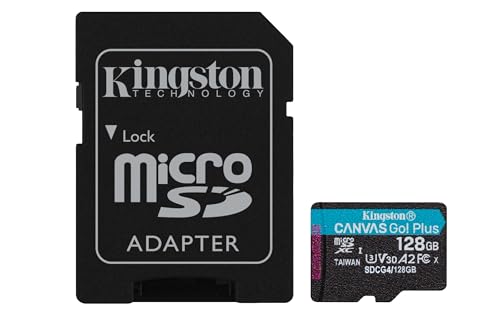
3. Kingston Canvas Go! Plus 1 TB
1 TB · UHS-I · A2, U3, V30 · up to 200 MB/s
Kingston Canvas Go! Plus (Gen4) with 1 TB capacity, with A2 and V30 classes, bundled with an SD adapter.

4. Kingston Canvas Go! Plus 256 GB
256 GB · UHS-I · A2, U3, V30 · up to 200 MB/s
The newer Gen4 version of the Kingston Canvas Go! Plus card, with read speeds up to 200 MB/s, A2, and V30. The series is on camera makers' recommended lists.

5. Lexar Professional SILVER PLUS 256 GB
256 GB · UHS-I · A2, U3, V30 · up to 205 MB/s
A Lexar card with read speeds up to 205 MB/s, A2, and V30 ratings. One of the bestsellers among microSD cards.
107 GB built-in storage and selecting card capacity
DJI Osmo Pocket 4 features 107 GB of built-in storage. This means you can start recording right out of the box, even before purchasing external media.
You can expand the internal 107 GB at any time using a microSD card up to 1 TB. Choosing the right card size depends mainly on your workflow and how often you transfer files to a computer.
A capacity of 256 GB is a sensible standard for those who record regularly and want convenient space for daily shots. It will work great during weekend trips without the need to clear memory every evening.
512 GB and 1 TB cards are an option for longer trips where access to a computer or external drive may be limited. Creators recording vast amounts of footage in the highest quality without interruptions for data management will appreciate the maximum size of 1 TB.
Fun fact: Osmo Pocket 4 has as much as 107 GB of built-in storage, so you can record a lot of video footage even if you forget to insert a microSD card.
In-camera formatting and why it pays to have a spare
Always format a new microSD card directly in the Osmo Pocket 4 before your first recording. The device uses the exFAT file system, and formatting from the camera menu prepares the appropriate folder structure and eliminates potential write errors.
Formatting erases all previous files, so make sure you have transferred important data to a drive. Also remember to regularly format the card in the camera after offloading your footage, instead of deleting individual files on a computer.
It is always a good idea to keep a second, spare microSD card in your case. Even the best media can fill up while recording an important event. A quick card swap lets you continue working without nervously browsing and deleting previous shots.
Questions and answers
What is the maximum microSD card capacity for DJI Osmo Pocket 4?
The camera supports microSD memory cards up to 1 TB. You can choose a 1 TB version from the Lexar SILVER PLUS or Kingston Canvas Go! Plus series, which are on DJI's official list. The media must support the exFAT file system.
Which cards does DJI recommend for Osmo Pocket 4?
DJI recommends two specific microSD card series: Lexar SILVER PLUS and Kingston Canvas Go! Plus. Both lines are recommended in 64 GB, 128 GB, 256 GB, 512 GB, and 1 TB capacities. Each of them meets the U3, A2, and V30 standards.
Does Osmo Pocket 4 record without a card?
Yes, the camera records without an inserted microSD card. The device has 107 GB of built-in storage, where you can freely save videos and photos. You can expand this space at any time by inserting an additional card into the slot.
Does a card from Pocket 3 work with Pocket 4?
A card from the previous model will work as long as it meets the requirements of the new device. Pocket 4 requires a V30 class card supporting the exFAT format up to 1 TB. If your current card is a Lexar SILVER PLUS or Kingston Canvas Go! Plus, you can safely use it.
What card capacity for Osmo Pocket 4?
For everyday use, 256 GB is the optimal choice, which combined with 107 GB of built-in storage provides plenty of working space. For long trips without a computer, it is better to choose 512 GB or the maximum 1 TB. If you shoot occasionally, 64 GB or 128 GB will suffice.
Sources
- DJI: Osmo Pocket 4 specs (supported and recommended microSD cards) - manufacturer page (dji.com)
- Lexar: DJI Pocket 4 storage, what microSD card should you buy - industry article (lexar.com)
- ProjectGo.Pro: Best SD card for DJI Pocket 4 - industry article (projectgo.pro)
- Alik Griffin: Best memory card for DJI Osmo Pocket - industry article (alikgriffin.com)

Leave a comment
This site is protected by hCaptcha and the hCaptcha Privacy Policy and Terms of Service apply.