









As an Amazon Associate I earn from qualifying purchases.
Quick answer: our top pick is INIU 20000mAh 45W (20,000 mAh · 45 W USB PD · built-in USB-C cable).
Best power bank for Galaxy S26 Ultra? Choose a model with a PPS profile
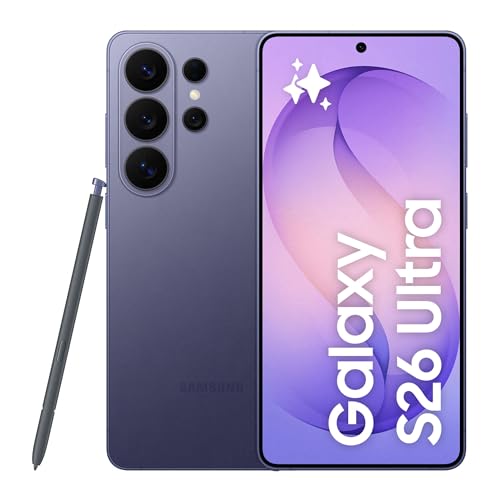
If you are looking for a power bank for Galaxy S26 Ultra, choose a model that supports 45 W PPS technology, such as the official Samsung power bank or Baseus QPow3. The phone can draw up to 60 W from a wall charger, but among power banks with confirmed PPS protocol, 45 W currently remains a safe and realistic maximum. A Qi2.2 magnetic power bank, on the other hand, will only work if you purchase a magnetic case, as the smartphone itself does not have built-in magnets.
You will not find a wall charger in the box with the smartphone, which is why a power bank often becomes the main power source away from home. To save time, it is worth choosing an accessory tailored to this model's specific power requirements.
Charging power in practice: why watts alone on the casing are not enough
Galaxy S26 Ultra supports the Super Fast Charging 3.0 standard up to 60 W with a 20 V and 3 A profile. In tests by GSMArena, a 60 W wall charger peaks at 51-53 W, charging the battery to 51% in 15 minutes, to 84% in half an hour, and to 100% in 43 minutes. The manufacturer itself claims reaching 75% charge in about 30 minutes.
However, none of the power banks in this comparison with confirmed PPS offer a full 60 W. Devices from Samsung and Baseus QPow3 deliver 45 W in Super Fast Charging 2.0 mode. In practice, this means charging is slightly slower than with the fastest wall charger, but the phone still charges very efficiently.
A high wattage printed on the casing alone does not guarantee success. Samsung smartphones require the USB PD protocol with PPS to reach higher power levels. If you connect the phone to a port with standard USB PD without PPS, the device will only draw around 15 W.
For this reason, a powerful power bank like Anker Power Bank 165 W, which offers up to 100 W on a single port, may not unleash the smartphone's full potential. The manufacturer does not mention PPS support in the description, so it is unclear exactly what power the phone will draw from it. This shows that having the right protocol is what matters, not just the declared maximum power.
Other popular manufacturers, such as INIU or UGREEN, list USB PD 45 W in their specifications without explicitly mentioning a PPS profile. INIU claims that its 20 000 mAh model can charge Samsung S25 Ultra up to 80% and supports multiple protocols, but this should be treated as a manufacturer claim until PPS support is explicitly confirmed in the documentation.
Fun fact: Galaxy S26 Ultra is the first phone in this series with charging reaching 60 W, and to achieve full speed on a compatible charger, the standard 3 A cable included in the box is sufficient.
Below you will find a roundup of tested power banks, selected for their travel convenience, built-in cables, and compatibility with demanding smartphones.
Recommended power banks for Galaxy S26 Ultra

1. INIU 20000mAh 45W
20,000 mAh · 45 W USB PD · built-in USB-C cable
The number one power bank on Amazon. 20,000 mAh, up to 45 W over USB-C and a built-in cable, so there is no extra cable to carry.

2. Anker Power Bank 25000mAh 165W
25,000 mAh · up to 100 W from one port · 2 built-in cables
A power bank for heavy users: 165 W total, up to 100 W from one port, and two built-in cables (one retracts out to 70 cm). Anker says it charges an iPhone 17 Pro Max three times. At 90 Wh it fits the carry-on limit.

3. Samsung Battery Pack 20000mAh 45W
20,000 mAh · 45 W Super Fast Charging 2.0 (PPS) · 3 ports
Samsung's own power bank with Super Fast Charging 2.0, which means the PPS that Galaxy phones need for full speed. A 5 A USB-C cable is included, three ports.

4. Baseus PicoGo AM52 Qi2.2 25W 10000mAh
10,000 mAh · magnetic Qi2.2 25 W · 45 W over USB-C · 0.6 in thin
Qi2.2 certified, so iPhone 16 and 17 models charge wirelessly at the full 25 W. Over USB-C it delivers 45 W, enough for a Samsung too. Baseus quotes 45% on an iPhone 17 Pro in 30 minutes.

5. Baseus QPow3 20000mAh 45W
20,000 mAh · 45 W USB PD 3.0 with PPS · 2 built-in cables
One of the few power banks that state PPS up to 45 W outright. That matters for Samsung and Pixel phones, which charge slower without PPS. Two built-in USB-C cables and a display.
Qi2.2 wireless charging and no built-in magnets
The Galaxy S26 Ultra supports the modern Qi2.2 wireless standard at speeds up to 25 W. Unlike competing solutions, this phone's body does not feature built-in alignment magnets.
To enjoy the convenience of magnetic power banks, you need to purchase a dedicated case with an integrated magnetic ring. Without such a cover, a magnetic power bank will not stay attached to the back of the phone and will detach when you try to slip it into a pocket.
Keep in mind that wireless charging also involves significantly higher energy losses than wired charging. Hybrid models, such as the Baseus PicoGo AM52, offer Qi2.2 wireless charging and allow you to plug in a USB-C cable in an emergency to charge the phone at up to 45 W.
Battery capacity, energy losses, and airline limits
The built-in battery in the Galaxy S26 Ultra has a capacity of 5000 mAh. Power bank manufacturers state capacity based on single cells rated at 3.7 V. In terms of watt-hours, this equals roughly 37 Wh for 10 000 mAh, 74 Wh for 20 000 mAh, and 90 Wh for 25 000 mAh.
During charging, some energy is inevitably lost through voltage conversion. In reality, about three-quarters of the energy stored in the cells reaches the phone's battery. You can calculate the estimated number of full charges by multiplying the power bank's capacity by 0.72 and dividing the result by 5000 mAh.
Using this rough formula, a 20 000 mAh model will charge your smartphone almost 3 times. If you choose a 25 000 mAh capacity, you will get about 3.6 full charges.
Strict rules apply to lithium-ion batteries during air travel. Regulations allow carrying power banks with a capacity of up to 100 Wh, typically only in carry-on luggage. Both 20 000 mAh and 25 000 mAh variants (such as an Anker model rated at 90 Wh) easily fit within this permitted limit.
Frequently asked questions about powering the Galaxy S26 Ultra
Which power bank charges the Galaxy S26 Ultra the fastest?
Devices offering 45 W with confirmed PPS support in their specifications charge it the fastest, such as the original Samsung 20 000 mAh power bank or the Baseus QPow3 45 W. The phone will then activate Super Fast Charging 2.0 mode. Models without confirmed PPS support may charge the phone at noticeably slower speeds.
Will the Galaxy S26 Ultra charge from a power bank at 60 W?
Currently, no power bank with confirmed PPS support delivers the full 60 W to this phone. You can only reach the maximum 60 W output and the Super Fast Charging 3.0 standard with a suitable wall charger. When it comes to power banks, the 45 W standard remains the safe maximum.
Does a magnetic power bank fit the Galaxy S26 Ultra?
Yes, but the phone requires a dedicated case with a magnetic ring. The smartphone itself does not have built-in magnets from the factory, so a magnetic power bank will not stick directly to the glass back.
How many times will a 20 000 mAh power bank charge the Galaxy S26 Ultra?
A 20 000 mAh power bank will charge a 5000 mAh battery nearly 3 times. Due to natural energy losses in the voltage converters, roughly 72% of the energy stored in the cells actually reaches the phone.
Does the Galaxy S26 Ultra need a power bank with PPS?
Yes, if you want fast top-ups on the go. When connected to a standard USB PD port without PPS support, the smartphone limits power draw to around 15 W, which noticeably increases the time spent plugged into a cable.
Sources
- Samsung: Samsung Galaxy S26 Ultra - manufacturer page (samsung.com)
- GSMArena: Samsung Galaxy S26 Ultra - industry article (gsmarena.com)
- Tom's Guide: Samsung Galaxy S26 Ultra - industry article (tomsguide.com)
- HotHardware: Samsung Galaxy S26 Ultra - industry article (hothardware.com)

Leave a comment
This site is protected by hCaptcha and the hCaptcha Privacy Policy and Terms of Service apply.