









As an Amazon Associate I earn from qualifying purchases.
Quick answer: our top pick is SanDisk Extreme 1 TB (1 TB · UHS-I · A2, U3, V30 · up to 190 MB/s).
Best microSD card for ROG Ally X? Best choice for gaming
For the ROG Ally X console, the best option is a 1 TB UHS-I microSD card with an A2 performance rating. Although the device features a modern UHS-II card reader, the UHS-I standard offers the best value for money in terms of gaming storage space. You get plenty of room for modern titles without spending a fortune on expensive media.
Most gamers simply need reliable storage for new game installs from platforms like Steam or Game Pass. A UHS-I A2 card handles game loading smoothly and holds many games at once. Choosing a 1 TB model means you will rarely have to delete installed files.
UHS-I or UHS-II: how do these standards differ in practice
The difference between these standards primarily comes down to maximum data transfer rates defined by the SD Association. A standard UHS-I card reaches a limit of up to 104 MB/s, while the UHS-II interface allows for transfers of up to 312 MB/s. Theoretically, UHS-II media is three times faster when transferring files.
In reality, UHS-II microSD cards rarely appear in stores in large capacities. Bestsellers with 512 GB and 1 TB capacities are almost exclusively UHS-I models. In addition, UHS-II media currently remains very expensive, making the purchase of a high-capacity variant poor value for money.
For this reason, Windows Central highlights the UHS-I SanDisk Extreme card as the best choice for the ROG Ally and ROG Ally X consoles. The UHS-II standard mainly makes sense if you regularly move huge files between devices and can accept less storage for the same price.
Fun fact: The UHS-II reader in the ROG Ally X handles standard UHS-I cards without issue, as the SD standard maintains full backward compatibility.
Below, we have gathered recommended memory card models that work great with the handheld console and offer the right performance for gaming.
Recommended microSD cards for ROG Ally X
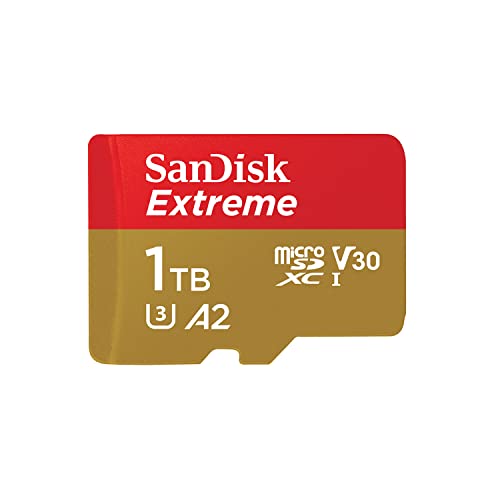
1. SanDisk Extreme 1 TB
1 TB · UHS-I · A2, U3, V30 · up to 190 MB/s
SanDisk Extreme with 1 TB capacity, featuring A2 and V30 ratings. It holds a large game library or many hours of footage.

2. Lexar Professional SILVER PLUS 1 TB
1 TB · UHS-I · A2, U3, V30 · up to 205 MB/s
Lexar SILVER PLUS with 1 TB capacity, read speeds up to 205 MB/s, A2, and V30 ratings.

3. SanDisk Extreme PRO 1 TB
1 TB · UHS-I · A2, U3, V30 · up to 200 MB/s
A higher-tier SanDisk series with read speeds up to 200 MB/s, A2 and V30 ratings, and 1 TB capacity.

4. SanDisk Extreme 512 GB
512 GB · UHS-I · A2, U3, V30 · up to 190 MB/s
SanDisk Extreme in a 512 GB capacity. The V30 rating handles 4K recording, while A2 speeds up app and game loading times.
Memory Card or M.2 2280 SSD Replacement
Expanding storage with a microSD card is the simplest method, but not the only one if you need data space. For example, ROG Xbox Ally X comes with a factory internal 1 TB PCIe 4.0 NVMe drive in the full M.2 2280 format. Replacing the internal drive requires opening the device casing, which is why buying a memory card remains the fastest, non-invasive way to immediately expand your game library.
New Card Reader Placement in the ROG Ally X Chassis
Many users of the first console version reported memory card failures caused by high temperatures during intense gameplay. Ahead of launch, Guru3D pointed out that the microSD card slot on ROG Ally X was moved to a different location. It is now positioned further from the hot air exhaust to reduce card failures known from the older device.
Fun fact: On ROG Ally X, the microSD slot was moved away from the hot air exhaust to reduce card failures reported on the first Ally.
Questions and Answers About ROG Ally X Storage
Does ROG Ally X support UHS-II cards?
Yes, the ROG Ally X console features a built-in UHS-II microSD card reader. It provides full support for media operating in SD, SDHC, and SDXC standards. This allows you to use the fastest cards reaching transfer speeds of up to 312 MB/s.
Will a standard UHS-I card work in ROG Ally X?
A standard UHS-I card will work in this console without any technical issues. The SD card standard guarantees full backward compatibility, allowing you to safely insert an older card into a newer slot. The card will simply operate at its standard speed capped at 104 MB/s.
What microSD card capacity for ROG Ally X?
The best choice for most gamers is a 1 TB card in the UHS-I A2 standard. Large games take up a lot of space, so smaller cards fill up quickly. This capacity allows you to easily install demanding titles without having to constantly delete data.
Does ROG Xbox Ally X have the same card reader?
Yes, the ROG Xbox Ally X model is equipped with the exact same single UHS-II microSD card reader. This means identical compatibility with SD, SDHC, and SDXC standards as in the base ROG Ally X. You can successfully use the same memory card models in both devices.
Does a microSD Express card make sense in ROG Ally X?
The card reader in ROG Ally X was designed with the UHS-II standard in mind, not SD Express. A card of this type will not utilize its full potential in the console slot and may operate at reduced base speeds. A proven UHS-I card or a UHS-II model remains a much more sensible purchase.
Sources
- ASUS: ROG Ally X (2024) specifications - manufacturer page (rog.asus.com)
- ASUS: ROG Xbox Ally X (2025) specifications - manufacturer page (rog.asus.com)
- SD Association: Bus Speed (UHS-I, UHS-II, SD Express) - industry article (sdcard.org)
- Windows Central: Best ROG Ally microSD cards - industry article (windowscentral.com)
- Wikipedia: Asus ROG Ally - industry article (en.wikipedia.org)
- Guru3D: ASUS ROG Ally X confirmed specifications - industry article (guru3d.com)

Leave a comment
This site is protected by hCaptcha and the hCaptcha Privacy Policy and Terms of Service apply.