









As an Amazon Associate I earn from qualifying purchases.
Quick answer: our top pick is Dell 27 Plus S2725QS (4K) (27-inch · 4K · 120 Hz · IPS · speakers).
Which monitor to buy on Black Friday? A short answer for everyone
For most people, the best choice is a 27-inch monitor. For work, study, and movies, choose 4K. For gaming, go with QHD and a high refresh rate. If you play a lot and want the best contrast, get an OLED monitor. For Mac users, 5K is the best fit.
Black Friday 2026 falls on Friday, November 27, and Cyber Monday on Monday, November 30. That gives you a little time to work out what class of monitor you need and to see what it costs before the sales start.
What to buy and for whom
Work and a laptop with USB-C
Get a 27-inch 4K 120 Hz monitor with USB-C. One cable carries video, data, and power to your laptop, so you have one cable on your desk instead of three. You don't need 120 Hz for work, but the cursor and scrolling are noticeably smoother than at 60 Hz.
If you work on a desktop computer, you can skip USB-C with power delivery and save money. A 4K 120 Hz monitor without a USB hub is enough in that case.
PC and console gaming
The best choice here is a QHD gaming monitor with a refresh rate of 144 to 260 Hz. QHD is the resolution at which a mid-range graphics card can sustain a high refresh rate. 4K gaming requires a much more powerful card.
Gaming with the best contrast
An OLED monitor delivers true black, because each pixel lights up on its own, and its response time is 0.03 ms. It's the choice for demanding gamers who know they will pay more for it.
Small budget
You have two options. A cheap 27-inch Full HD monitor is the least expensive, but with small text it is clearly less sharp than QHD. If sharpness matters to you, a cheap 4K 60 Hz monitor is the cheapest way into 4K, good for work and movies, but not for fast-paced games.
Mac
For a Mac, look for a 27-inch 5K monitor. It will show an image as sharp as a Retina display, in 2x mode with a 2560 x 1440 workspace. A 5K monitor with Thunderbolt or USB-C also charges your MacBook.
We chose the products below according to these roles.
Black Friday picks: 27-inch monitors

1. Dell 27 Plus S2725QS (4K)
27-inch · 4K · 120 Hz · IPS · speakers
A sharp 4K monitor with a 120 Hz refresh rate and a height-adjustable stand. It has speakers but doesn't charge a laptop over USB-C, so it suits a desktop PC better.

2. ASUS TUF Gaming VG27AQ3A
27-inch · QHD · 180 Hz · 1 ms · Fast IPS
A QHD gaming monitor with a 180 Hz refresh rate and wide color coverage of 130% sRGB. ELMB Sync combines motion blur reduction with variable refresh rate.

3. LG UltraGear 27GX704A (OLED)
26.5-inch · OLED · QHD · 240 Hz · HDMI 2.1
An OLED gaming monitor with a glossy coating and a 240 Hz refresh rate. The full 240 Hz also works over HDMI 2.1, which comes in handy with a console.

4. Dell 27 Plus S2725DSM (QHD)
27-inch · QHD · 144 Hz · IPS · speakers
An affordable QHD monitor for home and office with a 144 Hz refresh rate and speakers. The stand adjusts for height, tilt and swivel, and pivots to portrait.
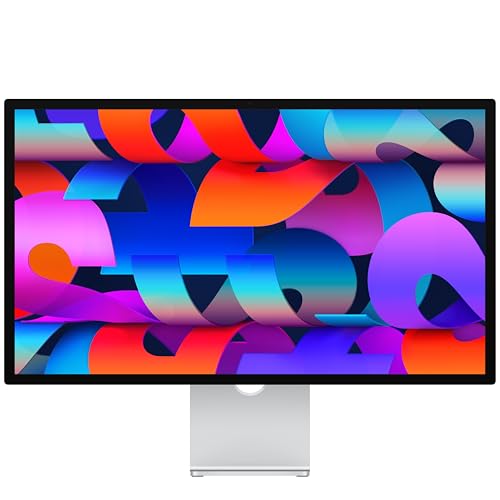
5. Apple Studio Display (2026)
27-inch · 5K Retina · Thunderbolt 5 · 12 MP camera
An Apple 5K monitor with a Center Stage camera, six speakers and two Thunderbolt 5 ports. The simplest choice for a Mac if you want everything to work right out of the box.
What to look for in the specs
Resolution and sharpness
On a 27-inch screen, 4K gives about 163 pixels per inch, QHD about 109, and 5K 218. The difference shows mostly in text. QHD is fine for gaming, but for reading all day 4K looks better.
A Mac scales the image best at 5K. At 4K, text is still sharp, but the scaling is fractional.
Fun fact: a 5K screen has almost 14.7 million pixels, which is as many as four QHD screens combined.
Refresh rate and response time
60 Hz is enough for work, 120 Hz gives a smoother cursor and scrolling, and 144-260 Hz is for gaming monitors. For games, look at response time too. IPS monitors usually list 0.5-1 ms, and OLED 0.03 ms.
IPS or OLED
OLED has true black, but usually lower brightness across a fully bright screen than IPS. There is also a risk of burn-in on static elements, such as the taskbar or a game interface. Manufacturers reduce it with protection features, and some offer a warranty that covers burn-in. Check its terms.
USB-C with laptop charging
Check how many watts the monitor delivers and how many your laptop needs. You will find 65 W, and 96 W on 5K monitors for Mac. A version without USB-C power delivery may look the same, but it will not charge your laptop.
HDMI 2.1 for consoles
The PS5 and Xbox Series X output 120 Hz video over HDMI 2.1. Check the specs for the HDMI version the monitor has, because many models only have HDMI 2.0, and full refresh rate then works only over DisplayPort, meaning from a PC.
Stand adjustment
The most convenient stand adjusts height, swivel, and pivot. If the monitor only tilts, you can set the height with a riser or a VESA arm.
What prices look like
Below are only proportions, because exact amounts depend on the store. Use a 4K 120 Hz monitor as the reference point.
- A cheap 27-inch Full HD monitor costs roughly one third of that price.
- A QHD gaming monitor is roughly half.
- A QHD OLED is about one and a half times more.
- 5K monitors for Mac are about three times more expensive.
- Apple Studio Display costs about half again more than those.
On Black Friday, choosing the right monitor class matters more than the discount itself, so start with your needs and budget, and only then look for deals.
How to spot a fake Black Friday deal
The UK consumer organization Which? tracked prices of 175 products at 8 retailers from May 2024 to May 2025. It turned out that 83% of them were just as cheap or cheaper at least once outside the four-week sale period. No product had its lowest price of the year on Black Friday itself.
What this means for you:
- Compare the deal price with the price history of the last few months, not with the crossed-out list price. No US law sets a fixed 30-day reference price, so a "was" price alone tells you little.
- Before the sale, check the price history, for example on camelcamelcamel for Amazon, and add products to your wish list.
- Be wary of offers that seem too good to be true, and check who sells and ships the product.
- Check the full model number. Monitors come in series with very similar names: with and without USB-C, 60 Hz and 120 Hz, Full HD and QHD. A deal may be for an older model or a weaker variant.
- A good price is one you would accept even without a discount.
Frequently asked questions about monitors on Black Friday
Is it worth buying a monitor on Black Friday?
If you need one right now and the price is good, yes. According to the Which? study, none of the products studied had its lowest price of the year on Black Friday itself. So there is no reason to buy in a rush if the offer does not hold up against the price history.
Which 27-inch monitor should I choose: 4K or QHD?
For work, study, and movies, choose 4K, because it gives about 163 pixels per inch versus 109 for QHD. For gaming, QHD is easier on the graphics card and lets you keep a high refresh rate. 4K for gaming makes sense if you have a much more powerful graphics card.
Does an OLED gaming monitor make sense?
For demanding gamers, yes: true black and a 0.03 ms response time make a difference. It costs about one and a half times more than a 4K 120 Hz monitor and has lower brightness across a fully bright screen than IPS. Also check whether the manufacturer offers a warranty that covers burn-in.
Which monitor should I buy for a Mac?
Ideally a 27-inch 5K, because macOS then scales the image as sharply as on a Retina screen. 5K monitors are about three times more expensive than a 4K 120 Hz one. A cheaper option is 4K, which gives sharp text, but with fractional scaling.
How can I tell whether a monitor deal is real?
Compare the deal price with the price history of the last few months. Pay attention to the full model number, because similarly named versions differ in refresh rate, USB-C, or resolution. Also check who sells and ships the product.
Guides for specific models
- Best monitor for Mac mini M6 - 4K or 5K, HDMI or Thunderbolt
- Best monitor for Mac Studio M5 - 5K or 6K and how many displays
- Best monitor for MacBook Air M5 - two screens with the lid open
- Best monitor for MacBook Pro M6 - two 4K screens at 165 Hz and USB-C charging
- Best monitor for MacBook Neo - one 4K 60 Hz screen over USB-C
- Best monitor for iPad Air M4 - USB-C, 4K and the 60 Hz limit
- Best monitor for Steam Machine - 1440p or 4K, DisplayPort or HDMI
- Best monitor for ROG Xbox Ally X and X20 - portable or 27-inch with USB-C
Sources
- Dell: Dell 27 Plus 4K USB-C Monitor S2725QC - manufacturer page (dell.com)
- Samsung: 27" Odyssey G5 G50F QHD 180Hz - manufacturer page (samsung.com)
- ASUS ROG: Strix OLED XG27AQDMES specifications - manufacturer page (rog.asus.com)
- LG: UltraGear OLED GX7 27GX704A-B - manufacturer page (lg.com)
- BenQ: MA270S specifications - manufacturer page (benq.eu)
- RTINGS: Dell S2725QS monitor review - industry article (rtings.com)
- RTINGS: BenQ MA270S monitor review - industry article (rtings.com)
- TechRadar: BenQ MA270S 5K monitor review - industry article (techradar.com)
- Tom's Hardware: Best gaming monitors - industry article (tomshardware.com)
- Which?: Most Black Friday deals the same price or cheaper at other times of the year - industry article (which.co.uk)


Leave a comment
This site is protected by hCaptcha and the hCaptcha Privacy Policy and Terms of Service apply.