








As an Amazon Associate I earn from qualifying purchases.
Quick answer: our top pick is Dell 27 Plus S2725DC (27 inches · 1440p · 144 Hz · USB-C).
Best monitor for ROG Xbox Ally X?
For a desk, the best choice is a 27-inch 1440p monitor with a USB-C input. For travel, get a 16-inch portable monitor that you can power and connect with a single USB-C cable.
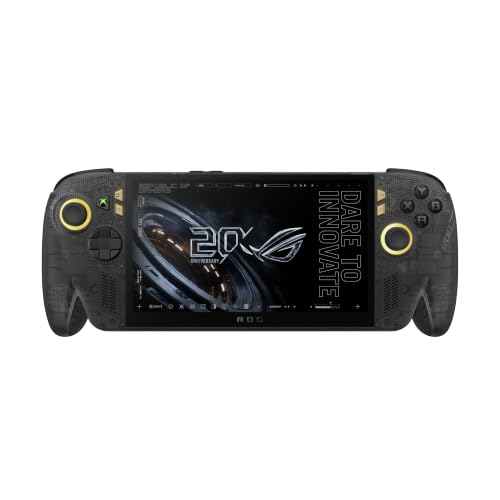
The same answer applies to the 2025 ROG Xbox Ally X and the newer X20 model. The X20 has the same Ryzen AI Z2 Extreme processor, but a 7.4-inch OLED screen instead of a 7-inch IPS. Both models have Full HD and 120 Hz, and from a monitor's point of view they differ little, because what matters is the ports.
A USB-C input on the monitor is the simplest solution. One cable carries the picture and, with the right power output, can also charge the console.
How to connect a monitor to the console
The console has two USB-C ports with DisplayPort output. On the X20, one is USB4 compatible with Thunderbolt 4, with DisplayPort 2.1, FreeSync and Power Delivery 3.0. The other is a USB 3.2 Gen 2 Type-C with DisplayPort and Power Delivery. The 2025 Ally X has two USB-C ports with DisplayPort 2.1.
You have three options:
- Monitor with USB-C: one cable between the console and the monitor, no extras needed.
- Monitor without USB-C: a USB-C to DisplayPort cable, for which you need a free DisplayPort input on the monitor.
- Docking station: a good choice when you also want to plug power, a keyboard and other accessories into one place.
The console's power adapter is rated at 68 W. If you plan to charge through the monitor's cable, check its specification to see how many watts it delivers over USB-C. With a weaker port, the console may need a separate power adapter.
A separate article covers docking stations for the ROG Xbox Ally X.
Fun fact: the USB4 port on the ROG Xbox Ally X20 is compatible with Thunderbolt 4 and has DisplayPort 2.1, so you can connect a monitor to it without a docking station.
Below we have collected monitors chosen by one criterion: whether they connect to the console with a single USB-C cable, and if not, how else to connect them. They include 27-inch models and portable 16-inch ones.
Monitors we recommend for ROG Xbox Ally X and X20

1. Dell 27 Plus S2725DC
27 inches · 1440p · 144 Hz · USB-C
A 1440p monitor with a USB-C input, so you connect the console with a single cable, no dock needed. The resolution is a sensible step up from the console's 1080p screen, and 144 Hz makes use of the smoothness in lighter games.

2. ARZOPA Z1FC 16.1" 144Hz
16.1 inches · 1080p · 144 Hz · USB-C
A portable monitor that fits in a backpack next to the console. Video and power run over a single USB-C cable. The 1080p resolution is the same as on the console's screen, so games run just as smoothly, only on a bigger screen.

3. Dell 27 Plus S2725QC
27 inches · 4K · 120 Hz · USB-C
The 4K version with a USB-C input. A sharp picture for movies, the Windows desktop and lighter games, and in demanding titles you can set a lower resolution. The pick if the monitor also doubles as a work display for your laptop.

4. ASUS TUF Gaming VG27AQ3A
27 inches · 1440p · 180 Hz · no USB-C
A 1440p 180 Hz gaming monitor with no USB-C input. You connect the console with a USB-C to DisplayPort cable or through a dock. A pick for those who already have a dock.
1440p or 4K: what a higher resolution gives you
The console screen is 1080p. A 1440p monitor is a sensible step up: the image is noticeably sharper at 27 inches, and the console has fewer pixels to handle than with 4K. For desk gaming, it is usually the best compromise.
A 4K monitor makes sense mainly if you also use it for movies, the Windows desktop and lighter games. In demanding titles you can set a lower resolution in the game, and the result on an external screen depends on the game and the settings.
With a 16-inch portable monitor, the difference is smaller. The 1080p version gives the same image as the built-in screen, just on a larger surface. The 2.5K version gives more detail, but it will put more load on the console.
A high refresh rate is also useful. 144 Hz and 180 Hz monitors have headroom beyond what the console can deliver in heavier games, but in lighter titles you will see the difference in smoothness.
The Auto Super Resolution feature is also interesting, as it upscales DirectX 11 and 12 games in desktop mode. For now it has only reached testing in the Xbox Insider program, so don't buy a monitor with it in mind.
What happens after you connect a monitor
After you plug in the cable, the console's built-in screen turns off on its own and the image moves to the large screen. You don't have to switch anything in the settings.
Fun fact: this automatic switching also works with a TV, so the same connection will work in the living room.
You can connect a keyboard and mouse via Bluetooth or USB. If the console sits on a desk and you use the USB-C port for video, the other port stays free for power or accessories. When you run out of ports, a docking station will help.
On the road, the setup is simple: the console, a portable monitor and a single USB-C cable. Such a monitor is powered and gets its image through the same cable, so on a train or in a hotel you don't need anything else.
Most common questions about a monitor for the ROG Xbox Ally X
Which monitor for the ROG Xbox Ally X?
For a desk, choose a 27-inch 1440p monitor with a USB-C input. For travel, a 16-inch portable monitor works well. You can connect both with a single USB-C cable.
Can the ROG Xbox Ally X be connected to a monitor?
Yes. The console supports external monitors through the USB-C port with DisplayPort output. After you connect one, its built-in screen turns off and the image moves to the monitor.
Does the ROG Xbox Ally X20 need a docking station for a monitor?
Not always. You can connect a monitor with a USB-C input directly with a single cable. A monitor without USB-C can be connected with a USB-C to DisplayPort cable, and a dock is convenient when you want to connect more devices at once.
1440p or 4K monitor for the ROG Xbox Ally X?
The console screen is 1080p, so 1440p is a sensible step up for gaming. 4K makes sense mainly for movies, the Windows desktop and lighter games, and in heavier titles you can lower the resolution in the settings.
Does a portable monitor work with the ROG Xbox Ally X?
Yes, if it has a USB-C input. Such a monitor gets its image and power through a single cable, which is convenient when traveling. Check the power delivery in the description of the specific model.
See also
- Best docking station for ROG Xbox Ally X - the ones that actually fit
- Best microSD card for ROG Xbox Ally and Ally X20 - UHS-II or microSD Express
- Best SSD for ROG Xbox Ally and Ally X - M.2 2280, capacity and the thermal cover
- Best power bank for ROG Xbox Ally X - 65 W to charge while you play
- Best monitor for Steam Machine - 1440p or 4K, DisplayPort or HDMI
Sources
- ASUS ROG: ROG Xbox Ally X20 specs - manufacturer page (rog.asus.com)
- ASUS ROG: ROG Xbox Ally - manufacturer page (rog.asus.com)
- ASUS ROG: ROG Xbox Ally updates for docking - manufacturer page (rog.asus.com)
- T3: A new Xbox handheld just broke cover - industry article (t3.com)
- PCWorld: Asus' new USB-C dock for ROG Ally - industry article (pcworld.com)
- CGMagazine: ASUS ROG Bulwark Dock DG300 review - industry article (cgmagonline.com)

Leave a comment
This site is protected by hCaptcha and the hCaptcha Privacy Policy and Terms of Service apply.