






As an Amazon Associate I earn from qualifying purchases.
Quick answer: our top pick is SanDisk microSD Express 512 GB (microSD Express · up to 880 MB/s · for the X20).
Best microSD card for ROG Xbox Ally and Ally X20? It depends on the console model
For the ROG Xbox Ally X20, buy a microSD Express card. For the standard ROG Xbox Ally, a UHS-I or UHS-II card is enough.
This is the most important difference between these consoles, and it determines whether you overpay for a card whose speed the reader can't use. Below: where this difference comes from and how to choose the capacity.
Why the same card works differently in each console
According to ASUS, the ROG Ally, Ally X, Xbox Ally and Xbox Ally X have a UHS-II reader. The Ally X20 has a microSD Express reader (SD v8.0, PCIe Gen4 x1). The same reader works in UHS-I DDR200 mode with UHS-I cards.
The effect goes both ways. A UHS-II card inserted into the X20 runs at UHS-I speed. A microSD Express card inserted into a UHS-II reader also drops to UHS-I speed, as confirmed by the SanDisk card description.
So in the standard Xbox Ally an Express card will work, but you won't make use of its speed. That means overpaying. UHS-II readers also read regular UHS-I cards, so a cheaper card in this console is not a compromise.
If you have the Ally X, the situation is the same as in the Xbox Ally: a UHS-II reader, so an Express card makes no sense there. We have a separate article for this model.
When choosing, look at the read speed. ASUS advises not to go by the V60 and V90 classes, because they mainly concern write speed.
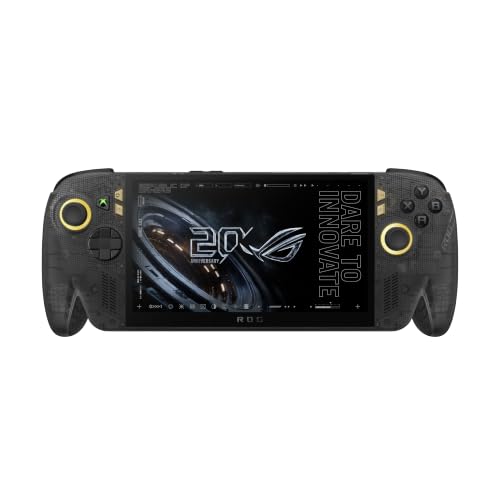
Fun fact: The X20 was created for the 20th anniversary of the ROG brand and has a 7.4-inch OLED screen.
How many GB to choose
ASUS recommends cards from 512 GB to 2 TB. Two terabytes is the maximum capacity supported by all current Ally models.
256 GB can be tight, because many new AAA games exceed 100 GB. Two or three such titles will fit, and there will be no room left for the rest.
For an indie and retro game library, a UHS-I card is enough, even if you have a standard Xbox Ally with a UHS-II reader. The X20 also has its own 1 TB PCIe 4.0 M.2 2280 drive, so the card there is an add-on for your library, not the only place for games.
We matched cards to both consoles by reader standard and the capacity recommended by ASUS. Express for the X20, UHS-I for the others.
Recommended microSD cards for ROG Xbox Ally and Ally X20

1. SanDisk microSD Express 512 GB
microSD Express · up to 880 MB/s · for the X20
A card for the microSD Express reader in the Ally X20. Reads up to 880 MB/s according to SanDisk. In a UHS-II reader it runs at UHS-I speed, so it is overkill for the regular Ally.

2. SanDisk microSD Express 1 TB
1 TB · microSD Express · up to 880 MB/s
The same series at 1 TB, for someone who keeps a whole game library on the card. Writes up to 800 MB/s according to SanDisk.

3. Lexar PLAY PRO microSD Express 1 TB
1 TB · microSD Express · up to 900 MB/s
A second brand in the same class. Reads up to 900 MB/s and writes up to 600 MB/s according to Lexar.

4. Samsung P9 microSD Express 512 GB
microSD Express · up to 800 MB/s · for the X20
Samsung's microSD Express card. Reads up to 800 MB/s according to Samsung.
Cards listed for Nintendo Switch 2 and the card with an Xbox license
Express cards for the X20 are often listed on Amazon under Nintendo Switch 2. This is not a mistake: it is the same microSD Express standard. If you see such a listing, don't be put off.
Fun fact: the same microSD Express card fits the X20 and the Nintendo Switch 2, because both consoles use this standard.
For the regular Xbox Ally, ASUS recommends a SanDisk card with an Xbox license. In our lineup, that is the SanDisk microSD do ROG Xbox Ally 1 TB, a regular UHS-I card, not Express. For the Ally X20, look among Express cards, for example SanDisk, Lexar PLAY PRO or Samsung P9.
Most common questions about Ally cards
What card reader does the ROG Xbox Ally X20 have?
The X20 has one microSD Express reader (SD v8.0, PCIe Gen4 x1). Regular UHS-I cards work in it in UHS-I DDR200 mode. The console also has a separate 1 TB M.2 2280 drive.
Will a UHS-II card work in the Ally X20?
It will work, but at UHS-I speed, as ASUS states. If you already have such a card, you can keep using it. A new purchase only makes sense if you care about Express speed.
Does a microSD Express card make sense in the regular ROG Xbox Ally?
No, it doesn't. According to SanDisk, an Express card works in UHS-I and UHS-II devices at UHS-I speed, so it won't make use of its full speed. It is better to buy a regular UHS-I or UHS-II card.
What is the maximum card capacity in the ROG Xbox Ally X20?
2 TB, the same as on all current Ally models according to ASUS. The manufacturer recommends a range from 512 GB to 2 TB.
Will a Nintendo Switch 2 card work in the Ally X20?
If it is a microSD Express card, yes, because it is the same standard. Check in the listing that it is Express and not a regular UHS-I card.
See also
- Best docking station for ROG Xbox Ally X - the ones that actually fit
- Best SSD for ROG Xbox Ally and Ally X - M.2 2280, capacity and the thermal cover
- Best microSD card for ROG Ally X - UHS-II or a regular UHS-I card
- Best microSD card for Steam Deck - capacity matters more than speed
- Best microSD card for Steam Frame - is microSD Express worth it?
Sources
- ASUS: ROG Xbox Ally X20 (2026) specifications - manufacturer page (rog.asus.com)
- ASUS: ROG Xbox Ally (2025) specifications - manufacturer page (rog.asus.com)
- ASUS: How to install games to an SD card on your ROG Ally - manufacturer page (rog.asus.com)
- T3: ROG Xbox Ally X20 - industry article (t3.com)
- Windows Central: Best ROG Ally microSD cards - industry article (windowscentral.com)
- Royal Strawberry: Best microSD cards for the ROG Xbox Ally - industry article (royalstrawberry.com)

Leave a comment
This site is protected by hCaptcha and the hCaptcha Privacy Policy and Terms of Service apply.