






As an Amazon Associate I earn from qualifying purchases.
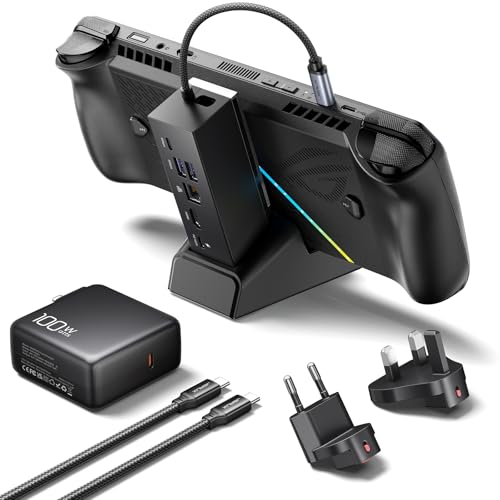
Quick answer: our top pick is JSAUX 6-in-1 Dock + 100W Charger (100 W charger included · HDMI 4K 120 Hz).
Best docking station for ROG Xbox Ally X?
Choose only those accessories that explicitly list the ROG Xbox Ally X model in their specifications. The console has larger grips than the original ROG Ally, so not every handheld stand will accommodate it. You must also remember to purchase a more powerful power supply, as the stock power brick will not provide full performance when docked.
The most convenient choice to start with is a ready-to-go JSAUX bundle featuring a docking station and a dedicated 100 W charger. This helps avoid power deficit issues and lets you connect the device to a TV or monitor right away. The iVANKY 10-in-1 multiport dock also works well and has confirmed compatibility with this console version.
Fun fact: The ROG Xbox Ally X is the first portable handheld featuring the official Xbox logo, developed jointly by ASUS and Microsoft engineers, running Windows 11 with the built-in, full-screen Xbox console interface.

The trap of older accessories: why Steam Deck docks do not fit?
Many gamers try to use stands previously purchased for other consoles. Unfortunately, the ROG Xbox Ally X features significantly thicker, more contoured grips than the first ROG Ally. As a result, the console does not fit into the slots of most popular docking stations.
The second issue is the built-in USB-C connection cable coming from the dock. Due to the larger grips, the console rests in the stand differently than the Steam Deck, so the dock's connector doesn't always align directly with the port. That is why manufacturers explicitly state which models the dock is compatible with.
Even the best-selling accessories on the market do not guarantee proper operation. Popular models such as the Anker 6-in-1, UGREEN 9-in-1, or the older JSAUX 6-in-1 dock designed for the Steam Deck do not list the Xbox Ally X on their compatibility lists at all. Moreover, the manufacturer JSAUX itself clearly points out that the older 6-in-1 version and the 7-in-1 model created for the previous ROG Ally are not compatible with the new ROG Xbox Ally and Xbox Ally X.
It is safer to choose versions that the manufacturer describes as compatible with the Xbox Ally X. Among them, you will find the refreshed JSAUX 6-in-1 dock, the JSAUX HB0612 version, and a 4-in-1 variant equipped with a wider base where the console's thicker grips rest securely.

The official ASUS ROG Bulwark DG300 versus cheaper alternatives
The official ASUS ROG Bulwark Dock DG300 stands out with its HDMI 2.1 port. It allows video output at 4K at 144 Hz or 8K at 30 Hz. A crucial addition for demanding gamers is full support for VRR (Variable Refresh Rate) technology, as well as HDR10 support, effectively eliminating stuttering and screen tearing on modern TVs.
The ASUS device is equipped with three high-speed 10 Gb/s USB-A ports, an Ethernet network port, a traditional audio output, and a power input of up to 140 W with pass-through charging up to 100 W. The set includes the dock itself and a USB-C cable with a dedicated angled connector that makes plugging into the console easier. Note that the manufacturer does not include a charger in the box and explicitly recommends purchasing a 100 W or more powerful power adapter.
ASUS also offers a more compact design, the ROG 100W Gaming Charger Dock, which combines a wall charger, an HDMI 2.0 port, and a USB-A port in a single enclosure while supporting HDR10. Cheaper docks from other brands, such as the JSAUX 6-in-1, typically offer a 4K 120 Hz HDMI output and an Ethernet port. If you do not require the HDMI 2.1 standard with VRR support, a cheaper third-party dock will meet your everyday desktop needs.
Below are the docking stations that list the ROG Xbox Ally X in the manufacturer's description, ranked by popularity.

Recommended docks for ROG Xbox Ally X

1. JSAUX 6-in-1 Dock + 100W Charger
100 W charger included · HDMI 4K 120 Hz
A dock bundled with a 100 W charger, so you do not have to borrow the console's own charger. 4K 120 Hz HDMI and Ethernet. The maker lists ROG Xbox Ally X, ROG Xbox Ally, Legion Go 2 and Legion Go S.
2. JSAUX 6-in-1 Dock for ROG Xbox Ally X
for Xbox Ally X · HDMI 4K 120 Hz · Ethernet
The most popular dock that explicitly names the ROG Xbox Ally X. 4K 120 Hz HDMI and Ethernet. JSAUX recommends a 100 W charger with it, because with 65 W the console may warn about insufficient power.
3. iVANKY 10-in-1 Dock for ROG Xbox Ally X
for Xbox Ally X · 10 ports · 100 W charging
A ten-port dock that names the ROG Xbox Ally X (2025). Over a thousand reviews on Amazon.
4. ASUS ROG Bulwark Dock DG300 (official)
official ASUS · HDMI 2.1 · up to 100 W to the console
ASUS ROG's official dock: HDMI 2.1 with VRR, three 10 Gbps USB-A ports, Ethernet and an audio jack. No charger in the box, and ASUS recommends a 100 W or stronger power supply.
Powering the console: why the 65 W from the box is not enough with a docking station?
ROG Xbox Ally X comes with a 65 W charger in the box, and that is precisely the maximum power consumption of the console itself while gaming. When you connect the power adapter directly to the device, everything works smoothly. The problem arises when you plug that same power adapter into a docking station.
Every docking station is an active electronic device that consumes a certain amount of power for its own needs. Power is drawn to operate internal controllers, support USB ports, run the Ethernet network card, and drive the video converter. When you connect the stock 65 W charger to the dock, significantly less power reaches the console itself.
For this reason, manufacturer JSAUX warns that a 65 W or weaker power adapter will trigger a slow charging warning on the console. The console then charges slower than it should. To prevent this, dock manufacturers, including ASUS and JSAUX, consistently recommend using power adapters rated at least 100 W.
Frequently asked questions about docking stations for ROG Xbox Ally X
Does a Steam Deck dock fit ROG Xbox Ally X?
In most cases, older Steam Deck docks will not fit this console. ROG Xbox Ally X has significantly thicker grips, meaning the device does not fit into the narrow slots of the stands. Therefore, choose docks that the manufacturer lists as compatible with Xbox Ally X.
Why does ROG Xbox Ally X display a low-power warning in the dock?
This message appears when you connect the stock 65 W charger to the docking station. The console itself requires 65 W for full performance, and the docking station takes some of that power to run its own ports, network card, and video output. To make the message disappear, connect a 100 W power supply to the dock.
Does ASUS Bulwark Dock include a charger?
There is no wall charger in the ASUS ROG Bulwark Dock DG300 package. Inside the box, you will find only the docking station and a USB-C cable with a convenient right-angle plug. The manufacturer officially recommends purchasing a separate external power adapter of 100 W or higher.
Will a dock for the original ROG Ally work with Xbox Ally X?
Most docks designed for the original ROG Ally do not fit due to the altered dimensions of the casing. Brand JSAUX explicitly states that its popular 7-in-1 docks created for the first ROG Ally are not compatible with the ROG Xbox Ally and Xbox Ally X models. The new model requires a wider cradle slot.
Can I play in 4K 120 Hz through a docking station?
Yes, gaming at 4K at 120 Hz is possible if you choose a dock with the right specifications. Such throughput is easily handled by compatible JSAUX 6-in-1 docks with an HDMI connector, while the official ASUS ROG Bulwark Dock DG300, thanks to its HDMI 2.1 port, allows you to reach up to 4K at 144 Hz and offers VRR support.
See also
- Best microSD card for ROG Xbox Ally and Ally X20 - UHS-II or microSD Express
- Best SSD for ROG Xbox Ally and Ally X - M.2 2280, capacity and the thermal cover
- Best docking station for Steam Deck OLED - 4K 120 Hz on your TV
- Best docking station for Legion Go 2 - official or cheaper
Sources
- ASUS ROG: ROG Bulwark Dock (2025) DG300 - manufacturer page (rog.asus.com)
- ASUS ROG: The best accessories to supercharge your ROG Xbox Ally - manufacturer page (rog.asus.com)
- Xbox: ROG Xbox Ally - manufacturer page (xbox.com)
- PCWorld: Asus' new USB-C dock supercharges your ROG Ally or Steam Deck - industry article (pcworld.com)
- CGMagazine: ASUS ROG Bulwark Dock DG300 review - industry article (cgmagonline.com)
- Evetech EveZone: Docks for ROG Ally X and Legion Go 2 - industry article (evezone.evetech.co.za)


Leave a comment
This site is protected by hCaptcha and the hCaptcha Privacy Policy and Terms of Service apply.