









As an Amazon Associate I earn from qualifying purchases.
Quick answer: our top pick is UGREEN Steam Deck Dock 9-in-1 (HDMI 4K 60 Hz · Ethernet · 100 W charging).
Best docking station for Steam Deck OLED?
Any docking station with a USB-C connector, HDMI output, and pass-through charging will work with the Steam Deck OLED. The official Valve dock supports up to 4K at 60 Hz. If you want 4K at 120 Hz on your TV, you will need a dock equipped with an HDMI 2.1 port.
Docks from well-known accessory brands are the most popular among gamers. The most frequently chosen models include the UGREEN 9-in-1, Anker 6-in-1, and JSAUX docks. Each allows you to conveniently place the console on a TV stand and connect it to a large screen.
Choosing a specific model depends on the display you use every day. For a standard 60 Hz TV, a simpler model with an HDMI 2.0 port is enough. If your TV features a 120 Hz panel, it is better to invest in a dock with the newer video standard.
4K at 60 Hz vs. 120 Hz: what HDMI 2.0 and HDMI 2.1 offer
The Steam Deck OLED outputs video via its USB-C port supporting DisplayPort 1.4 Alt Mode. The console's chip itself can output up to 8K at 60 Hz or 4K at 120 Hz. What you ultimately see on your TV depends on the bandwidth of the port on the docking station.
A standard HDMI 2.0 port limits video transmission to 4K at 60 Hz or 1440p at 120 Hz. This standard is offered by most budget hubs and the official Valve dock. Games will run smoothly, but you will not take full advantage of high refresh rates at native 4K on a modern TV.
You will only get full 4K at 120 Hz if the docking station has an HDMI 2.1 port. You will also need a proper Ultra High Speed HDMI cable and a TV input that supports this standard. Keep the in-game settings in mind as well, since the Steam Deck OLED cannot maintain 120 frames per second at 4K in every title.
Fun fact: The Steam Deck OLED has a 7.4-inch display, which is slightly larger than the original Steam Deck with an LCD panel, which measured 7 inches.
Valve dock vs. third-party alternatives: differences in features
The official Valve docking station features HDMI 2.0 output, DisplayPort 1.4, a Gigabit Ethernet port, and three USB-A ports. You can buy the dock officially in the Steam store, while on Amazon it only appears from third-party sellers. Its main limitation remains the lack of 4K at 120 Hz support over an HDMI cable.
Third-party alternatives offer a much wider selection of ports. For example, the UGREEN 9-in-1 dock features fast 10 Gb/s USB ports, an Ethernet port, and a 4K 60 Hz HDMI port. The Anker 6-in-1 model offers a similar set with 5 Gb/s USB ports and 4K 60 Hz video support.
If you are looking for HDMI 2.1 support, look towards JSAUX. The HB0612 model features a wider base, Gigabit Ethernet, and native 4K 120 Hz output. When it comes to the JSAUX HB0602, be careful with listings on Amazon, as depending on the country, they state either a 4K 60 Hz or 4K 120 Hz port; therefore, for high-refresh-rate gaming, the HB0612 or HB0603 is a safer choice.
We have selected the most popular docking stations on the market, taking into account their compatibility with the console and port variety.
Recommended docks for Steam Deck OLED

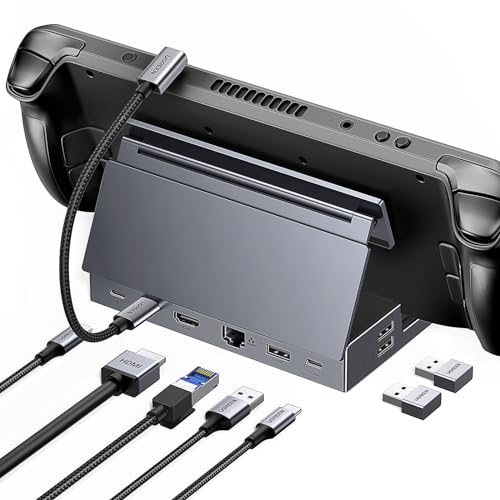
1. UGREEN Steam Deck Dock 9-in-1
HDMI 4K 60 Hz · Ethernet · 100 W charging
A best seller among Steam Deck accessories on Amazon. 4K 60 Hz HDMI, gigabit Ethernet, 10 Gbps USB ports and pass-through charging. The maker lists Steam Deck, Steam Deck OLED, ROG Ally, Ally X and Legion Go.
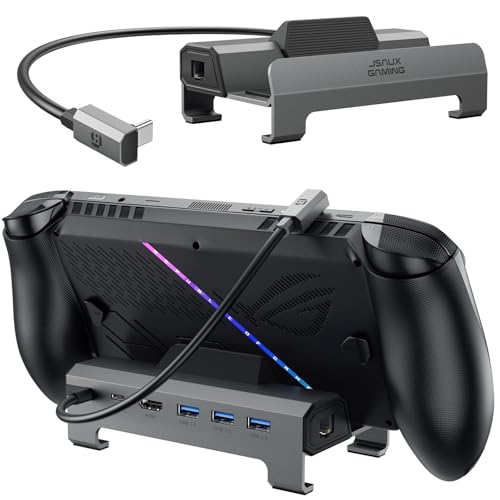
2. JSAUX 6-in-1 Dock HB0612
wider cradle · HDMI 4K 120 Hz · Ethernet
The same wider cradle as the 4-in-1, plus 4K 120 Hz HDMI and Ethernet. The maker lists ROG Xbox Ally X, Legion Go 2, Legion Go S and Steam Deck LCD and OLED.
3. JSAUX 6-in-1 Dock HB0603 (HDMI 2.1)
HDMI 2.1 4K 120 Hz · Ethernet · 100 W charging
The version with Ethernet and three USB-A ports. HDMI 2.1 up to 4K 120 Hz and a 100 W charging port.
Powering via dock: factory 45 W and more powerful chargers
The Steam Deck OLED comes bundled with an original 45 W power adapter supporting the Power Delivery 3.0 standard. The console itself does not draw more than 45 W, regardless of how powerful a power source you connect to it. This value is completely sufficient for simultaneous gaming and fast battery recharging.
Most docking stations feature a USB-C power input that accepts chargers up to 100 W. The dock itself consumes a few watts to power its own integrated circuits, USB ports, and network card. If you connect the factory 45 W charger, slightly less energy will reach the console itself.
A power supply close to 100 W comes in handy when you connect additional accessories to the dock. If you plan to charge other devices through the dock or connect power-hungry external drives, a more powerful charger will ensure complete stability for the entire setup.
Frequently asked questions about Steam Deck docks
Does Steam Deck OLED support 4K 120 Hz on a TV?
Yes, Steam Deck OLED supports such a signal via its USB-C port in DisplayPort 1.4 Alt Mode. To send this video to a TV via HDMI, you need a docking station with HDMI 2.1 support, an HDMI Ultra High Speed cable, and a compatible port on your TV. However, you will need to adjust the in-game resolution, as the console cannot handle all titles at 4K at 120 frames per second.
Is the official Valve dock better than docks from Amazon?
The official Valve dock is very well-built and additionally offers a full-size DisplayPort 1.4 output alongside the HDMI 2.0 port. However, it is limited to 4K 60 Hz when connected to a TV via HDMI. Third-party docks available on Amazon, such as select JSAUX models, can offer HDMI 2.1 with 4K 120 Hz support, while UGREEN designs provide faster 10 Gbps USB ports.
Which charger for Steam Deck docking station?
The basic 45 W charger included in the box is enough to run both the dock and the console, but the dock's ports consume part of the power. If you want to make sure your Steam Deck always charges at full speed, you can buy a more powerful USB-C Power Delivery charger. Docking stations easily accept power supplies up to 100 W, which is useful when connecting other devices.
Does a Steam Deck LCD dock fit the OLED?
Yes, the Steam Deck OLED chassis has the same external dimensions and port layout as the earlier LCD variant. Any docking station compatible with the first model will securely hold the OLED version. This applies to both the original Valve accessory and third-party products such as UGREEN, Anker, or JSAUX.
Can I connect a controller and keyboard through the docking station?
Yes, every docking station features built-in USB-A ports where you can plug in wired controllers, a keyboard, a mouse, or wireless dongles. Thanks to this, the Steam Deck OLED instantly turns into a traditional desktop PC or a home console connected to a TV. The hardware effortlessly recognizes standard USB accessories.
Sources
- Valve: Steam Deck tech specs - manufacturer page (steamdeck.com)
- Valve: Steam Deck Docking Station - manufacturer page (steamdeck.com)
- ThunderboltLaptop: Can Steam Deck OLED run 4K at 120Hz through a dock? - industry article (thunderboltlaptop.com)
- Pocket Tactics: The best Steam Deck docks - industry article (pockettactics.com)
- PCGamesN: Best Steam Deck dock - industry article (pcgamesn.com)
- SteamDeckHQ: The official Steam Deck dock is here - industry article (steamdeckhq.com)

Leave a comment
This site is protected by hCaptcha and the hCaptcha Privacy Policy and Terms of Service apply.