









As an Amazon Associate I earn from qualifying purchases.
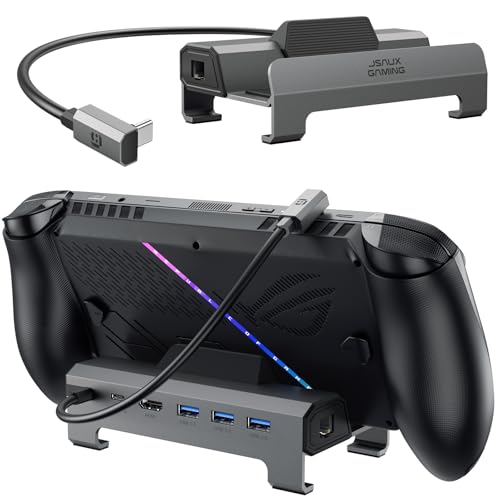
Quick answer: our top pick is JSAUX 6-in-1 Dock HB0612 (wider cradle · HDMI 4K 120 Hz · Ethernet).
Best docking station for Legion Go 2?
A docking station with a USB-C port and HDMI output will work well for Legion Go 2, but it is safest to choose a model with a wider base that explicitly lists this console in its specifications. Designs by JSAUX tailored for larger devices are a solid choice. They provide stable support and effortlessly handle high-quality video output.
You can also choose the official Lenovo Legion Go USB-C Dock, which Lenovo's brochure also lists for Legion Go 2. However, you should know that with the factory 65 W power supply, the dock will deliver only 45 W of power to the console. You will only achieve full-speed charging by connecting a more powerful charger.
Fun fact: You can detach the controllers on Legion Go 2 from the screen at any time, just like on the Nintendo Switch. The right controller features an optical sensor on the bottom, allowing it to function as a vertical computer mouse in FPS mode when placed on a desk.
What to look out for when choosing a dock for Legion Go 2
The most important factor is the physical size of the device and the profile of the base itself. Legion Go 2 features a large 8.8-inch OLED screen and thick, detachable controllers. Many universal docks were designed with smaller handhelds in mind, which means this model may sit unstably or not fit at all into their narrow slots.
Pay attention to the supported HDMI standard and video specifications. The console's USB4 ports support DisplayPort 1.4, enabling high refresh rate signal transmission. If you play on a 4K 120 Hz TV, look for a dock with an HDMI output that supports such a signal, as basic models cap 4K at 60 Hz.
Also check the maximum Power Delivery passthrough charging power. The docking station itself consumes some power to run its own USB ports, video chipset, and Ethernet port. If the power supply is underpowered, the console's battery may slowly drain even while resting in a plugged-in dock.
Official Lenovo dock or a JSAUX alternative
The official Lenovo Legion Go USB-C Dock offers one HDMI 2.0 output, a 1 Gb/s Ethernet port, and three 5 Gb/s USB ports. Via HDMI, you can achieve 4K at 60 Hz or 2K at 120 Hz. The device appears on the compatibility list in Lenovo's official brochure for Legion Go 2, but its drawback remains slower charging with the standard power adapter.
Third-party alternatives from JSAUX, such as the HB0612 or HB0503, feature a widened and elevated cradle that fits the console's bulky chassis perfectly. The HB0612 model supports 4K at 120 Hz via HDMI, delivering smoother performance on a newer TV. The lineup also includes a 6-in-1 kit with an included 100 W charger, leaving the power supply included with the console free for other uses.
Be cautious with popular universal docks like the UGREEN 9-in-1 or Anker 6-in-1. While they are great accessories, their manufacturers only list the first-generation Legion Go in their official descriptions and do not declare compatibility with the newer model.
Below you will find docking stations that can handle connecting Legion Go 2 to a display.
Recommended docks for Legion Go 2
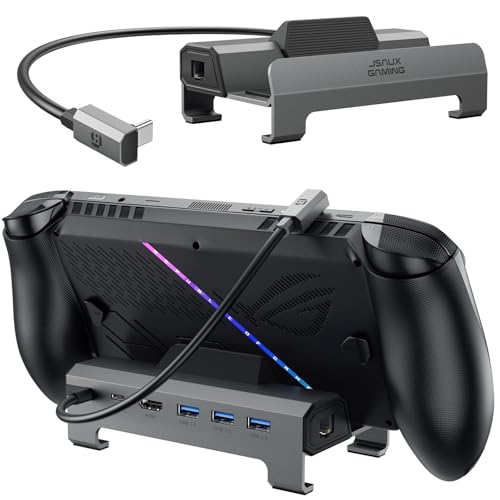
1. JSAUX 6-in-1 Dock HB0612
wider cradle · HDMI 4K 120 Hz · Ethernet
The same wider cradle as the 4-in-1, plus 4K 120 Hz HDMI and Ethernet. The maker lists ROG Xbox Ally X, Legion Go 2, Legion Go S and Steam Deck LCD and OLED.

2. JSAUX 4-in-1 Dock HB0503
wider cradle · HDMI 4K 60 Hz / 2K 120 Hz
A budget dock with a wider, raised cradle for handhelds with protruding grips. The maker lists ROG Xbox Ally X, Legion Go 2, Legion Go S and Steam Deck.

3. JSAUX 6-in-1 Dock + 100W Charger
100 W charger included · HDMI 4K 120 Hz
A dock bundled with a 100 W charger, so you do not have to borrow the console's own charger. 4K 120 Hz HDMI and Ethernet. The maker lists ROG Xbox Ally X, ROG Xbox Ally, Legion Go 2 and Legion Go S.
Why a 90 W or 100 W charger makes sense
The manufacturer includes a 65 W USB-C charger with the console. Legion Go 2 accepts a maximum of 65 W, which allows for efficient battery charging while gaming in handheld mode. The problem arises when you plug that same power adapter into a docking station instead of directly into the console.
The docking station's electronics require constant power to handle video, audio, wired internet, and peripherals. For this reason, the official Lenovo dock reserves part of the power for itself and delivers only 45 W to the console. For the Lenovo dock to pass through the full 65 W to the device, you need to power it with at least a 90 W charger.
A third-party 100 W power supply completely eliminates this compromise. It provides enough power headroom to run all of the dock's ports while simultaneously charging the console at its maximum factory speed.
Fun fact: The USB4 ports used in Legion Go 2 offer transfer speeds of up to 40 Gb/s. Such bandwidth allows you to connect a docking station with a monitor to the console, as well as an external graphics card (eGPU), significantly boosting performance in desktop gaming.
Questions and answers about Legion Go 2 docks
Does the official Legion Go dock work with Legion Go 2?
Yes, the Lenovo docking station works with the newer console. Information regarding Legion Go Gen 2 support appeared in the manufacturer's promotional materials, as reported by Notebookcheck. While Lenovo's technical support page still mainly lists the first version, the hardware remains fully compatible.
Why does Legion Go 2 charge slower in the Lenovo dock?
This is due to the power consumption of the docking station itself. The device requires power to run the gigabit Ethernet port, HDMI output, and three USB ports. When you connect a standard 65 W charger to the station, the dock delivers only 45 W to the console, and you will only unlock the full 65 W with a 90 W or more powerful power supply.
Does a Steam Deck dock fit Legion Go 2?
Most docks designed exclusively for Steam Deck do not physically fit Legion Go 2. Lenovo's new console features an 8.8-inch screen and thicker grips, meaning it does not fit into the tight cradles of older docks. It is better to choose models with a wider base, such as JSAUX HB0612 or HB0503.
Which charger for Legion Go 2 docking station?
A USB-C wall charger with Power Delivery support and a power output of 90 W or 100 W works best. This power output allows the station to power connected accessories while delivering the maximum allowable 65 W to the console. Plugging the factory 65 W power supply into the dock will limit the console's charging speed.
Can I get 4K 120 Hz through a docking station?
Yes, but this requires a docking station with an appropriate video output. The official Lenovo dock features an HDMI 2.0 port that supports 4K at 60 Hz or 2K at 120 Hz. If you want full 4K 120 Hz, choose a dock that supports this standard, such as JSAUX HB0612.
Sources
- Lenovo PSREF: Legion Go 2 (8AHP2) specifications - manufacturer page (psref.lenovo.com)
- Lenovo Support: Legion Go USB-C Dock overview - manufacturer page (support.lenovo.com)
- Notebookcheck: Legion Go Gen Two named in Lenovo's dock compatibility brochure - industry article (notebookcheck.net)
- Evetech EveZone: Docks for ROG Ally X and Legion Go 2 - industry article (evezone.evetech.co.za)
- NoobFeed: Legion Go 2 eGPU docking guide - industry article (noobfeed.com)

Leave a comment
This site is protected by hCaptcha and the hCaptcha Privacy Policy and Terms of Service apply.