








As an Amazon Associate I earn from qualifying purchases.
Quick answer: our top pick is SanDisk Extreme 1 TB (1 TB · UHS-I · A2, U3, V30 · up to 245 MB/s).
Best microSD card for Lenovo Legion Go 2? Best a UHS-I A2 card with 512 GB or 1 TB capacity
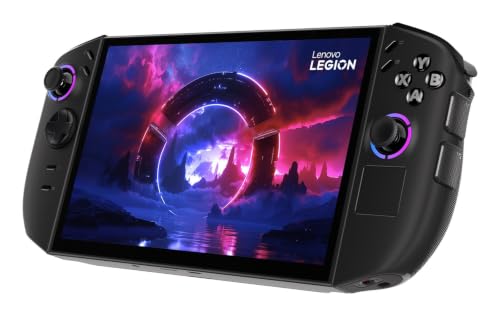
For the Legion Go 2, buy a UHS-I microSD card with an A2 rating and a capacity of 512 GB or 1 TB. For gaming, what matters most is capacity and the A2 class, not the record-breaking speed printed on the packaging.
The most commonly bought card is the SanDisk Extreme. Samsung PRO Plus, Samsung EVO Select and Lexar Silver Plus are also good alternatives. According to manufacturers, UHS-I A2 cards read at up to about 160-200 MB/s, which is well within the capabilities of the card reader in this device.


What the card reader in the Legion Go 2 can do
In the PSREF specification, Lenovo simply lists a microSD card reader, without specifying the UHS class. The manufacturer therefore does not say how fast this slot is.
The answer comes from Notebookcheck. In a test with an Angelbird AV Pro V60 card, the reader reached a sequential read speed of 260.4 MB/s, and copying JPG photos averaged 181 MB/s. The reviewer rates the reader as fast, but notes that it does not support the SD Express standard.
A result of 260 MB/s is more than the roughly 104 MB/s offered by the classic UHS-I mode. It therefore looks like the reader works faster than standard UHS-I, but keep in mind that this is a Notebookcheck measurement, not a Lenovo claim.
Fun fact: in the Notebookcheck test, the reader hit 260 MB/s, more than twice the classic UHS-I limit.
Why microSD Express won't help
A microSD Express card will work in the Legion Go 2, but without its full speed. Because the reader has no SD Express support, such a card works like a regular one. Overpaying for it makes no sense.
Fun fact: the Legion Go 2 has no SD Express reader, so a microSD Express card runs in it at the speed of a regular card (Notebookcheck).
Below, we have gathered cards that we selected for 512 GB and 1 TB capacity and the A2 class.

Recommended microSD cards for Lenovo Legion Go 2
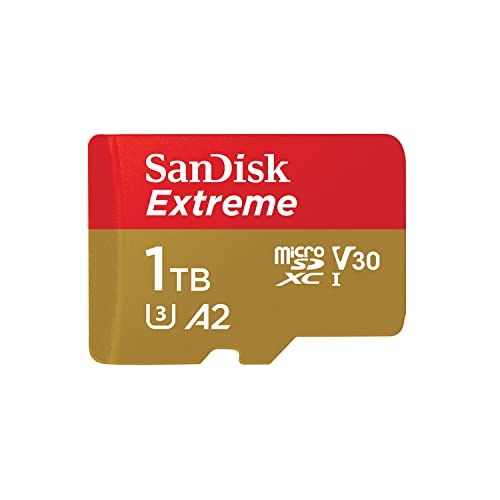
1. SanDisk Extreme 1 TB
1 TB · UHS-I · A2, U3, V30 · up to 245 MB/s
SanDisk Extreme with 1 TB capacity, featuring A2 and V30 ratings. It holds a large game library or many hours of footage.

2. SanDisk Extreme 512 GB
512 GB · UHS-I · A2, U3, V30 · up to 190 MB/s
SanDisk Extreme in a 512 GB capacity. The V30 rating handles 4K recording, while A2 speeds up app and game loading times.

3. Lexar Professional SILVER PLUS 1 TB
1 TB · UHS-I · A2, U3, V30 · up to 205 MB/s
Lexar SILVER PLUS with 1 TB capacity, read speeds up to 205 MB/s, A2, and V30 ratings.
Buying on Black Friday? Read our guide: best microSD card for Switch 2, cameras and phones.

microSD card or SSD: what to store where
Games on a card load more slowly than from the SSD inside the console. That is why it is better to install the heaviest titles you play most often on the SSD.
The card works great as storage for the rest of your library: smaller games, indie titles, older releases, and the ones you come back to from time to time. This way you do not have to keep deleting and re-downloading games.
Lenovo lists one M.2 slot for an SSD. If you are wondering whether replacing the drive would be a better move than getting a card, we have a separate article about the drive for the Legion Go 2.
Maximum capacity and formatting in Windows
According to Tom's Hardware, the microSD slot will accept an additional 2 TB. For most gamers, 512 GB or 1 TB is a sensible choice, because it gives plenty of space without reaching for the largest cards.
It is best to format a new card in Windows on the console itself. Insert it into the slot, open File Explorer, right-click the card and choose Format. Remember that formatting erases all data, so do it before installing games.
Most common questions about microSD cards in the Legion Go 2
Which microSD card for Lenovo Legion Go 2?
Choose a UHS-I card with an A2 rating, preferably 512 GB or 1 TB. The SanDisk Extreme is the most commonly bought, and the Samsung PRO Plus and Lexar Silver Plus are also sensible options.
Does the Legion Go 2 support microSD Express cards?
A microSD Express card will work, but without its full speed. The reader does not support SD Express, so such a card works like a regular one.
How fast is the card reader in the Legion Go 2?
Lenovo does not state the UHS class. Notebookcheck measured a sequential read of 260.4 MB/s with an Angelbird AV Pro V60 card, and an average of 181 MB/s when copying JPG photos. That is more than the approx. 104 MB/s of classic UHS-I.
What is the maximum card capacity in the Legion Go 2?
According to Tom's Hardware, the microSD slot will accept an additional 2 TB. In practice, 512 GB or 1 TB is usually enough for a large game library.
Is it better to buy a microSD card or a larger SSD for the Legion Go 2?
It depends on your games. It is better to keep the heaviest titles on the SSD, because they load faster from it than from a card. A card is a convenient and simple way to add space for the rest of your library.
See also
- Best docking station for Legion Go 2 - official or cheaper
- Best SSD for Lenovo Legion Go 2 - 2242 or 2280 and the 2 TB limit
- Best power bank for Lenovo Legion Go 2 - 65 W and a 74 Wh battery
- Best microSD card for ROG Xbox Ally and Ally X20 - UHS-II or microSD Express
- Best microSD card for Steam Deck - capacity matters more than speed
Sources
- Lenovo PSREF: Legion Go (8" 8ASP2) specifications - manufacturer page (psref.lenovo.com)
- Lenovo PSREF: Legion Go 8ASP2 spec sheet (PDF) - manufacturer page (psref.lenovo.com)
- Notebookcheck: Lenovo Legion Go 2 review - industry article (notebookcheck.net)
- Tom's Hardware: Lenovo Legion Go 2 review - industry article (tomshardware.com)
- Windows Central: Lenovo Legion Go 2 review - industry article (windowscentral.com)

Leave a comment
This site is protected by hCaptcha and the hCaptcha Privacy Policy and Terms of Service apply.