






As an Amazon Associate I earn from qualifying purchases.
Quick answer: our top pick is Crucial P310 1 TB (M.2 2280) (M.2 2280 · PCIe 4.0 · no heatsink · up to 7,100 MB/s).
Best SSD for ROG Xbox Ally? Choose an M.2 2280 NVMe without a heatsink
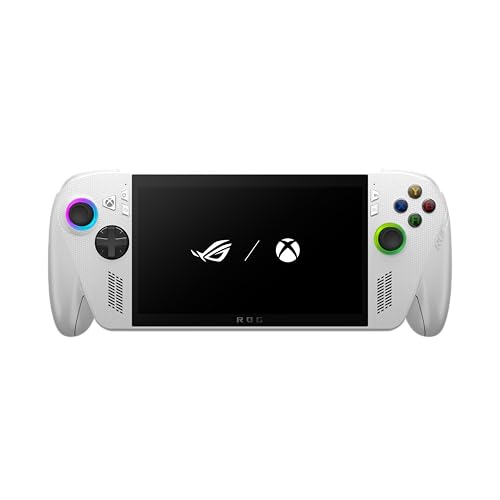
The ROG Ally X, ROG Xbox Ally and ROG Xbox Ally X accept M.2 2280 NVMe drives. Buy a model without a heatsink, in 1 or 2 TB capacity, and you will be on the safe side.
The exception is the original ROG Ally. It only takes the shorter M.2 2230 format, so a 2280 drive will not fit it.
ASUS gives the WD_BLACK SN7100X as an example, available up to 4 TB. Digital Trends mentions capacities of up to 8 TB according to ASUS, but in practice you need to check the clearance under the cover.

2280 or 2230: which model uses which format
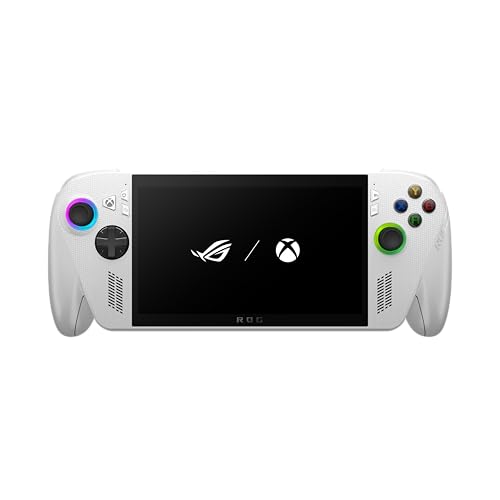
The original ROG Ally has a slot for a 2230 drive. The ROG Ally X, ROG Xbox Ally and ROG Xbox Ally X have a slot for the longer 2280 format. Digital Trends states explicitly that you can't fit the shorter drive in the ROG Ally X.
This is where mistakes come from. Older guides wrote about 2230 because they covered the original Ally, while newer models got a larger drive. If you come across instructions that don't name the model, check their date and which console they refer to.
Fun fact: ASUS changed the drive format between generations. The original ROG Ally has 2230, while the Ally X and both Xbox Ally models already use 2280.
We selected drives in the M.2 2280 NVMe format, without a heatsink, in 1 and 2 TB capacities. We took into account models that sell well, as well as a drive with an Xbox license.

Recommended SSDs for ROG Xbox Ally
1. Crucial P310 1 TB (M.2 2280)
M.2 2280 · PCIe 4.0 · no heatsink · up to 7,100 MB/s
A solid seller among M.2 2280 drives. No heatsink, PCIe 4.0, and reads up to 7,100 MB/s according to Crucial. 1 TB makes sense when the stock drive fills up after a few big games.
2. Samsung 990 PRO 1 TB (M.2 2280)
M.2 2280 · PCIe 4.0 · no heatsink · up to 7,450 MB/s
The top-selling NVMe drive in this list, in the version with no heatsink. Samsung rates it for reads up to 7,450 MB/s. Skip the heatsink version: every millimeter counts under the back cover.

3. Kingston NV3 1 TB (M.2 2280)
M.2 2280 · PCIe 4.0 · no heatsink · up to 6,000 MB/s
Slower on paper at up to 6,000 MB/s according to Kingston, but it is still PCIe 4.0 in the 2280 size with no heatsink. It is also one of the best sellers in its category.
4. Crucial P310 2 TB (M.2 2280)
2 TB · M.2 2280 · PCIe 4.0 · no heatsink
The same model as the 1 TB version, with 2 TB of space. A good pick if your game library already outgrows 1 TB.
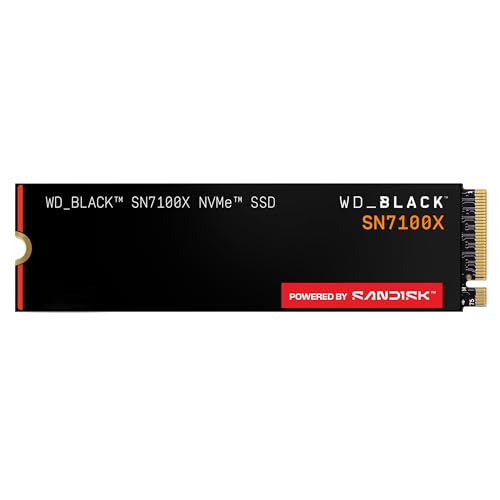
5. WD_BLACK SN7100X 2 TB (M.2 2280)
M.2 2280 · Xbox licensed · up to 7,250 MB/s
An officially Xbox licensed drive that the maker describes as built for the ROG Xbox Ally and PC. It is a normal M.2 2280 drive, reading up to 7,250 MB/s according to WD. It sells less than the other drives here.
How many GB: 1 TB or 2 TB
The factory drive in the Xbox Ally X is a 1 TB M.2 2280, according to Windows Central. If that size is enough for you, there is no point in swapping the drive just for the sake of it.
Start by asking how many games you keep installed at once. If you occasionally delete old titles to make room for new ones, 1 TB will work fine as a new drive, for example if your version has a smaller factory drive.
If your library already doesn't fit on 1 TB today, or you don't want to go back to constant cleaning up, go for 2 TB. You'll find a 2 TB drive in the list above.
Read speeds differ between these drives on paper, but in a handheld console, what matters more than the numbers in the spec sheet is that the drive fits under the cover and has no heatsink.
Fun fact: The WD_BLACK SN7100X has an official Xbox license, and the manufacturer describes it as made for the ROG Xbox Ally and PC.
Drive replacement in brief
Back up your data before doing anything. Digital Trends reports that replacing the drive in the ROG Ally X takes about 10 minutes and is of medium difficulty. Windows Central writes that in the Xbox Ally it is much simpler than in the Legion Go 2.
You need a Phillips screwdriver and a guitar pick or a thin piece of plastic to pry off the cover. Under the cover there are small screws and delicate ribbon cables, so take your time.
Before you remove the drive, disconnect the battery connector. The drive itself is held by a single screw. Set aside the thermal shield from the old drive, don't throw it away, and stick it onto the new one.
Windows on the new drive
You have two options. The first is ASUS Cloud Recovery: hold the volume up button plus the power button to enter the BIOS, press Y to turn off EZ mode, and in the Advanced tab choose ASUS Cloud Recovery. You need Wi-Fi, the download takes longer, and the console will restart a few times.
The second option is cloning. Retro Handhelds explains that you need a USB NVMe enclosure and a program such as Macrium Reflect. Turn off device encryption in the Windows settings beforehand.
Frequently asked questions about the drive for the ROG Xbox Ally
What drive format does the ROG Xbox Ally use?
The ROG Xbox Ally accepts an M.2 2280 NVMe drive. The same goes for the ROG Xbox Ally X and the ROG Ally X. The original ROG Ally, on the other hand, uses the 2230 format.
Does an M.2 2230 drive fit the ROG Xbox Ally?
No. According to Digital Trends, you can't fit a shorter drive in the ROG Ally X, and ASUS lists the 2280 format for the newer models. The 2230 drive is the format of the original ROG Ally.
Will a drive with a heatsink fit in the ROG Xbox Ally?
It's better not to risk it. Digital Trends advises checking the clearance and avoiding drives with their own heatsink. Buy versions without a heatsink.
Do you need to install Windows again after replacing the drive in the ROG Xbox Ally?
If you don't clone the drive, yes. You can use ASUS Cloud Recovery from the BIOS, which requires Wi-Fi. The alternative is to clone the system using a USB NVMe enclosure and a program such as Macrium Reflect.
How many GB should you choose for the ROG Xbox Ally X?
The Ally X comes with 1 TB from the factory, so a new 1 TB drive only makes sense if you are replacing it for another reason. If you are running out of space, choose 2 TB.
See also
- Best docking station for ROG Xbox Ally X - the ones that actually fit
- Best microSD card for ROG Xbox Ally and Ally X20 - UHS-II or microSD Express
- Best SSD for Steam Machine - M.2 2280 or 2230 and how much storage
- Best SSD for Lenovo Legion Go 2 - 2242 or 2280 and the 2 TB limit
Sources
- ASUS ROG: How to upgrade the SSD and reinstall Windows on your ROG Ally, ROG Xbox Ally, or ROG Xbox Ally X - manufacturer page (rog.asus.com)
- Digital Trends: How to replace the SSD in the ROG Ally X - industry article (digitaltrends.com)
- Retro Handhelds: How to upgrade ROG Ally X SSD - industry article (retrohandhelds.gg)
- Windows Central: Xbox Ally X vs Legion Go 2 - industry article (windowscentral.com)
- Windows Central: Xbox Ally and Legion Go 2 SSD upgrade paths seem to diverge - industry article (windowscentral.com)


Leave a comment
This site is protected by hCaptcha and the hCaptcha Privacy Policy and Terms of Service apply.