






As an Amazon Associate I earn from qualifying purchases.
Quick answer: our top pick is Lexar Professional SILVER PLUS 256 GB (256 GB · UHS-I · A2, U3, V30 · up to 205 MB/s).
Best microSD card for DJI Osmo Action 6? The easiest choice is from the DJI list
Buy a microSD card rated U3, V30 and A2, with a capacity of up to 1 TB. The safest option is to take one straight from the list recommended by DJI, namely the Lexar Professional SILVER PLUS or the Kingston Canvas Go! Plus.
The camera supports cards up to 1 TB in the exFAT file system. You don't need to look for anything more expensive or faster, because higher speed classes won't bring any benefit here.
Below you will find what these symbols actually mean, what capacity to choose and how to prepare the card for your first recording.


The DJI list in plain language and why V30 is enough
DJI recommends two series of cards, and all of them are rated U3, A2 and V30. The first is the Lexar Professional SILVER PLUS in capacities of 64, 128, 256, 512 GB and 1 TB. The second is the Kingston Canvas Go! Plus, also in capacities of 64, 128, 256, 512 GB and 1 TB.
The maximum video bitrate in the Osmo Action 6 is 120 Mb/s, at a resolution of up to 7680x4320. The V30 class guarantees a minimum sustained write speed of 30 MB/s, which is 240 Mb/s. That is twice as much as the camera will ever send to the card.
That is why V60 and V90 cards give you nothing here. They have a higher guaranteed write speed, but the camera won't use that headroom anyway. You would pay more for a parameter that goes unused in this camera.
The A2 rating refers to the speed of handling small files and apps. For video recording V30 matters more, but you get A2 in the package, because that is how the whole DJI list looks.
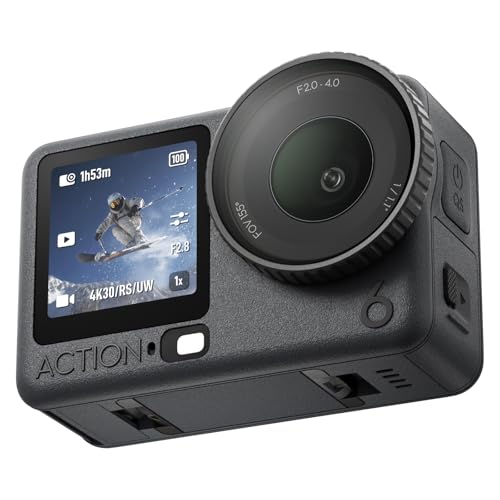
Fun fact: The Osmo Action 6 is the first action camera with a variable aperture of f/2.0-f/4.0 (Engadget). The memory card has nothing to do with this.
We selected the products below from the series that DJI lists on its list, plus one popular card from outside it, described separately.

Recommended microSD cards for DJI Osmo Action 6
1. Lexar Professional SILVER PLUS 256 GB
256 GB · UHS-I · A2, U3, V30 · up to 205 MB/s
A Lexar card with read speeds up to 205 MB/s, A2, and V30 ratings. One of the bestsellers among microSD cards.

2. Kingston Canvas Go! Plus 256 GB
256 GB · UHS-I · A2, U3, V30 · up to 200 MB/s
The newer Gen4 version of the Kingston Canvas Go! Plus card, with read speeds up to 200 MB/s, A2, and V30. The series is on camera makers' recommended lists.

3. Kingston Canvas Go! Plus 128 GB
128 GB · UHS-I · A2, U3, V30 · up to 200 MB/s
Kingston Canvas Go! Plus (Gen4) in a 128 GB capacity, with A2 and V30 ratings. An affordable option for shorter trips.

4. Lexar Professional SILVER PLUS 1 TB
1 TB · UHS-I · A2, U3, V30 · up to 205 MB/s
Lexar SILVER PLUS with 1 TB capacity, read speeds up to 205 MB/s, A2, and V30 ratings.

5. SanDisk Extreme 256 GB
256 GB · UHS-I · A2, U3, V30 · up to 190 MB/s
One of the best-selling microSD cards, with U3, V30 and A2 ratings. It is not on DJI's list, but it has the same ratings as the cards that are.
Built-in 50 GB storage vs. a card: which capacity for whom
The camera has 64 GB of built-in storage, of which 50 GB is available to you. For a single short trip that may be enough, but with regular recording it will quickly get tight. A card gives you freedom and lets you swap storage during the day.
If you go on short trips and offload your footage as soon as you get back, 128 GB is enough. The Kingston Canvas Go! Plus in this capacity is a sensible choice to start with.
For most users, 256 GB is the most convenient. You have plenty of headroom and don't need to clear the card every evening. This capacity is available in both the Lexar SILVER PLUS and the Kingston Canvas Go! Plus.
512 GB and 1 TB cards make sense when you shoot a lot in the highest quality, go on longer trips without access to a computer, or simply don't want to think about space. The Lexar SILVER PLUS 1 TB reaches the upper limit the camera supports.
Separately, there is the SanDisk Extreme, one of the most popular microSD cards. It isn't on DJI's list, but it has the same ratings: U3, V30 and A2. Since the specs match, it's a reasonable alternative, for example in the 256 GB version. However, if you want to be sure you're choosing a model named by the camera's manufacturer, stick to the DJI list.
Fun fact: The Osmo Action 6 transfers files over Wi-Fi at up to 80 MB/s, and over USB-C at up to 800 MB/s (Engadget). So a card isn't the only way to offload your recordings, and a USB-C cable can be the fastest way to move footage to a computer.
exFAT and formatting the card in the camera
The Osmo Action 6 works with cards formatted with the exFAT file system. This file system handles large video files well, so a new high-capacity card usually comes already formatted with it from the factory.
Even so, it's best to format the card in the camera itself, in the settings menu. The camera will then set up a structure that matches its requirements, and you'll avoid strange write errors.
Formatting erases everything on the card, so offload your recordings first. It's also worth doing after moving a card from another device, such as a phone or another camera.
One note for US buyers: DJI does not sell this camera through its own US store, so it reaches the US through other sellers (DroneXL).
Frequently asked questions about cards for the Osmo Action 6
What is the maximum microSD card size for the Osmo Action 6?
The camera supports microSD cards up to 1 TB. DJI's list includes models of that capacity from both Lexar (Professional SILVER PLUS) and Kingston (Canvas Go! Plus). The file system is exFAT.
Can the Osmo Action 6 record without a card?
Yes, the camera has 64 GB of built-in storage, of which 50 GB is available to the user. That's enough for shorter recordings, but for a longer trip it's better to have a card.
Is it worth buying a V60 or V90 card for the Osmo Action 6?
No. The camera's maximum bitrate is 120 Mb/s, while the V30 class guarantees 240 Mb/s of write speed, which is twice as much. Higher classes will cost more, and the camera won't use their extra headroom anyway.
Which cards does DJI recommend for the Osmo Action 6?
DJI recommends the Lexar Professional SILVER PLUS and the Kingston Canvas Go! Plus, each in capacities of 64, 128, 256, 512 GB and 1 TB. All of them have U3, A2 and V30 ratings.
Does the SanDisk Extreme work in the Osmo Action 6?
The SanDisk Extreme isn't on DJI's list, but it has the same ratings as the cards on the list: U3, V30 and A2. So the specs match. If you want to be sure about compatibility, choose a card from the manufacturer's list.
See also
- Best microSD card for DJI Osmo Action 5 Pro - cards from DJI's list
- Best microSD card for a dash cam - 70mai A810 Lite and High Endurance cards
- Best microSD card for DJI Mini 5 Pro - cards from DJI's list
Sources
- DJI: Osmo Action 6 specs - manufacturer page (dji.com)
- Engadget: DJI Osmo Action 6 review - industry article (engadget.com)
- PetaPixel: DJI's Osmo Action 6 camera has a new square image sensor - industry article (petapixel.com)
- Gizmodo: DJI Osmo Action 6 variable aperture - industry article (gizmodo.com)
- DroneXL: DJI Osmo Action 6 launches with variable aperture - industry article (dronexl.co)

Leave a comment
This site is protected by hCaptcha and the hCaptcha Privacy Policy and Terms of Service apply.