








As an Amazon Associate I earn from qualifying purchases.
Quick answer: our top pick is Apple Studio Display (2026) (27-inch · 5K · Thunderbolt 5 · 12MP camera).
Best monitor for Mac Studio M5? Short answer
For work with text and photos, a 27-inch 5K display is the best choice, with the same sharpness as the Apple Studio Display. For HDR video editing, the Studio Display XDR is a better fit. If you run out of room for your windows, consider a 32-inch 6K display.
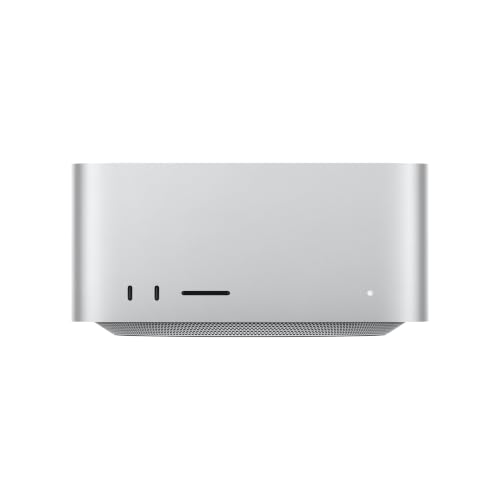
You need to buy the monitor separately. According to Apple, the Mac Studio box contains only the computer and a power cord, and Macworld adds that the keyboard, mouse and monitor are sold separately.
The choice comes down to three questions: how big a screen you want, whether you need HDR and 120 Hz, and how many monitors you want to connect. We go through them one by one below.

5K, 6K or 4K: what resolution and 120 Hz give you
5K on 27 inches is 5120 x 2880 pixels. That is what the Apple Studio Display and the BenQ PD2730S offer. It is a safe choice for everyday work, because the Studio Display has the same pixel count.
The Studio Display has 600 nits, a 12 MP camera with Center Stage and two Thunderbolt 5 ports. According to BGR, it has no HDR or variable refresh rate. If you don't need them, it is a cheaper alternative to the XDR model.
The BenQ PD2730S has a matte coating, 218 PPI and 98% P3, so it works well for color work.
6K means a bigger screen. The LG UltraFine 32U990A has 32 inches and 6144 x 3456 pixels, Thunderbolt 5, 60 Hz and DisplayHDR 600. Choose it if you keep many windows open at once, for example a timeline, a preview and tools side by side.
Of this group, only the Studio Display XDR offers 120 Hz, with a 47-120 Hz refresh rate (Adaptive Sync). Choose it for HDR video and motion graphics.
Fun fact: The Studio Display XDR with mini-LED backlighting replaced the Pro Display XDR and delivers up to 2,000 nits in HDR.
4K only makes sense if you care about a very high refresh rate. The Mac Studio can drive one 4K monitor at up to 240 Hz.
We picked models that suit the Mac Studio in terms of resolution and connectors.

Recommended monitors for Mac Studio M5
1. Apple Studio Display (2026)
27-inch · 5K · Thunderbolt 5 · 12MP camera
Apple's display for Macs without a screen: 27-inch 5K, 600 nits and two Thunderbolt 5 ports. It has a 12MP Center Stage camera with Desk View and speakers, so a Mac Studio desk needs no separate webcam.
2. BenQ PD2730S (5K)
27-inch · 5K · 98% P3 · Thunderbolt 4
5K with a Nano Matte finish, 218 PPI and 98% P3, for color work. Thunderbolt 4 lets you daisy-chain two of them, and the KVM switch handles a second computer.

3. LG UltraFine 32U990A (6K)
32-inch · 6K · Thunderbolt 5 · DisplayHDR 600
A bigger screen for more windows: 32 inches and 6144 x 3456 pixels on a Nano IPS Black panel. It has Thunderbolt 5 like the Mac Studio, which runs 6K at 60Hz on several of these at once.

4. Apple Studio Display XDR
27-inch · mini-LED · 120Hz · up to 2,000 nits HDR
The successor to the Pro Display XDR: mini-LED backlight, 120Hz and up to 2,000 nits in HDR. The pick for HDR video editing. A Mac Studio with M5 Max runs 120Hz on two of them, with M5 Ultra on four.
How many monitors you can connect: M5 Max vs M5 Ultra
The M5 Max supports up to five monitors at once via Thunderbolt and HDMI. That means four monitors at up to 6K 60 Hz or 4K 165 Hz, plus a fifth at up to 5K 60 Hz via HDMI.
If you prefer smoother motion, the M5 Max supports up to three monitors. That means two at up to 8K 60 Hz, 5K 120 Hz or 4K 240 Hz, plus a third at up to 5K 60 Hz via HDMI. In practice, you get 120 Hz at 5K on two screens.
The M5 Ultra offers more: monitors at up to 6K 60 Hz or 4K 165 Hz, and at higher refresh rates, up to four at 8K 60 Hz, 5K 120 Hz or 4K 240 Hz. That means 5K 120 Hz on four screens.
Fun fact: The Mac Studio with the M5 Ultra supports up to eight monitors at once.
On the back, both models have four Thunderbolt 5 ports, HDMI 2.1, two USB-A ports, 10 Gb Ethernet and a headphone jack. On the front, the M5 Max has two USB-C ports at up to 10 Gb/s and an SDXC card reader. The M5 Ultra has two Thunderbolt 5 ports on the front, which you can also use to connect a monitor.
A single Thunderbolt port can drive up to four monitors via a hub or daisy chain. However, this doesn't raise the limit from the previous paragraphs, it only saves ports.
With the M5 Max, Apple recommends connecting monitors to the Thunderbolt ports first, and only then to HDMI. Macworld also notes that the display specification depends on macOS 27, so update your system before connecting a larger setup.
Thunderbolt 5, USB-C or HDMI
The Thunderbolt 5 ports in the Mac Studio deliver up to 120 Gb/s and natively support DisplayPort 2.1. You can connect a single monitor via Thunderbolt or HDMI and get up to 8K 60 Hz, 5K 120 Hz or 4K 240 Hz.
So the monitor doesn't need to have Thunderbolt. The BenQ PD2730S has Thunderbolt 4, and a monitor with USB-C or HDMI works too. Thunderbolt is mainly useful when you want to daisy-chain monitors or connect accessories through the display itself.
A monitor's charging power does nothing for the Mac Studio. The computer has its own power supply, so 96 W in the Studio Display or up to 140 W in the XDR model is only useful for a laptop on the same desk.
The Studio Display has two Thunderbolt 5 ports. The XDR model has Thunderbolt 5 and a second port for accessories. Keep this in mind if you plan to daisy-chain several screens.
Frequently asked questions about a monitor for the Mac Studio
Which monitor should you choose for the Mac Studio M5?
For text, code and photos, a 27-inch 5K, such as the Apple Studio Display or BenQ PD2730S. For HDR video, the Studio Display XDR, and for more workspace, the 32-inch LG UltraFine 32U990A in 6K.
How many monitors can the Mac Studio with M5 Max handle, and how many with M5 Ultra?
The M5 Max supports up to five monitors, including four at up to 6K 60 Hz, and the M5 Ultra up to eight. At higher refresh rates the limits are lower: up to three monitors on the M5 Max and up to four on the M5 Ultra.
Can the Mac Studio M5 handle a 5K 120 Hz monitor?
Yes. According to Apple, the Mac Studio with the M5 Max delivers 5K 120 Hz on two monitors, and with the M5 Ultra on four. This requires a monitor that supports this mode, and the specification depends on macOS 27.
Is the Studio Display XDR worth buying for the Mac Studio?
If you edit HDR video or care about 120 Hz, yes: it has mini-LED, up to 2,000 nits in HDR and Adaptive Sync at 47-120 Hz. For regular office work and photo work, the Studio Display is enough, which according to BGR has no HDR or variable refresh rate.
Does a monitor for the Mac Studio need to have Thunderbolt?
No. The Mac Studio also has HDMI 2.1, and monitors with USB-C work too. Thunderbolt is convenient for daisy-chaining monitors and for accessories, but it isn't required.
See also
- Best docking station for Mac Studio M5 - Thunderbolt 5 and when it's worth it at all
- Best monitor for iPad Air M4 - USB-C, 4K and the 60 Hz limit
- Best monitor for Mac mini M6 - 4K or 5K, HDMI or Thunderbolt
- Best monitor for MacBook Neo - one 4K 60 Hz screen over USB-C
Sources
- Apple Support: Mac Studio (M5 Max or M5 Ultra) tech specs - manufacturer page (support.apple.com)
- Apple Support: Connect displays to your Mac Studio - manufacturer page (support.apple.com)
- Macworld: Mac Studio (M5 Max) review - industry article (macworld.com)
- BGR: Apple launches two new Studio Display models - industry article (bgr.com)
- BGR: 5 of the best monitors for Mac users - industry article (bgr.com)
- iGeeksBlog: Best monitors for Mac Studio - industry article (igeeksblog.com)

Leave a comment
This site is protected by hCaptcha and the hCaptcha Privacy Policy and Terms of Service apply.