








As an Amazon Associate I earn from qualifying purchases.
Quick answer: our top pick is Crucial 16 GB DDR4-3200 SO-DIMM (16 GB · DDR4-3200 · SO-DIMM · non-ECC).
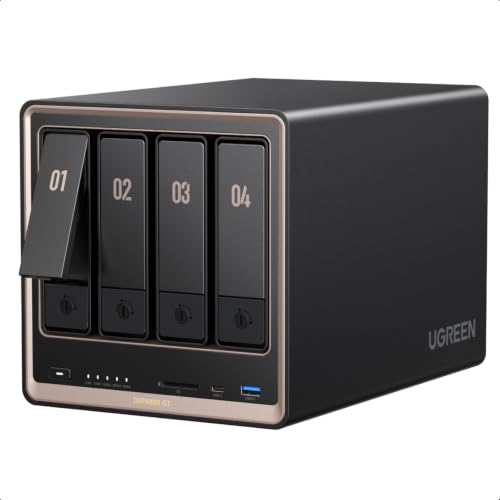
Best RAM for UGREEN DXP4800 GT? Short answer
The UGREEN DXP4800 GT takes DDR4-3200 SO-DIMM memory, the same kind used in laptops. The simplest upgrade is a single 16 GB module in the free slot, which together with the factory 8 GB gives you 24 GB.
If you want more, remove the factory module and install two: 2 x 16 GB gives 32 GB, and 2 x 32 GB gives 64 GB. The same applies to the 2-bay DXP2800 GT, which according to Vortez has an identical memory configuration.

Which memory fits and where the slots are
Both GT models come with 8 GB of DDR4 out of the box and officially support up to 64 GB. Performance comes from the AMD Ryzen Embedded R2514 processor. There are two SO-DIMM slots, and one of them holds the factory 8 GB DDR4-3200 module. The other is free.
DDR5 is not an option. Modules from older UGREEN NAS models do not fit the GT version, so do not look for them on the second-hand market.
Fun fact: the older DXP4800 and DXP4800 Plus models with Intel processors use DDR5 memory. The GT version with an AMD processor went back to DDR4.
The SO-DIMM slots are located together with the two M.2 2280 slots under a service cover on the underside of the case. The cover is held on by two screws. You unscrew it, remove or add a module, and put the cover back on.
Fun fact: UGREEN includes a screwdriver in the box, so you do not need to look for your own tool to open the cover.
Below we have gathered DDR4-3200 SO-DIMM modules based on manufacturer descriptions: standard and ECC, single modules and two-module kits. The manufacturer specifies DDR4 SO-DIMM 3200 and ECC support, but check the UGREEN compatibility list before buying. There is no guarantee that every module will work.

The RAM we recommend for the UGREEN DXP4800 GT
1. Crucial 16 GB DDR4-3200 SO-DIMM
16 GB · DDR4-3200 · SO-DIMM · non-ECC
One 16 GB module for the free slot. Together with the factory 8 GB, that makes 24 GB, enough for Docker and several services at once. It's standard non-ECC memory, the simplest and cheapest way to upgrade.
2. Crucial 32 GB (2 x 16 GB) DDR4-3200 SO-DIMM
2 x 16 GB · DDR4-3200 · SO-DIMM · non-ECC
A kit of two 16 GB modules. You remove the factory 8 GB module and fill both slots with a matching pair, 32 GB in total. A good pick for virtual machines and lots of containers.

3. OWC 16 GB DDR4-3200 ECC SO-DIMM
16 GB · DDR4-3200 · SO-DIMM · ECC
A module with ECC error correction, which the DXP4800 GT supports. PCWorld notes that matching ECC modules are needed for ECC to work consistently. A single module next to the factory 8 GB non-ECC module is a half-measure, so for a NAS holding important data take two of them, one per slot.

4. OWC 32 GB (2 x 16 GB) DDR4-3200 ECC SO-DIMM
2 x 16 GB · DDR4-3200 · SO-DIMM · ECC
A pair of 16 GB ECC modules for both slots, 32 GB in total. That way all the memory in the NAS has error correction, not just one module.
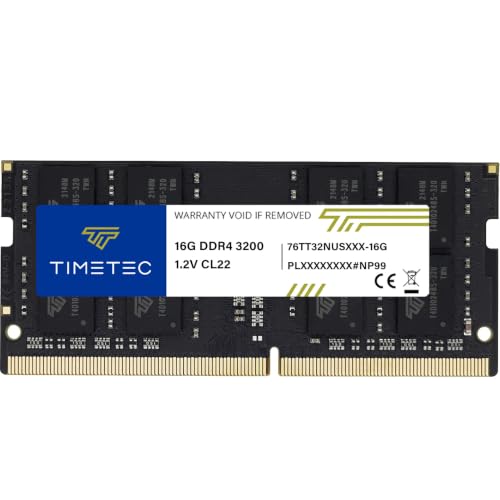
5. Timetec 16 GB DDR4-3200 SO-DIMM
16 GB · DDR4-3200 · SO-DIMM · non-ECC
A cheaper 16 GB non-ECC module from a lesser-known brand. Same specs as the Crucial: DDR4-3200 SO-DIMM. An option when budget matters.
ECC or standard memory
The DXP4800 GT supports ECC modules. However, PCWorld notes that for error correction to work consistently, you need to use the right ECC modules. The fact that the NAS accepts them does not mean ECC will work in every configuration.
For error correction to cover all the memory, both slots should have ECC modules. Remove the factory 8 GB module and install a pair, for example a 2 x 16 GB ECC kit. A single ECC module next to a standard one is a half-measure.
When is ECC worth it? When you keep important data on an array in your NAS. For a home archive of photos, videos and backups, standard non-ECC memory is perfectly sufficient. It is also cheaper.
How many GB to choose
For simple file sharing over the network, 8 GB is usually enough. If your NAS serves as a data cabinet, you don't need to pay extra for memory.
More RAM makes sense when Docker, virtual machines or many services running at once are involved. The UGOS Pro system supports both containers and virtualization. Here is a practical breakdown:
- 24 GB (8 GB + a 16 GB module): Docker and several services at once, the simplest and cheapest upgrade.
- 32 GB (2 x 16 GB): virtual machines and many containers, with the factory module replaced.
- 40 GB (8 GB + a 32 GB module): one large module in the free slot, without touching the factory one.
- 64 GB (2 x 32 GB): the maximum stated by UGREEN, for very demanding uses.
If you don't know where to start, buy one 16 GB module. You can always switch to two modules later.
We describe the drives for this NAS in a separate article.
Most common questions about RAM in the DXP4800 GT
Which RAM for the UGREEN DXP4800 GT?
DDR4-3200 SO-DIMM, meaning laptop-format modules. You can add one 16 GB module to the free slot or replace the factory module and install two modules. Check the UGREEN compatibility list before buying.
How much RAM does the UGREEN DXP4800 GT support?
Officially up to 64 GB. It comes with 8 GB of DDR4 in one of the two slots. You reach the maximum by installing two 32 GB modules.
Does the UGREEN DXP4800 GT use DDR4 or DDR5 memory?
DDR4. The older DXP4800 and DXP4800 Plus with Intel processors use DDR5, so their memory does not fit the GT version. When buying, look for a clear DDR4 SO-DIMM label.
Does the UGREEN DXP4800 GT support ECC memory?
Yes, according to PCWorld and Vortez. For error correction to work consistently, you need the right ECC modules in both slots. Standard non-ECC modules are also supported and are cheaper.
How do I replace the RAM in the UGREEN DXP4800 GT?
Undo the two screws on the service cover on the bottom, you will find a screwdriver in the box. Under the cover are both SO-DIMM slots and two M.2 2280 slots. Insert the new module into the free slot or replace the factory module, then screw the cover back on.
Sources
- UGREEN: NASync DXP4800 GT - manufacturer page (ai.ugreen.com)
- PCWorld: Ugreen DXP4800 GT review - industry article (pcworld.com)
- Vortez: UGREEN NASync DXP2800 GT and DXP4800 GT review - industry article (vortez.net)
- Club386: UGREEN NASync DXP4800 GT review - industry article (club386.com)
- NASCompares: UGREEN DXP4800 GT and DXP2800 GT, before you buy - industry article (nascompares.com)


Leave a comment
This site is protected by hCaptcha and the hCaptcha Privacy Policy and Terms of Service apply.