








As an Amazon Associate I earn from qualifying purchases.
Quick answer: our top pick is CalDigit TS5 Plus (Thunderbolt 5 · 20 ports · Ethernet 10 Gb/s).
Best docking station for Mac Studio M5? Thunderbolt 5, if you want ports on your desk
If you want ports on your desk instead of at the back of the computer, or you connect several monitors and drives with a single cable, get a Thunderbolt 5 dock. If not, the Mac's own ports may be perfectly enough for you.
The Mac Studio with M5 Max or M5 Ultra has plenty of them, so a dock is not essential. Below we describe when it makes sense and which one to choose for which use. If you are looking for a display, a separate article covers the monitor for the Mac Studio M5.

What ports does the Mac Studio M5 have and what might be missing
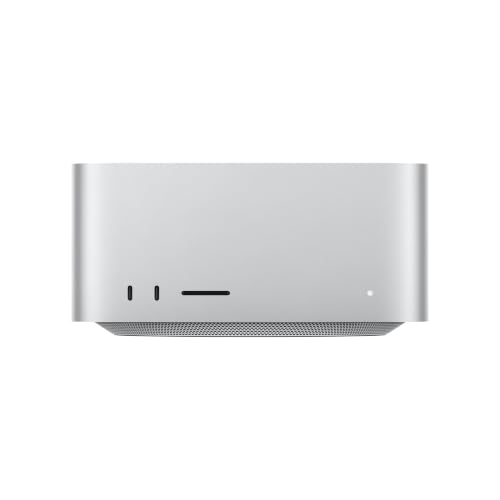
At the back you will find four Thunderbolt 5 (USB-C) ports with speeds up to 120 Gb/s, with USB 4, USB 3 and DisplayPort 2.1. There are also two USB-A ports (USB 3 up to 5 Gb/s), HDMI, 10 Gb Ethernet and a headphone jack.
At the front there is an SDXC card reader (UHS-II) and two USB-C ports. On the M5 Max they offer up to 10 Gb/s, and on the M5 Ultra they are Thunderbolt 5.
What people most often miss is USB-A ports, because there are only two. For a keyboard, a mouse, hardware keys and older accessories, that quickly becomes too few.
The second matter is convenience. Ports at the back of the case are hard to reach, and a dock standing on your desktop brings them within easy reach.
Laptop charging through the dock does not matter here. It is only useful if you also connect a MacBook to the same dock.
So a dock is worth considering in three situations:
- you want ports on your desk, not at the back of the computer,
- you connect several monitors, Thunderbolt drives and USB devices with a single cable,
- you are short of USB-A ports.
We have selected Thunderbolt 5 docks of various sizes, from small to the largest. The descriptions are based on manufacturers' data, and none of them mentions the Mac Studio M5 in its description.

Thunderbolt 5 docks for Mac Studio M5 we recommend
1. CalDigit TS5 Plus
Thunderbolt 5 · 20 ports · Ethernet 10 Gb/s
The largest dock in the lineup: 20 ports according to CalDigit, including Ethernet 10 Gb/s. It moves everything the front of the Mac lacks onto your desk, including additional USB-A ports.
2. CalDigit TS5
Thunderbolt 5 · 15 ports · SD and microSD readers
A smaller version of the CalDigit dock: 15 ports, including three Thunderbolt 5 for more devices, SD and microSD UHS-II card readers, and Ethernet 2.5 Gb/s.

3. Anker Prime TB5
Thunderbolt 5 · 14 ports · built-in cooling
A Thunderbolt 5 dock with 14 ports and built-in cooling, according to Anker. It has two downstream Thunderbolt 5 ports and a video output, so it handles a monitor and a drive over a single cable from the Mac.

4. UGREEN Maxidok 17-in-1
Thunderbolt 5 · 17 ports · M.2 slot
A dock with a built-in slot for an M.2 NVMe drive up to 8 TB, so extra storage lives in the same device as the dock. You buy the drive separately, and the Thunderbolt 5 cable is 80 cm.
Multiple monitors and drives on a single cable
The Mac Studio with M5 Max supports up to five monitors. Thunderbolt 5 ports carry DisplayPort 2.1, so a Thunderbolt 5 dock can deliver video without taking up more ports on the Mac.
Fun fact: The Mac Studio with M5 Max supports up to four monitors through a single Thunderbolt port.
Then there are drives. Docks with downstream Thunderbolt 5 ports, such as the CalDigit TS5 with three of them or the Anker Prime TB5 with two, let you connect a fast external drive and a monitor to the Mac with a single cable.
If you prefer fewer cables on your desk, consider the UGREEN Maxidok 17 in 1. The extra storage sits in the same enclosure as the ports. You buy the drive separately.
Fun fact: the UGREEN Maxidok 17 in 1 dock has a bay for an M.2 NVMe drive of up to 8 TB.
Thunderbolt 5 or Thunderbolt 4, and which dock for what
A Thunderbolt 5 dock will make use of the Mac's fast ports, which Apple rates at up to 120 Gb/s. An older Thunderbolt 4 dock will also work, just more slowly, so if you already have one, you don't need to replace it right away.
For a new purchase, it makes sense to get Thunderbolt 5, especially if you plan to use fast drives and several monitors. Choose by use case:
- CalDigit TS5 Plus: the biggest option, with 20 ports and 10 Gb/s Ethernet according to the manufacturer. The power supply is larger than the dock itself, as Cult of Mac points out, so leave room for it.
- CalDigit TS5: 15 ports, including three downstream Thunderbolt 5 ports, SD and microSD UHS-II card readers, and 2.5 Gb/s Ethernet.
- Anker Prime TB5: 14 ports and built-in cooling according to the manufacturer. A good choice for a monitor and a drive on one cable.
- UGREEN Maxidok 17 in 1: choose it when you want an M.2 drive inside the dock. The Thunderbolt 5 cable is 80 cm long.
- UGREEN Maxidok 10 in 1: a smaller Thunderbolt 5 version, for when you only need a few USB ports and a video output.
If the 10 Gb Ethernet in your Mac is enough for you, don't overpay for a dock with faster networking. Instead, look at the number of USB-A ports and how many Thunderbolt 5 ports are left downstream.
Frequently asked questions about docks for Mac Studio
Which dock for Mac Studio M5?
A Thunderbolt 5 dock, if you want ports on your desk or several monitors and drives on a single cable. The CalDigit TS5 Plus suits large setups, the UGREEN Maxidok 17 in 1 suits a drive inside the dock, and smaller models suit a simpler desk.
Does the Mac Studio need a dock?
It doesn't have to. It has four Thunderbolt 5 ports on the back, two USB-A ports, HDMI, 10 Gb Ethernet, and ports on the front, which is often enough. A dock makes sense when you want more ports within reach or you also connect a MacBook.
How many monitors can I connect to the Mac Studio through one cable?
According to Apple, the M5 Max supports up to four monitors through a single Thunderbolt port, and up to five in total. Thunderbolt 5 ports carry DisplayPort 2.1.
Thunderbolt 5 or Thunderbolt 4 for the Mac Studio?
Thunderbolt 5 gives you the full 120 Gb/s. A Thunderbolt 4 dock will also work, but with lower bandwidth, so for a new purchase it's better to choose Thunderbolt 5.
How many USB-A ports does the Mac Studio M5 have?
Two, on the back, with USB 3 at up to 5 Gb/s. If that's not enough, a dock will add more, for example the CalDigit TS5 Plus.
See also
- Best monitor for Mac Studio M5 - 5K or 6K and how many displays
- Best docking station for MacBook Neo - the one-monitor limit and the workaround
- Best docking station for iMac M6 - hub or Thunderbolt 4, 2 ports or 4
- Best docking station for MacBook Air M4 - one or two monitors
Sources
- Apple: Mac Studio (M5 Max or M5 Ultra) tech specs - manufacturer page (support.apple.com)
- Macworld: Mac Studio (M5 Max) review - industry article (macworld.com)
- Macworld: M5 Pro and Max and multi-monitor support - industry article (macworld.com)
- 9to5Mac: CalDigit TS5 Plus review - industry article (9to5mac.com)
- Cult of Mac: CalDigit TS5 Plus Thunderbolt dock review - industry article (cultofmac.com)

Leave a comment
This site is protected by hCaptcha and the hCaptcha Privacy Policy and Terms of Service apply.