








As an Amazon Associate I earn from qualifying purchases.
Quick answer: our top pick is Anker 7-in-1 USB-C hub (Best seller · HDMI 4K 60 Hz · USB-A · SD and microSD).
Best docking station for iMac M6? A short look at what's missing
If you want to connect a regular mouse, a flash drive or an SD card to your iMac M6, a USB-C hub is enough. The computer has no USB-A ports, no HDMI and no card reader. It only has USB-C (Thunderbolt) ports and a headphone jack.
A Thunderbolt 4 dock makes sense mainly if you buy the version with two ports and you will quickly run out of them. The dock then takes up one port, and in return you get more Thunderbolt 4 ports, USB-A and Ethernet.
The charging power of the station does not matter here, because the iMac comes with its own 143 W power adapter in the box. Pay attention to which ports you get and how many monitors you want to connect.


Two ports or four: which version you have
The version with the 10-core processor has two Thunderbolt / USB 4 ports. The 12-core version has four Thunderbolt 4 ports. Each port delivers up to 40 Gb/s, and USB 3.1 Gen 2 devices run at speeds of up to 10 Gb/s.
In practice, on the two-port version one of them will quickly be taken by a monitor or a drive, and the other by a hub. In that case every additional port makes a difference. With four ports, a hub is more of a convenience than a necessity.
The options for connecting monitors also differ. The 10-core version supports one external monitor via Thunderbolt, up to 6K 60 Hz or 4K 165 Hz. The 12-core version supports two such monitors or one up to 8K 60 Hz, 5K 120 Hz or 4K 240 Hz.
The limit is set by the computer, not by the station. A dock will not add a second monitor if the iMac does not support it.

Hub or Thunderbolt 4 dock: what each one offers
A USB-C hub is a small adapter for a single port. A typical set includes HDMI, USB-A, USB-C and an SD and microSD reader. It solves the most common shortcomings and is usually enough for the office, studying and basic work.
A Thunderbolt 4 dock is larger and sits on the desk. It offers several Thunderbolt 4 ports, more USB-A, often Ethernet, and sometimes a card reader. It is a solution for someone who wants to connect a fast drive, a monitor, a mouse, a keyboard and a network cable all at once.
Pay attention to charging. In station descriptions you will find the charging power, but the iMac is powered from its own adapter. That number will be useful at most for a phone or a laptop.
Beware of a hub with two HDMI outputs. macOS does not support MST, so a cheap USB-C hub with two HDMI ports will show the same image on both monitors (this is how Plugable describes it). You will get two different images through separate Thunderbolt or USB-C ports, not from a single cheap hub.
No station description other than PULWTOP mentions the iMac M6. The manufacturer PULWTOP states that to add a monitor, you need to connect its hub to a Thunderbolt port. For the M6, other stations are listed by the iThinkDifferent website, including UGREEN 8 in 1, CalDigit TS4, Plugable TBT-UDM and Anker 555. So do not assume that two monitors will work through a single cable.
Below we have gathered hubs and docks according to which iMac shortcomings they address: USB-A, card reader, Ethernet and additional Thunderbolt ports.

Recommended docks for iMac M6

1. Anker 7-in-1 USB-C hub
Best seller · HDMI 4K 60 Hz · USB-A · SD and microSD
The best-selling hub in this list and the simplest fix for the iMac's missing USB-A and card reader. It takes one port and adds HDMI 4K 60 Hz, USB-A, USB-C and an SD and microSD reader. The charging power in the listing does not matter here, because the iMac has its own power adapter.

2. PULWTOP 11-in-1 hub for iMac 24
Made for the iMac · M.2 NVMe bay · 2.5 Gb Ethernet
A hub made for the 24-inch iMac, so it matches the case in color and shape. It adds HDMI 4K 60 Hz, 2.5 Gb Ethernet, 10 Gb/s USB-A and USB-C, a card reader and an M.2 NVMe bay for a drive up to 4 TB without a heatsink. The drive is sold separately. The maker says a display needs the hub on a Thunderbolt port.

3. UGREEN Revodok Max 208 Thunderbolt 4
Thunderbolt 4 · 3 x 40 Gb/s · 3 x 10 Gb/s USB-A · Ethernet
A dock for the cheaper iMac with two ports: one port goes in and you get three 40 Gb/s Thunderbolt 4 ports, three 10 Gb/s USB-A ports and Ethernet. A good pick when you want a fast drive, a display and a mouse at once. The charging power the maker lists does not count here, because the iMac has its own adapter.
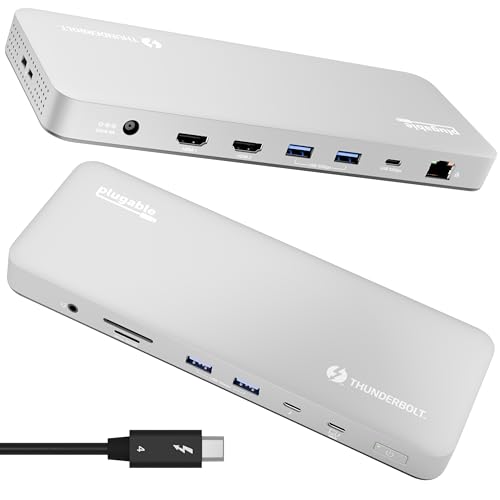
4. Plugable Thunderbolt 4 Dock (TBT-UDM)
Thunderbolt 4 · 13 ports · no driver
A Thunderbolt 4 dock with 13 ports that needs no driver. The maker's listing talks about M4 and M5 MacBooks, and iThinkDifferent also lists it for the iMac M6. The iMac itself sets the display limit, not the dock.
Ethernet in the power adapter and a drive in the hub
The 2.5 Gb/s Ethernet port in the iMac M6 is in the power adapter, not in the computer. It comes standard on the 12-core version, and as an extra-cost option on the 10-core one. If you have a version without it and you work over a cable, look for a hub or dock with Ethernet. PULWTOP, UGREEN Revodok Max 208 and SATECHI 12 in 1 have it, for example.
Fun fact: The iMac's Ethernet is in the power adapter, so you plug the network cable in where the power cable ends, not at the back of the computer.
Fun fact: In the M6, this port got faster, from 1 Gb/s to 2.5 Gb/s.
A drive in a hub is a separate topic. PULWTOP has an M.2 NVMe bay for a drive of up to 4 TB, in sizes 2230-2280, without a heatsink. You buy the drive separately. It is a convenient way to get extra space, because the iMac's internal drive starts at 256 GB. In the 10-core version you can choose 512 GB or 1 TB, and in the 12-core version up to 2 TB.
We covered external drives in a separate guide. Here the rule is enough: a fast drive is best connected to a Thunderbolt port, not to an ordinary hub.
Most common questions about a dock for the iMac M6
How many ports does the iMac M6 have?
The version with the 10-core processor has two Thunderbolt / USB 4 ports. The 12-core version has four Thunderbolt 4 ports. Each port provides up to 40 Gb/s. There is also a headphone jack.
Does the iMac M6 have USB-A?
No. It has no HDMI or card reader either. For older accessories you need a USB-C hub or a dock that has USB-A. USB 3.1 Gen 2 devices run at speeds of up to 10 Gb/s.
How many monitors can the iMac M6 handle?
The 10-core version supports one monitor over Thunderbolt, up to 6K 60 Hz or 4K 165 Hz. The 12-core version supports two such monitors or one up to 8K 60 Hz, 5K 120 Hz or 4K 240 Hz. A dock will not change this limit.
Does a docking station charge the iMac?
There is no need. The iMac has its own 143 W power adapter in the box, so the docking station's charging power does not matter for it. It will be useful at most for a phone or a laptop.
Will one hub with two HDMI ports give two different images on the iMac?
A cheap USB-C hub with two HDMI ports will not. macOS does not support MST, so you will see the same image on both monitors (this is how Plugable describes it). Connect the second monitor separately through a Thunderbolt port, as long as your version of the iMac supports it.
More iMac M6 guides
See also
- Best docking station for Mac Studio M5 - Thunderbolt 5 and when it's worth it at all
- Best docking station for Mac mini M6 - M4 docks fit too
- Best docking station for MacBook Neo - the one-monitor limit and the workaround
Sources
- Apple: iMac - Technical Specifications - manufacturer page (apple.com)
- Apple Germany: iMac - Technische Daten - manufacturer page (apple.com)
- MacRumors: Apple announces new iMac with M6 chip - industry article (macrumors.com)
- MacRumors: new iMac gets 2.5 Gigabit Ethernet - industry article (macrumors.com)
- iThinkDifferent: iMac with M6 ports, Wi-Fi 7 and Ethernet - industry article (ithinkdiff.com)
- iThinkDifferent: best iMac with M6 hubs and docks - industry article (ithinkdiff.com)

Leave a comment
This site is protected by hCaptcha and the hCaptcha Privacy Policy and Terms of Service apply.