


As an Amazon Associate I earn from qualifying purchases.
Quick answer: our top pick is DJI Mic Mini Transmitter (1 transmitter · OsmoAudio · no receiver).
Best microphone for DJI Osmo Pocket 4? Start with the Mic Mini 2
If you don't know which one to pick, get the DJI Mic Mini 2. According to DJI, its transmitter connects to the Osmo Pocket 4 directly over Bluetooth, so you don't need a receiver for the camera alone.
The cheapest way to better sound is the DJI Mic Mini transmitter on its own. You pair it with the camera and record vlogs with one person in the frame, without buying the rest of the kit.
The DJI Mic 3 makes sense if you have higher demands. Heliguy, a DJI reseller's knowledge base, confirms that the Pocket 4 connects to Mic 3 transmitters. Choose it when you want to use the same set to record with a camera and a phone as well.

Which DJI microphones connect to the Pocket 4 and what is OsmoAudio
According to Heliguy, the Osmo Pocket 4 works with DJI Mic 3, DJI Mic 2 and DJI Mic Mini transmitters. DJI also states that the Mic Mini 2 connects to the Pocket 4, Osmo 360, Osmo Nano and Osmo Action 6, all without a receiver.
OsmoAudio is DJI's audio ecosystem that links microphones with cameras. Thanks to it, the Pocket 4 sees the transmitter as its own wireless microphone, with no cables or extra devices.
The camera also has 3 built-in microphones, so it will record sound without any add-ons. However, a transmitter clipped to your clothes puts the microphone closer to your mouth, which is the whole point in a vlog.
Fun fact: The Osmo Pocket 4 can record four audio channels at once: two from DJI Mic transmitters and two from its own microphones (Heliguy).
Below we have gathered the DJI microphones that, according to the manufacturer and Heliguy, connect to the Pocket 4. We chose them based on whether the camera supports the transmitter, and divided them into kits with a receiver and a cheaper transmitter on its own.

Microphones we recommend for the DJI Osmo Pocket 4
1. DJI Mic Mini Transmitter
1 transmitter · OsmoAudio · no receiver
The cheapest route to better sound on the Pocket 4: a single transmitter you pair directly with the camera. There is no receiver or case, so you can't connect it to a camera. For a vlog with one person in the frame, it's more than enough.
2. DJI Mic Mini (2 TX + 1 RX)
2 transmitters · receiver · up to 48 h with case
The first-generation Mic Mini as a full kit: two transmitters, a receiver and a charging case that the manufacturer rates for up to 48 hours of use. The transmitters connect to the Pocket 4 directly, and the receiver handles a phone and a camera.
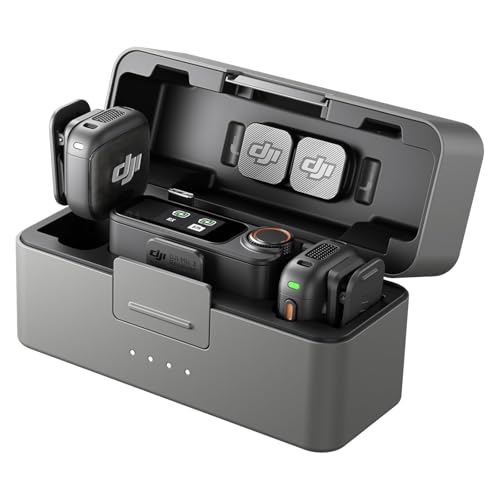
3. DJI Mic 3 (2 TX + 1 RX)
2 transmitters · receiver · higher series
DJI's higher microphone series. Heliguy confirms that the Osmo Pocket 4 connects to Mic 3 transmitters and supports two at once. A good pick if you also record with a camera and a phone using the same kit.

4. DJI Mic 3 (1 TX + 1 RX)
1 transmitter · receiver · higher series
The same Mic 3 in a smaller kit: one transmitter and a receiver, without a charging case. A cheaper way into the higher series when you record solo.
How to pair the transmitter with the camera step by step
Pairing takes a moment and you do it from the camera. According to Heliguy, it works like this:
- Swipe down on the camera screen.
- Go to the system settings.
- Select the wireless microphone and turn on pairing mode.
- Turn on pairing on the transmitter.
The camera supports two transmitters at once. This means you can record two people in the frame on two separate channels, plus two more channels from the built-in microphones (left and right).
Pocket 4 has Bluetooth BLE 5.4 and BR/EDR, so connecting to the transmitters does not require any additional accessories.
Kit with a receiver or just a transmitter
You do not need a receiver for the Pocket 4 camera itself. It only becomes useful when the same microphone is meant to work with a phone, a camera, or a computer.
If you only record with the Pocket 4 and appear on your own, a single DJI Mic Mini transmitter is enough. However, you will not be able to connect it to a camera, because it has no receiver or case.
The 1 TX + 1 RX kit is one transmitter and one receiver for one person. The 2 TX + 1 RX kit with a charging case has two transmitters, so it is suitable for recording two people, for example a conversation or an interview.
The charging case is convenient when traveling. For the first-generation Mic Mini, the manufacturer states up to 48 hours of operation with the case.
Fun fact: the DJI Mic Mini 2 transmitter connects to the camera directly via Bluetooth, without a receiver (DJI).
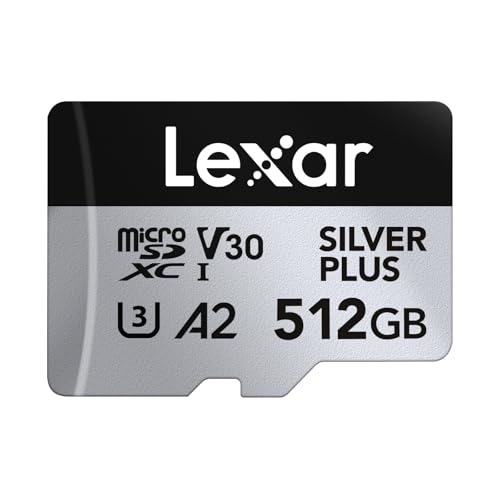
A separate article describes the microSD card for the Osmo Pocket 4.
Most common questions about microphones for the Osmo Pocket 4
Which microphone for the DJI Osmo Pocket 4?
To start with, the DJI Mic Mini 2 is the best choice, because its transmitter connects to the camera directly. The cheapest option is the DJI Mic Mini transmitter alone, and for more demanding users we recommend the DJI Mic 3.
Does the DJI Mic Mini work with the Osmo Pocket 4?
Yes. Heliguy states that the Pocket 4 connects to DJI Mic Mini transmitters, and without a receiver. You pair it directly with the camera.
Do you need a receiver for the Osmo Pocket 4?
No, not for the camera itself. The receiver from the kit will be useful when you want to use the microphone with a phone, a camera, or a computer as well.
How many microphones can you connect to the Osmo Pocket 4?
The camera supports two transmitters at once. With OsmoAudio you can record up to four channels: two from the DJI Mic transmitters and two from the camera's built-in microphones.
How do you pair the DJI Mic with the Osmo Pocket 4?
Swipe down on the screen, go to the system settings, and select the wireless microphone. Turn on pairing mode on the camera, then pairing on the transmitter.
See also
Sources
- DJI: Osmo Pocket 4 specs - manufacturer page (dji.com)
- DJI: Mic Mini 2 FAQ - manufacturer page (dji.com)
- Heliguy: How do I connect Osmo Pocket 4 to DJI Mic 3, Mic 2, Mic Mini - industry article (heliguy.com)
- Heliguy: Does Osmo Pocket 4 support two DJI Mic transmitters - industry article (heliguy.com)
- Heliguy: Osmo Pocket 4 OsmoAudio four-channel output - industry article (heliguy.com)
- Digital Camera World: Best accessories for the DJI Osmo Pocket 3 and Pocket 4 - industry article (digitalcameraworld.com)

Leave a comment
This site is protected by hCaptcha and the hCaptcha Privacy Policy and Terms of Service apply.