








As an Amazon Associate I earn from qualifying purchases.
Quick answer: our top pick is Logitech K400 Plus (touchpad · USB receiver · for the couch · local layout).
Best keyboard and mouse for Steam Machine? Short answer
For the couch, get the Logitech K400 Plus, a keyboard with a built-in touchpad. You keep it on your lap and you need neither a table nor a separate mouse. For a desk, a keyboard and mouse set will work better, for example the Logitech MK295 Silent or MK270.
Steam Machine runs on SteamOS and accepts a keyboard and mouse with no fuss. In its first impressions, Tom's Hardware writes that you can connect a mouse and keyboard or other controllers to the console. Engadget also notes that the base version doesn't even come with a controller in the box, so it's worth sorting out your control gear right away.
Below we explain what a keyboard is useful for, where to plug it in and how to choose between a touchpad and a mouse. The controller and the monitor for Steam Machine are covered in separate articles.

What a keyboard is for on Steam Machine
For couch gaming a gamepad is enough, but a keyboard makes a difference when you go beyond the console interface itself. Tom's Hardware writes that if you want to use Steam Machine like a regular PC at a desk, you can switch to the KDE Plasma desktop. The reviewer expects most people will never enter that mode, but appreciates that you can use the computer as a computer.
If you do look into it, you will need a mouse and keyboard. Windows Central reports that SteamOS lets you exit to a full Linux desktop. There you can install launchers, games and apps from outside the Steam store, for example Xbox Cloud Gaming or Battle.net.
A keyboard also comes in handy every day: for searching the store and your library, for typing in chat and for entering passwords. Typing on an on-screen keyboard with a gamepad gets tiresome fast.
Fun fact: beneath the Steam Machine console interface sits a full KDE Plasma desktop.
We chose the Logitech sets by a single criterion: each connects through a USB receiver, so you just plug it into a port and it works. They differ in whether they are designed for the couch or for the desk.

Keyboards and mice for Steam Machine we recommend
1. Logitech K400 Plus
touchpad · USB receiver · for the couch · local layout
A keyboard with a built-in touchpad, designed for a computer connected to a TV. You hold it on your lap and control the desktop without a mouse or a table. It connects through a small USB receiver.
2. Logitech MK270
keyboard + mouse · USB receiver · simple set
A simple keyboard and mouse set on one USB receiver. Enough for the desktop, the browser and games where a mouse is more comfortable than a gamepad.
Where to plug in the keyboard and mouse
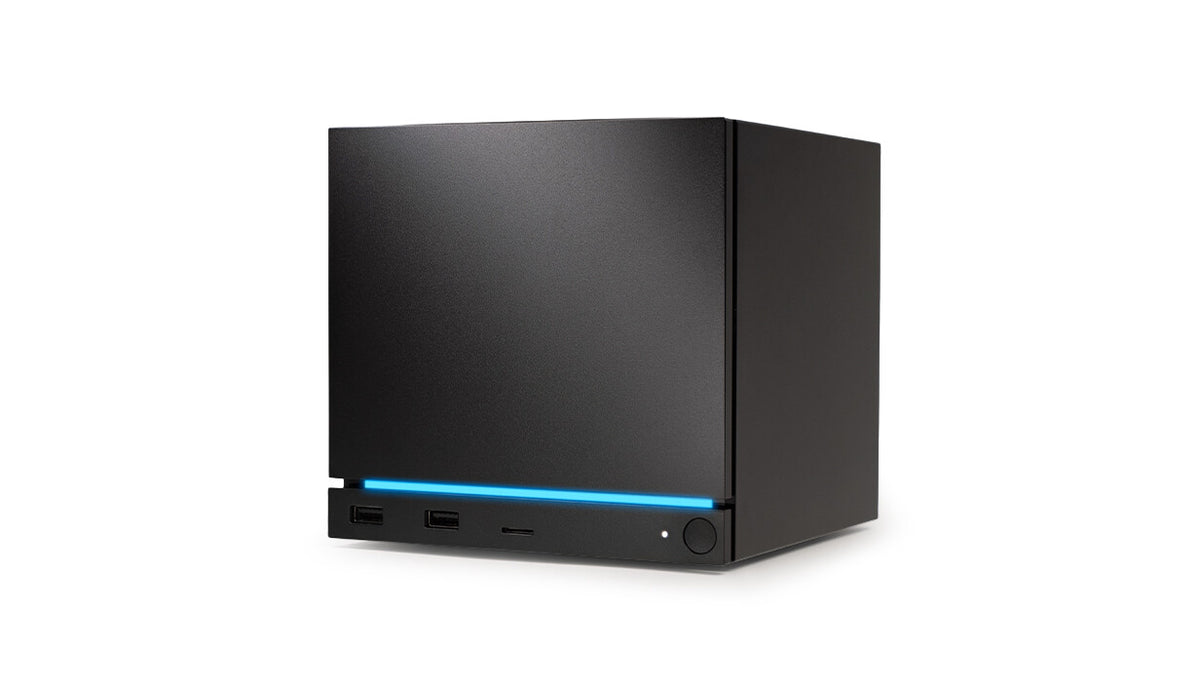
According to the Tom's Hardware review, the Steam Machine has two USB-A 3.2 Gen 1 ports and a microSD reader on the front. On the back there are two USB-A 2.0 ports and a USB-C 3.2 Gen 2 port. Sets with a USB receiver go into a USB-A port on the front, because that is the easiest one to reach.
A set with a single receiver, like the MK295 Silent or MK270, takes up only one port, and the keyboard and mouse work together through it. The K400 Plus also uses a small USB receiver.
There is also Bluetooth 5.3 on a separate antenna, so Bluetooth keyboards and mice are an option too. A USB receiver is simply easier: you plug it in and use it, with no pairing in the settings.
It is worth remembering that the console has a built-in receiver for Steam Controllers. That receiver is a separate matter and does not take up a USB port.
Couch or desk
On the couch, the most comfortable option is a keyboard with a built-in touchpad, because it does not need a table. You put the K400 Plus on your lap and navigate the desktop without a mouse. It is a good choice when the Steam Machine sits next to the TV and you only use a keyboard occasionally.
At a desk, a keyboard and mouse set works best. The MK295 Silent has quiet keys, so it will not disturb anyone in the room. The MK270 is a simpler set that is enough for the desktop, the browser, and games where a mouse is more comfortable than a gamepad.
One thing to keep in mind when buying: keyboards come with the key layout of a given country. The link in the box leads to the version with the layout used in your country, so the keys will be where you know them from other computers.
Fun fact: from the SteamOS desktop you can also install launchers from outside Steam, for example Battle.net.
Frequently asked questions
Which keyboard and mouse for the Steam Machine?
For the couch, the Logitech K400 Plus with a touchpad, because it needs neither a table nor a separate mouse. For a desk, a keyboard and mouse set, for example the MK295 Silent or MK270. All of them connect through a USB receiver.
Does the Steam Machine support a keyboard and mouse?
Yes. Tom's Hardware writes that you can connect a mouse and keyboard or other controllers to the console. Windows Central adds that nothing stops you from using the Steam Machine like a full mini PC.
What is a keyboard useful for on the Steam Machine?
For working on the KDE Plasma desktop, installing launchers and apps from outside Steam, and for searching and typing in chat. If you only play with a gamepad, you may not need one at all.
Keyboard with a touchpad or a set with a mouse for the Steam Machine?
Choose the touchpad if you sit on the couch, because it works without a table. A set with a mouse is better at a desk, when you work on the desktop or play titles where a mouse is more comfortable than a gamepad.
Where to plug in the keyboard receiver on the Steam Machine?
Into the USB-A port on the front of the console, because it is the closest. On the back you have two more USB-A 2.0 ports, so the receiver will fit there too if you prefer to hide it out of sight.
More Steam Machine storage guides
- Best SSD for Steam Machine - M.2 2280 or 2230 and how much storage
- Best monitor for Steam Machine - 1440p or 4K, DisplayPort or HDMI
- Best controller for Steam Machine - Xbox, DualSense or 8BitDo
- Best microSD card for Steam Machine - size and speed
Sources
- Valve: Steam Machine - manufacturer page (store.steampowered.com)
- Tom's Hardware: Valve Steam Machine review - industry article (tomshardware.com)
- Tom's Hardware: Valve brings back Steam Machine, hands-on - industry article (tomshardware.com)
- Windows Central: Valve announces Steam Machine - industry article (windowscentral.com)
- Engadget: Steam Machine starts at $1,049 with no controller - industry article (engadget.com)

Leave a comment
This site is protected by hCaptcha and the hCaptcha Privacy Policy and Terms of Service apply.