






As an Amazon Associate I earn from qualifying purchases.
Quick answer: our top pick is SanDisk Extreme 512 GB (512 GB · UHS-I · A2, U3, V30 · up to 190 MB/s).
Best microSD card for Steam Machine? The simple answer: A2 V30, 512 GB or 1 TB
For Steam Machine, a microSD card with A2 and V30 ratings and a capacity of 512 GB or 1 TB is enough. The reader in this console is a UHS-I type, so there is no point looking for anything faster.
UHS-II and microSD Express cards will fit in the slot, but they won't speed anything up, because they are limited by the reader. Nintendo has already moved to microSD Express in the Switch 2, but Valve went a different way with this hardware.
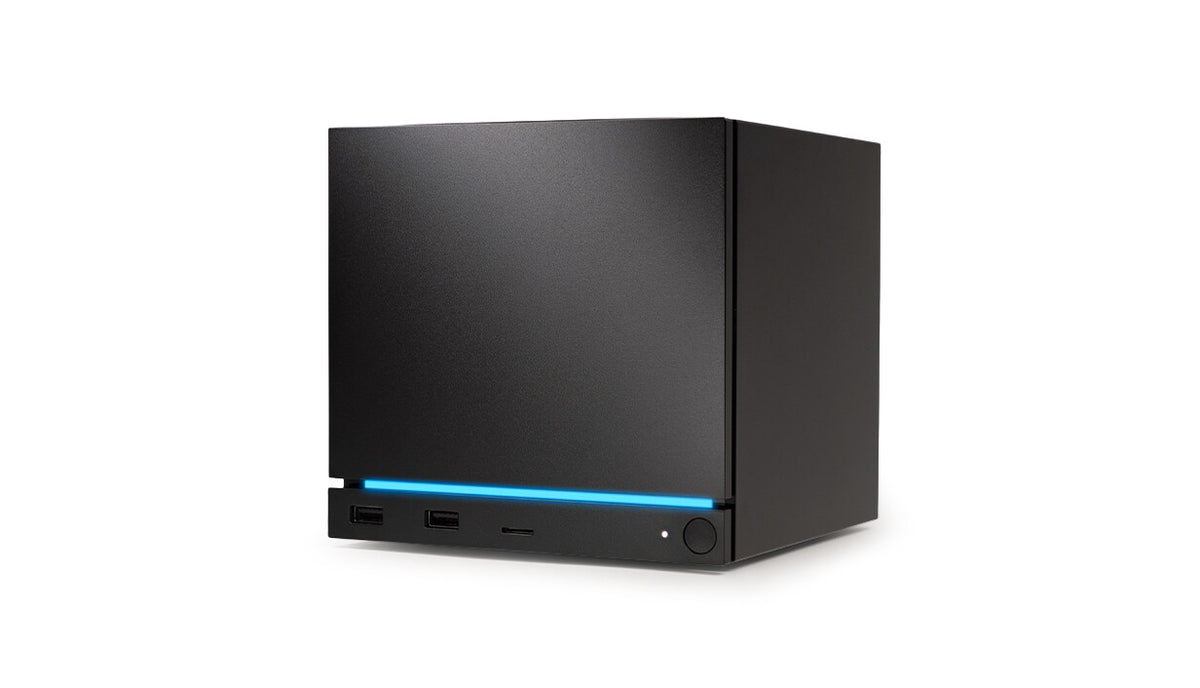
Valve itself offers Steam Machine in versions with a 512 GB or 2 TB NVMe SSD and with a microSD slot. A card is the easiest way to get more space, because you don't need to open the case.


Photo: Valve
Why a more expensive card won't be faster
Valve fits only UHS-I readers in Steam Machine, Steam Deck and Steam Frame. The Verge points out that UHS-I is slow compared to an SSD.
Royal Strawberry calculates that UHS-I limits real-world speed to around 100 MB/s, regardless of what is printed on the card. This is a conclusion drawn from the standard, not a measurement, but it describes the situation well: a card with higher numbers on the packaging will be throttled by the reader.
What does this mean in practice? Don't overpay for speed you won't use. The A2 class helps with loading apps and games, and V30 is a sensible standard, so these are what you should base your choice on. It's better to put the rest of your budget toward capacity.
Games that rely heavily on the drive may load more slowly from the card than from an SSD. That is what The Verge says. On the other hand, Valve engineer Yazan Aldehayyat said that, according to Valve's tests, SD cards work very well and are the most sensible option for most people.
Fun fact: The Verge compared Valve's microSD cards to cartridges. You can put the same card into a Steam Deck, Steam Machine and Steam Frame.

Using a Steam Deck card in Steam Machine
If you already have a Steam Deck, you can simply move the card over. A card formatted in SteamOS on a Steam Deck works in Steam Machine right away, and your games are visible on it without downloading them again.
Just remember that the performance of the same games can differ between devices. A game that runs well on the Deck won't necessarily behave identically on Steam Machine, and vice versa.
If you don't want to keep taking the card out of your handheld, buy a second one and leave it in the console permanently. You can then keep separate libraries.
Below we have gathered UHS-I cards in capacities from 256 GB to 1 TB, chosen with the fact in mind that the reader in Steam Machine won't take advantage of faster standards.
Recommended microSD cards for Steam Machine
1. SanDisk Extreme 512 GB
512 GB · UHS-I · A2, U3, V30 · up to 190 MB/s
SanDisk Extreme in a 512 GB capacity. The V30 rating handles 4K recording, while A2 speeds up app and game loading times.
2. SanDisk Ultra 1 TB
1 TB · UHS-I · A1, U1 · up to 150 MB/s
1 TB SanDisk Ultra with A1 rating and read speeds up to 150 MB/s. One of the most affordable 1 TB cards from a well-known brand.

3. Kingston Canvas Go! Plus 1 TB
1 TB · UHS-I · A2, U3, V30 · up to 200 MB/s
Kingston Canvas Go! Plus (Gen4) with 1 TB capacity, with A2 and V30 classes, bundled with an SD adapter.

4. SanDisk Extreme 256 GB
256 GB · UHS-I · A2, U3, V30 · up to 190 MB/s
One of the best-selling microSD cards. It features a V30 rating for 4K video recording and an A2 rating for apps and games.
How many GB to choose and when it is better to replace the SSD
For most people, 512 GB or 1 TB makes sense. A smaller card, for example 256 GB, will fill up quickly with larger titles, while a big one gives you peace of mind for longer. Valve does not state a capacity limit for the slot. The SDXC standard goes up to 2 TB, but do not treat that as a declaration from the console manufacturer.
A card makes sense as a fast and cheap expansion. However, if you want to keep the most demanding games on it, expect longer loading times. In that case, it is better to leave such titles on the internal SSD and keep the rest of your library on the card.
Replacing the SSD requires opening the case and makes sense when the whole library is meant to run at the drive's maximum speed. Before unscrewing anything, remove the microSD card. iFixit warns that it may crack, and the slot at the bottom front is delicate.
Fun fact: when asked about the card reader specification, a Valve engineer replied that convenience matters more. This is also a good hint for shopping: the card should simply be within easy reach.
Frequently asked questions about microSD cards in Steam Machine
Does Steam Machine support microSD Express cards?
The reader is UHS-I, so you will not benefit from microSD Express speeds. UHS-II and Express cards will not be faster here, because the reader limits them. There is no reason to pay extra for them.
Will a Steam Deck card work in Steam Machine?
Yes. A card formatted in SteamOS on a Steam Deck works in Steam Machine right away, and the games are visible without downloading them again. Performance may differ between the devices.
What microSD card capacity for Steam Machine makes sense?
512 GB and 1 TB are the most sensible choices. A smaller card, for example 256 GB, will also work, but it will fill up faster. Valve does not state a capacity limit for this slot.
Is a microSD card enough for new AAA games?
It will work, but games that need high speed may load longer than from an SSD. That is what The Verge says. If fast loading matters to you, leave the most demanding titles on the internal drive.
Where is the microSD slot in Steam Machine?
According to iFixit, the slot is at the bottom front of the case. The port is delicate, so remove the card before opening the console so that it does not crack.
More Steam Machine storage guides
Sources
- Valve: Steam Machine - manufacturer page (store.steampowered.com)
- The Verge: Valve is making microSD cards the next game cartridges - industry article (theverge.com)
- Engadget: Steam Machine storage and pricing - industry article (engadget.com)
- iFixit: Steam Machine (2026) SSD replacement - industry article (ifixit.com)
- Royal Strawberry: Steam Machine storage reference - industry article (royalstrawberry.com)


Leave a comment
This site is protected by hCaptcha and the hCaptcha Privacy Policy and Terms of Service apply.