






As an Amazon Associate I earn from qualifying purchases.
Quick answer: our top pick is Dell 27 Plus S2725QC (27-inch · 4K · 120 Hz · USB-C 65 W).
Best monitor for MacBook Neo? Best a 27-inch 4K with USB-C
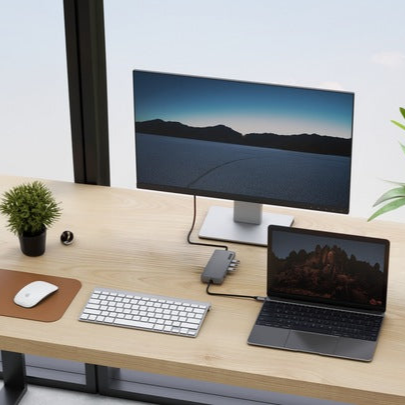
The simplest choice is a 27-inch 4K monitor with a USB-C input, which carries video and charges the laptop over a single cable. The most popular pick in our roundup is the Dell S2725QC.
Such a monitor gives you the full resolution the Neo can use and leaves just one cable to the laptop on your desk. The 65 W charging power from the monitor is more than the Neo needs.
Below I explain what the Neo supports, how to choose the port, and whether it's worth paying extra for 120 Hz.

What MacBook Neo can and can't do
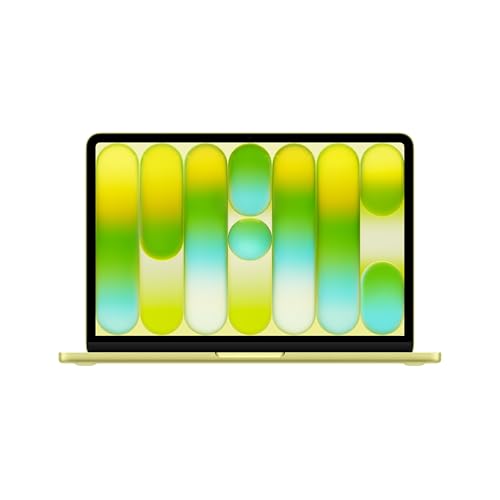
According to Apple, the Neo supports one external display up to native 4K resolution at 60 Hz. This works at the same time as the built-in display at full resolution.
Video is carried only by the USB 3 (USB-C) port, which supports DisplayPort 1.4 (HBR3). The other port is USB 2 (USB-C) and is used only for charging and data. The Neo has no HDMI or Thunderbolt.
Fun fact: MacBook Neo has two USB-C ports, but only one of them carries video, the one with USB 3. If the monitor stays blank, first check which port you plugged the cable into.
Two things follow from this. A 5K monitor, for example the Apple Studio Display, goes beyond the 4K 60 Hz limit stated by Apple, so we don't recommend it for the Neo. A second monitor is also out, because the Neo supports only one.
If you want two monitors or 5K, you need a MacBook Air with M5. Apple specifies two external displays for it.
We've gathered USB-C monitors chosen for a single 4K or QHD display, with single-cable laptop charging and for different uses: office work, a cheaper alternative, color work.

Recommended monitors for MacBook Neo
1. Dell 27 Plus S2725QC
27-inch · 4K · 120 Hz · USB-C 65 W
The best-selling USB-C monitor in this list: 27 inches, 4K and 120 Hz. One USB-C cable carries video and data and charges the MacBook at 65 W.
2. LG UltraFine 27UP850K
27-inch · 4K · 95% DCI-P3 · USB-C about 90 W
A 27-inch 4K panel with 95% DCI-P3 and DisplayHDR 400 per LG. USB-C charges the laptop at about 90 W (listings say 90 or 96 W), plus two HDMI ports and DisplayPort.

3. Dell 27 Plus S2725DC
27-inch · QHD · 144 Hz · USB-C 65 W
Dell's cheaper option with QHD (2560 x 1440) at 144 Hz, still with USB-C and 65 W charging. Text on 27 inches is less sharp than 4K, but fine for the browser and spreadsheets.
USB-C or HDMI: one cable versus an adapter
A monitor with USB-C is the most convenient solution. One cable carries video and data, and it charges the Neo at the same time. You plug it into the USB 3 port and your desk stays tidy.
The Neo's battery is 36.5 Wh, so charging from the monitor makes sense for all-day work. In the US, the box includes a 20 W adapter, so a USB-C monitor mainly saves you a cable on the desk and leaves the adapter free for your bag.
If you already have a monitor with HDMI only, you can connect it, but you need a USB-C to HDMI adapter. In that case, you have to charge the laptop separately, using the second USB-C port or a power adapter.
When buying a new monitor, choose USB-C. An adapter mainly makes sense when you already have a good screen with HDMI only and don't want to replace it.
4K or QHD at 27 inches, and what about 120 Hz
At 27 inches, 4K gives noticeably sharper text. If you read and write a lot, you will notice it. QHD, as in the Dell S2725DC, is less sharp, but it is enough for a browser and spreadsheets. It is a reasonable option when you want to stay within a smaller budget.
For color work, meaning photos and video, the ASUS ProArt PA279CRV makes sense. According to ASUS, it has 4K, 99% DCI-P3 and Adobe RGB, and Calman calibration with a Delta E below 2.
A common question concerns 120 Hz. A 120 Hz monitor will work with the Neo normally, but at 60 Hz, because that is the laptop's limit at 4K. So there is no point paying extra for a high refresh rate just because of the Neo.
A high refresh rate does no harm. The Dell S2725QC has 120 Hz and is popular mainly thanks to the combination of 4K, USB-C and charging. If you change laptops someday, it will be a bonus.
Fun fact: a 5K monitor, such as the Apple Studio Display, goes beyond the 4K 60 Hz limit that Apple states for the Neo. So even a very good Apple display is not a natural choice for this laptop.
Frequently asked questions about a monitor for the MacBook Neo
Which monitor should I choose for the MacBook Neo?
The simplest choice is a 27-inch 4K monitor with USB-C that charges the laptop with one cable. The most commonly bought one is the Dell S2725QC. If your budget is smaller, consider QHD, for example the Dell S2725DC.
How many monitors can I connect to the MacBook Neo?
One. Apple states support for one external display up to 4K at 60 Hz, at the same time as the built-in screen. The MacBook Air with M5 can handle two monitors.
Which MacBook Neo port supports a monitor?
Only the USB 3 (USB-C) port, which supports DisplayPort 1.4 (HBR3). The second port is USB 2 and is for charging and data, with no video output.
Does the MacBook Neo support a 5K monitor?
We don't recommend it. A 5K monitor, for example the Apple Studio Display, goes beyond the 4K 60 Hz limit stated by Apple. For 5K, you need a MacBook Air with M5.
Will a monitor with USB-C charge the MacBook Neo?
Yes, if the monitor has USB-C charging. 65 W is more than the Neo needs. A monitor with HDMI only and an adapter does not charge the laptop, so you need a separate power adapter.
Sources
- Apple: MacBook Neo technical specifications - manufacturer page (apple.com)
- MacRumors: MacBook Neo supports one external display - industry article (macrumors.com)
- MacRumors: MacBook Neo ships without a charger in the UK and EU - industry article (macrumors.com)
- Six Colors: MacBook Neo review - industry article (sixcolors.com)


Leave a comment
This site is protected by hCaptcha and the hCaptcha Privacy Policy and Terms of Service apply.