








As an Amazon Associate I earn from qualifying purchases.
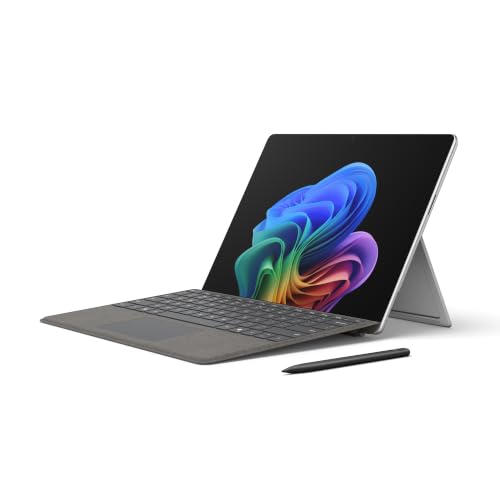
Quick answer: our top pick is Microsoft Surface Pro 13-inch Keyboard + Slim Pen (Microsoft original · Surface connector · with Slim Pen).
See Microsoft Surface Pro 13-inch Keyboard + Slim Pen on Amazon →
Which keyboard for Surface Pro 13-inch (2026)? The original is the simplest choice, Bluetooth is cheaper
The safest choice is the original Surface Pro 13-inch Keyboard. If you draw or take handwritten notes, get the version with the Slim Pen, because you get a complete set right away.
The cheaper route is a Bluetooth keyboard with a touchpad from another manufacturer. You buy it to save money, but you have to remember about pairing and charging the battery.
The Surface Pro 13-inch with Snapdragon X2 (Microsoft calls it the 12th Edition) has been on sale since June 16, 2026. The keyboard is sold separately, so it really is a separate expense to plan for.

Compatibility according to Microsoft
On the Surface keyboards page, Microsoft states that the Surface Pro 13-inch Keyboard fits these models: Surface Pro for Business 13-inch (12th Edition), Surface Pro 13-inch (11th Edition), Pro 10 for Business, Pro 9, Pro 8 and Pro X. This also applies to the version with a pen storage slot and the for Business versions.
The more expensive Surface Pro 13-inch Flex Keyboard fits the same models, but not the Pro X. It has a haptic touchpad, works wirelessly and charges the Slim Pen 2. It is sold separately.
There is one caveat here. The compatibility page lists the 12th Edition generation only in the for Business version and does not list the consumer version separately. The consumer 12th Edition has the same 13-inch format, and Microsoft's June promotion, in which a 13-inch keyboard was added to the new model, confirms that this is the right keyboard.
Watch out for the 12-inch model. The Surface Pro 12-inch has its own, smaller keyboard, which does not fit the 13-inch tablet. Surface Pro keyboards fit the Surface Pro 8 and newer 13-inch models.
Fun fact: according to Microsoft, the same 13-inch keyboard even fits the 2021 Surface Pro 8.
Below, we have selected the original Microsoft keyboards in several variants and three Bluetooth options from other manufacturers, described for the 13-inch Surface Pro.
Recommended keyboards for Surface Pro 13-inch (2026)
1. Microsoft Surface Pro 13-inch Keyboard + Slim Pen
Microsoft original · Surface connector · with Slim Pen
The original Surface Pro 13-inch Keyboard bundled with the Surface Slim Pen. It attaches to the Surface connector at the bottom, so there's no pairing or charging.
See Microsoft Surface Pro 13-inch Keyboard + Slim Pen on Amazon →
2. Microsoft Surface Pro 13-inch Keyboard
Microsoft original · keyboard only · no pen
Just the original Surface Pro 13-inch Keyboard, no pen. The simplest way to the Microsoft original if you don't need a pen; it uses the Surface connector.

3. BEESUFAR backlit keyboard for Surface Pro 13
Bluetooth · 7-color backlight · own battery
A Bluetooth keyboard with 7-color backlighting, listed by the maker for the 13-inch Surface Pro and models 11, 10, 9, 8 and X. It has its own battery.
See BEESUFAR backlit keyboard for Surface Pro 13 on Amazon →
Original or Bluetooth
The original connects through the Surface connector at the bottom of the tablet. You don't pair it, you don't charge it, and you don't think about the battery level. You plug it in and type.
The Inateck, MoKo and BEESUFAR keyboards connect via Bluetooth and have their own rechargeable battery. You need to pair them at first, and then charge them from time to time. It's a minor inconvenience, but it's worth knowing about before you buy.
Inateck lists the 2026 Surface Pro in its description, and MoKo describes its keyboard for 13-inch Surface Pro models from 8 to 12. BEESUFAR adds 7-color backlighting, which comes in handy if you often work in the evening.
If you use the tablet for work every day, the original saves you frustration. If the keyboard is meant as an add-on for trips or occasional typing, a Bluetooth keyboard with a touchpad is more than enough.
The for Business version with the Copilot key makes sense if you want that key within reach. Microsoft lists for Business keyboards alongside the same list of compatible 13-inch models.
Fun fact: in June 2026, Microsoft in the USA included the Surface Pro 13-inch Keyboard for free with the new Surface Pro, rather than the more expensive Flex (Techlomedia).
Key layout in the listing
Every listing has its own key layout: German QWERTZ, French AZERTY, Italian or American. Check this in the listing title before you click "buy".
This is about the labels on the keys. For example, the MoKo keyboard in our selection has a French AZERTY layout, so if you normally type on a different layout, some characters will be in different places.
Frequently asked questions about a keyboard for the 13-inch Surface Pro
Which keyboard for the 13-inch Surface Pro (2026)?
The best choice is the original Surface Pro 13-inch Keyboard, with the Slim Pen if you draw. A cheaper alternative is a Bluetooth keyboard with a touchpad, for example the Inateck, which lists the 2026 Surface Pro. Keep in mind that such models require pairing and charging.
Does the 2026 Surface Pro come with a keyboard?
No, the keyboard is sold separately. In the USA, from June 16 to 30, 2026, Microsoft gave away the 13-inch keyboard with the new Surface Pro, but that was only a promotion in its store.
Does the keyboard from the Surface Pro 11 fit the 2026 model?
According to Microsoft, the Surface Pro 13-inch Keyboard fits the Surface Pro 13-inch (11th Edition) and the Surface Pro for Business 13-inch (12th Edition). The page doesn't list the consumer version of the 12th Edition separately, but it has the same 13-inch format, and Microsoft's June promotion confirms this.
Does the keyboard for the 12-inch Surface Pro fit the 13-inch model?
No. The Surface Pro 12-inch has its own, smaller keyboard that doesn't fit 13-inch models. Look for a description that says 13-inch.
Is it worth buying a Surface Pro keyboard with the Slim Pen?
Yes, if you draw, take handwritten notes or mark up documents with a pen. The bundle is one decision and you get a complete set right away. If you don't need the pen, the keyboard alone is enough.
Sources
- Microsoft Support: Learn more about Surface keyboards - manufacturer page (support.microsoft.com)
- Techlomedia: Microsoft launches 12th-gen Surface Pro with Snapdragon X2 - industry article (techlomedia.in)
- Windows Central: New Snapdragon X2 Surface PCs are here - industry article (windowscentral.com)
- Tom's Hardware: Microsoft debuts Surface Pro and Surface Laptop with Snapdragon X2 - industry article (tomshardware.com)

Leave a comment
This site is protected by hCaptcha and the hCaptcha Privacy Policy and Terms of Service apply.