








As an Amazon Associate I earn from qualifying purchases.
Quick answer: our top pick is SanDisk Portable SSD (USB-C · up to 1000 MB/s · 1 TB).
Best external drive for Steam Machine? A portable SSD over USB-C
You're installing another big game and see that your 512 GB is down to a few gigabytes. You don't want to open the case, and deleting old games is no way to spend an evening. The simplest answer is a portable SSD plugged into the USB-C port on the back of the console, because it's the only port that gives you 10 Gb/s.
Steam Machine has been on sale since June 2026 in 512 GB and 2 TB versions (data from Engadget and iFixit). With the smaller version, an external drive quickly adds room for your library. With the larger one, it's handy for games you play less often.
A USB 10 Gb/s SSD delivers up to about 1000 MB/s. That's enough to copy big games quickly, and the drive fits in your pocket.
Which Steam Machine ports are fast
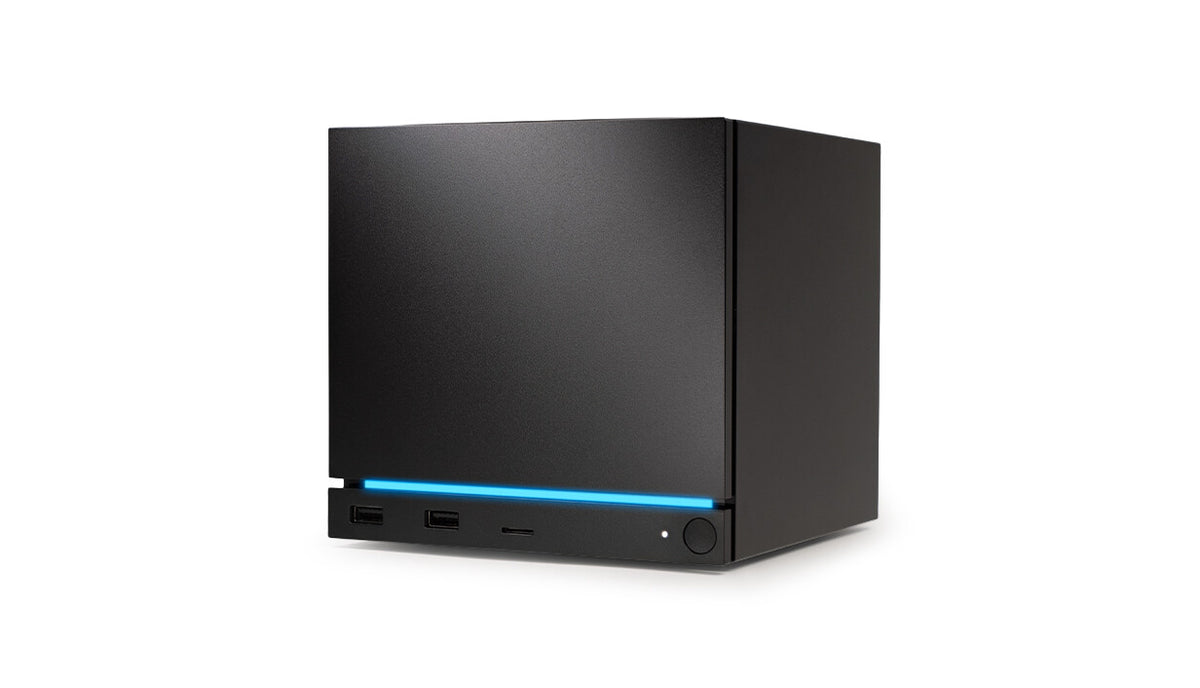
According to iFixit, the front has two USB-A 3.2 Gen 1 ports, which means 5 Gb/s. The back has one USB-C 3.2 Gen 2 port at 10 Gb/s and two USB-A 2.0 ports. There's also a fast microSD reader.
Say you buy an SSD and plug it into the front because it's more convenient. Everything works, but the port gives you half of what the same drive can do on the back. Moving the cable takes a few seconds, and games copy faster.
Leave the rear USB-A 2.0 ports for your keyboard and mouse. A drive faster than 10 Gb/s, such as a 2000 MB/s model on USB 20 Gb/s, will also work here, but it will run at the speed of the port.
We picked portable SSDs that make use of the USB 10 Gb/s port.
Best External Drives for Steam Machine That We Recommend

1. SanDisk Portable SSD
USB-C · up to 1000 MB/s · 1 TB
Portable SanDisk SSD, up to 1000 MB/s according to the manufacturer in the new model. One of the most popular external drives.

2. Samsung T9 portable SSD
USB-C · up to 2000 MB/s · 1-2 TB
Portable Samsung SSD, up to 2000 MB/s according to the manufacturer on a 20 Gb/s USB port. On a 10 Gb/s port it runs at that port's speed.

3. Samsung T7 portable SSD
USB-C · 10 Gb/s · up to 1050 MB/s
Small portable Samsung SSD with USB 10 Gb/s, up to 1050 MB/s according to the manufacturer. USB-C and USB-A cables are included.

4. Kingston XS1000 portable SSD
USB 3.2 Gen 2 · up to 1050 MB/s · very small
Very small portable Kingston SSD with USB 10 Gb/s, up to 1050 MB/s according to the manufacturer.

5. WD_BLACK P10 Game Drive
2.5-inch hard drive · USB 3.2 · for consoles
A hard drive designed for consoles, powered through the USB port. It gives you plenty of room for your game library, but copies more slowly than an SSD.
External drive, microSD card, or swapping the internal drive
An external drive wins on convenience. You plug it in, format it once, and get room for games without opening anything up. You can also take it to a friend's place or plug it into another computer.
A microSD card is clever, but slower. Tom's Guide measured the Steam Machine's internal drive reading at over 3800 MB/s, while a microSDXC card managed about 155 MB/s. BGR adds that big games can run worse from an SD card. A card works well for smaller and older titles.
Fun fact: in Tom's Guide's test, a Cyberpunk 2077 mission loaded in 9.6 s from the internal drive and in 16.9 s from the microSD card.
Swapping the internal drive gives the best speed, but you have to open the console. We cover that in a separate article on the internal drive.
Also keep in mind that BGR points out that some external drives can make load times longer. That's why an SSD on a fast port is a smarter choice than a slow flash drive or a random drive from a drawer.
A hard drive powered over USB will work too, but it copies data more slowly than an SSD. Treat it as storage for games you install once and rarely touch.
Short version: buy a portable SSD with USB 10 Gb/s, plug it into the USB-C port on the back, and keep the microSD card for smaller games.
Formatting and adding a library in SteamOS
The steps below come from the Steam Deck (SteamDeckHQ), so they may look a bit different on the Steam Machine. The idea is the same.
- Copy everything you want to keep off the drive, because formatting erases the data.
- Format the drive as ext4.
- In Desktop Mode, set up drive mounting and permissions, because the system won't do it on its own.
- In Steam's settings, add the drive as a new library and pick it when you install games.
The mounting and permissions step is where a drive most often "disappears" after a restart. Take a moment to get it right before you install your first game.
Fun fact: according to PC Gamer, Valve recommends a microSD card as a shared library that you can move between the Steam Deck, Steam Frame, and Steam Machine.
Common questions about drives for the Steam Machine
Does the Steam Machine support an external drive?
Yes, you can add an external drive as a game library. You need to format it as ext4 and set up mounting and permissions in Desktop Mode. The steps come from the Steam Deck, so check whether they look the same on your console.
Which port should I plug a drive into on the Steam Machine?
The USB-C port on the back, because it's the only 10 Gb/s port. The front USB-A ports give you 5 Gb/s, and the rear USB-A 2.0 port is best left for a keyboard and mouse.
External drive or microSD card for the Steam Machine?
For bigger games, an SSD is the better pick, because a card is clearly slower. A microSD card is handy for smaller titles and when you want one library shared across several devices.
Does a 2000 MB/s drive make sense in a Steam Machine?
You won't get its full speed, because the console's USB-C port is limited to 10 Gb/s. Such a drive will perform like a USB 10 Gb/s model. You can still buy one if you plan to use it with another, faster computer too.
Is a hard drive enough for games?
As storage for a big library, yes, especially USB-powered models made for consoles. It copies data more slowly than an SSD, so keep the games you play every day on an SSD.
See also
- Best DisplayPort to HDMI 2.1 Adapter for Steam Machine - 4K 120 Hz on a TV
- Best SSD for Steam Machine - M.2 2280 or 2230 and how much storage
- Best monitor for Steam Machine - 1440p or 4K, DisplayPort or HDMI
- Best microSD card for Steam Machine - size and speed
Sources
- Valve: Steam Machine - manufacturer page (store.steampowered.com)
- iFixit: Steam Machine (2026) - industry article (ifixit.com)
- Tom's Guide: Steam Machine 1TB storage - industry article (tomsguide.com)
- BGR: Common issues with the Steam Machine - industry article (bgr.com)
- PC Gamer: sharing a game library on microSD - industry article (pcgamer.com)
- SteamDeckHQ: External storage on SteamOS - industry article (steamdeckhq.com)
- Engadget: Steam Machine starts with 512GB - industry article (engadget.com)


Leave a comment
This site is protected by hCaptcha and the hCaptcha Privacy Policy and Terms of Service apply.