








As an Amazon Associate I earn from qualifying purchases.
Quick answer: our top pick is UGREEN DisplayPort 1.4 to HDMI 8K cable (active) (active cable · 1-3 m · 4K 240 Hz).
See UGREEN DisplayPort 1.4 to HDMI 8K cable (active) on Amazon →
Best DisplayPort HDMI adapter for Steam Machine? An active DisplayPort 1.4 to HDMI 2.1 adapter
A 4K 120 Hz TV only makes sense if it gets 120 frames per second at full quality, and Steam Machine has one good port for that: DisplayPort 1.4. So buy an active DisplayPort 1.4 to HDMI 2.1 adapter and connect it to your TV with an Ultra High Speed HDMI cable.
If you play on a monitor with a DisplayPort input, you don't need an adapter. A regular DisplayPort cable is enough, and HDR and FreeSync work over that port with no extra parts.
You only need an adapter if your TV has HDMI alone. It works in one direction: from the console to the screen. You can't use it the other way, from the TV to the console.
Fun fact: Steam Machine will also show 4K 120 Hz over its HDMI port, but with weaker color and no HDR (that's how TweakTown describes it).
What the HDMI port on Steam Machine can't do
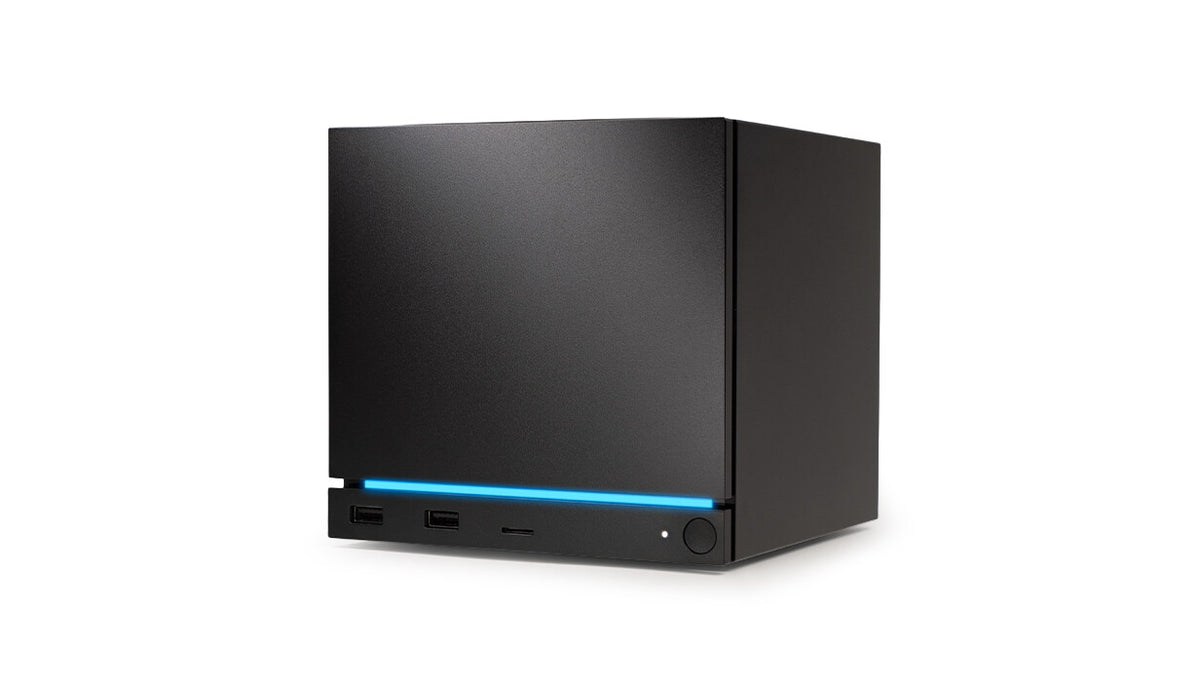
Steam Machine has been on sale since June 2026. According to iFixit, it has a DisplayPort 1.4 and a port listed as HDMI 2.0. On paper, HDMI 2.0 supports HDR, FreeSync and CEC, but at 4K 120 Hz the picture starts to suffer. According to Windows Central, DisplayPort 1.4 has much more bandwidth and handles this mode easily.
The older HDMI also lacks HDMI VRR, which smoothly matches the refresh rate to the frame rate. Valve is working on unlocking HDMI 2.1, but today DisplayPort gives you the full quality.
There's a practical side too. The HDMI port carries CEC, which lets you control the console with your TV remote. Picture an evening on the couch: with HDMI, you turn on the TV with the remote and everything wakes up together. Through an adapter you usually don't get that, so you turn on the console and the TV separately. It's a small inconvenience, and in return you get a better picture.
We chose the products below by type: active DisplayPort 1.4 to HDMI 2.1 adapters and cables for connecting a TV. Keep in mind that availability varies by country.
DisplayPort to HDMI adapters for Steam Machine we recommend
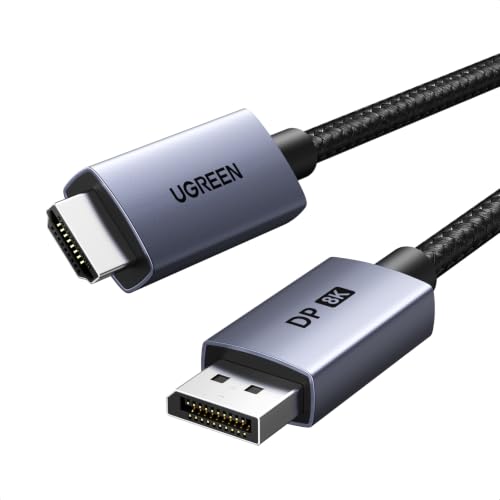
1. UGREEN DisplayPort 1.4 to HDMI 8K cable (active)
active cable · 1-3 m · 4K 240 Hz
Active UGREEN cable from DisplayPort to HDMI, so you don't need a separate HDMI cable. Up to 8K 60 Hz according to the manufacturer, works one way only.
See UGREEN DisplayPort 1.4 to HDMI 8K cable (active) on Amazon →

2. Cable Matters DisplayPort 1.4 to HDMI 2.1 adapter
active · 4K 120 Hz · 8K 60 Hz · short cable
Active adapter from DisplayPort 1.4 to HDMI 2.1, up to 4K 120 Hz and 8K 60 Hz according to the manufacturer. You need an Ultra High Speed HDMI cable to connect it to your TV.
See Cable Matters DisplayPort 1.4 to HDMI 2.1 adapter on Amazon →
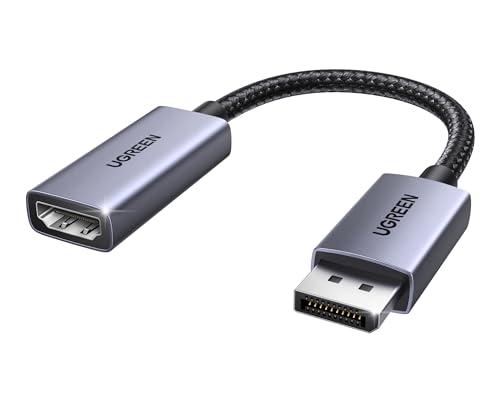
3. UGREEN DisplayPort 1.4 to HDMI 8K adapter (active)
active · 4K 240 Hz · 8K 60 Hz
Active UGREEN adapter from DisplayPort to HDMI, up to 8K 60 Hz and 4K 240 Hz according to the manufacturer. It works one way only: from the computer to the display.
See UGREEN DisplayPort 1.4 to HDMI 8K adapter (active) on Amazon →
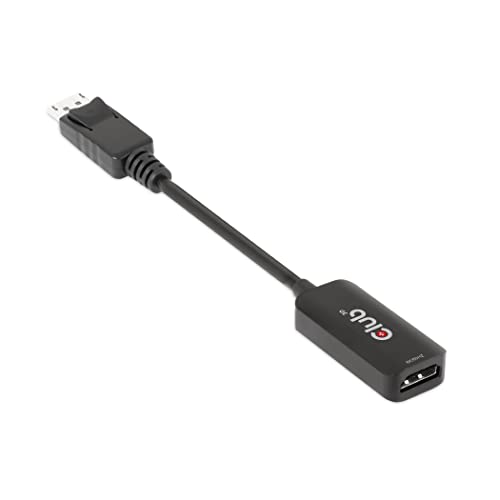
4. Club 3D DisplayPort 1.4 to HDMI 4K 120Hz adapter
active · 4K 120 Hz · HDR
Active Club 3D adapter from DisplayPort 1.4 to HDMI, 4K 120 Hz and 8K 60 Hz with HDR according to the manufacturer.
See Club 3D DisplayPort 1.4 to HDMI 4K 120Hz adapter on Amazon →
VRR, HDR, and SteamOS updates
HDR through an adapter is real, because DisplayPort 1.4 carries it and adapter makers list it in their specs. VRR is a different story, and there are no guarantees. It depends on the adapter model, its firmware, and your TV.
The maker of one popular adapter says outright that VRR is not supported. Some users report it worked after an update. If VRR matters to you, check the specific adapter's listing and your TV's manual before you buy.
Things change with updates. In May 2026, Notebookcheck reported that AMD is working on Linux drivers that will fully support HDMI 2.1, so the console could get 4K 120 Hz with HDR and VRR over its own HDMI port. On September 15, 2026, PC Games Hardware covered SteamOS 3.9, where HDMI already takes a step forward thanks to FRL mode.
Fun fact: in SteamOS 3.9 the console can do 4K 144 Hz with HDR over HDMI, but VRR disappears in that mode.
What does this mean in practice? You buy the adapter for today, and if HDMI 2.1 gets fully unlocked, you'll have a second option. Until then, an adapter is the simplest way to get 4K 120 Hz with full color on a TV.
Adapter or a ready-made DisplayPort to HDMI cable
There are two ways to go. An adapter is a small dongle that you plug a separate HDMI Ultra High Speed cable into. A ready-made active DisplayPort to HDMI cable does the same job in one piece, so you don't need a second cable.
Pick an adapter if you already have a good HDMI Ultra High Speed cable run behind your TV, or if you want to swap it easily. Pick the cable if you want fewer parts behind the cabinet. An ordinary HDMI cable from a few years ago may not handle 4K 120 Hz, so the Ultra High Speed label is a must here.
Check two things in the listing. The adapter must be active, because a passive one can't handle such a high mode. The maker should also state 4K 120 Hz, not just higher resolutions at 60 Hz.
Our advice: if you have a 4K 120 Hz TV with HDMI 2.1 and a good Ultra High Speed cable, buy an active DisplayPort 1.4 to HDMI 2.1 adapter. Go for the ready-made cable if you'd rather have one part instead of two.
Common questions about an adapter for the Steam Machine
Does the Steam Machine have HDMI 2.1?
According to iFixit, the HDMI port is listed as HDMI 2.0. Valve is working on unlocking HDMI 2.1, and AMD is working on Linux drivers that should fully support it. Until then, DisplayPort 1.4 gives you better picture quality.
Does a DisplayPort to HDMI adapter give 4K 120 Hz on a TV?
Yes, if it's an active DisplayPort 1.4 to HDMI 2.1 adapter and your TV has an HDMI 2.1 input. You'll need an HDMI Ultra High Speed cable to connect it to the TV.
Does VRR work through the adapter?
There's no certainty. It depends on the adapter model, its firmware, and your TV, and the maker of one popular adapter states that it's not supported. Check the specific model's listing before you buy.
Do I need an adapter for a monitor?
No, if the monitor has a DisplayPort input. Connect it to the console with a regular DisplayPort cable. You only need an adapter for a TV that has HDMI inputs alone.
Adapter or DisplayPort to HDMI cable for the Steam Machine?
Both work from the computer to the screen, and both must be active. An adapter fits when you already have a good HDMI Ultra High Speed cable. Choose the cable if you prefer one part instead of two.
See also
- Best External Drive for Steam Machine - USB-C 10 Gb/s SSD
- Best SSD for Steam Machine - M.2 2280 or 2230 and how much storage
- Best monitor for Steam Machine - 1440p or 4K, DisplayPort or HDMI
- Best microSD card for Steam Machine - size and speed
Sources
- Valve: Steam Machine - manufacturer page (store.steampowered.com)
- iFixit: Steam Machine (2026) - industry article (ifixit.com)
- Windows Central: Why doesn't Steam Machine use HDMI 2.1 - industry article (windowscentral.com)
- TweakTown: Steam Machine 4K 120Hz over HDMI - industry article (tweaktown.com)
- Notebookcheck: Steam Machine HDR and VRR - industry article (notebookcheck.net)
- PC Games Hardware: SteamOS 3.9, HDMI FRL and VRR - industry article (pcgameshardware.de)
- BGR: Steam Machine HDMI port - industry article (bgr.com)

Leave a comment
This site is protected by hCaptcha and the hCaptcha Privacy Policy and Terms of Service apply.