








As an Amazon Associate I earn from qualifying purchases.
Quick answer: our top pick is UGREEN NASync DXP2800 GT (diskless) (2 bays · newer model · no drives included).
Best NAS for Mac mini M6? Two bays and a 2.5 Gb/s port
Do you need a big NAS with a powerful CPU for a Mac mini M6? No. In most homes, a two-bay model with a 2.5 Gb/s port is enough. It has room for Time Machine backups, photos and documents, and the network won't slow your computer down.
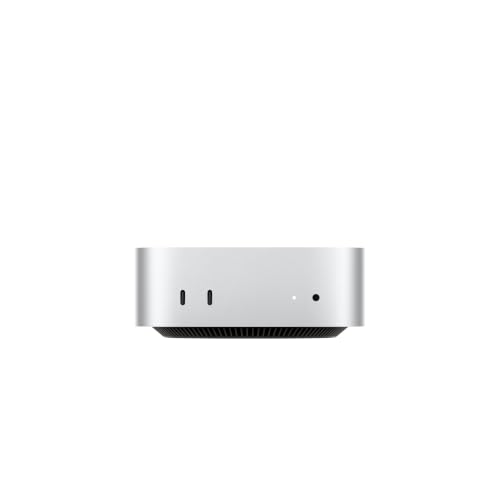
Apple announced the Mac mini M6 in August 2026. It has a 2.5 Gb/s Ethernet port on the back, with a 10 Gb/s option. If your NAS has a port with the same speed, backups and file copies run as fast as the drives allow.
Two bays also let you set up a mirror, known as RAID 1. More on that below, because it has one catch you need to know about.
What a NAS needs to work well with a Mac
Three features matter. The NAS's SMB server must advertise Time Machine support, so macOS sees it as a place for backups. It also helps if you can set a storage quota for each Mac. And the NAS has to keep up with your computer's network port.
The quota matters when several computers use one NAS. Without it, Time Machine fills the disk until there's no room left for photos and documents. With a quota, each Mac gets its own share.
Be careful with older guides that mention the AFP protocol. macOS 27 and later don't support it, so SMB is the only option. If a guide for your NAS tells you to turn on AFP, look for a newer version.
The NAS processor isn't the key factor here. Backups are mostly writes to disk, so the drives slow things down before the CPU does. There's no point hunting for the most powerful chip just to back up one or two Macs.
Look for a mention of Time Machine and SMB in the manufacturer's description. If it isn't there, check the NAS documentation before you buy.
Fun fact: the previous Mac mini M4 had a gigabit port. On the M6, 2.5 Gb/s networking is now standard, according to 9to5Mac.
We picked NAS models based on these three features: Time Machine support, network port and number of bays.
NAS Drives for Mac mini M6 We Recommend

1. UGREEN NASync DXP2800 GT (diskless)
2 bays · newer model · no drives included
Newer two-bay UGREEN NAS, ranked high among NAS devices. Drives are sold separately.
1, 2.5, or 10 Gb/s port
A 2.5 Gb/s port is the sensible middle. It matches the standard port on the Mac mini M6 and works with most home networks. For overnight backups and moving photos, the network won't feel like a bottleneck.
A 1 Gb/s port on a NAS will work, but your Mac will be waiting on the slower link. For the first full Time Machine backup and for larger video files, you'll notice the difference. With small files and daily incremental backups, the gap is smaller.
10 Gb/s makes sense if you buy a Mac with the optional 10 Gb/s port and want to work on large projects straight from the NAS. It's sometimes available on four-bay models, alongside a 2.5 Gb/s port. Keep in mind that you also need a switch and cabling that can handle that speed, otherwise the link drops to the slower one.
Two or four bays, and which drives
Two bays are enough for one Mac and a home archive. A pair of drives in RAID 1 protects you if one of them fails. Some two-bay models also have M.2 slots you can use for fast storage.
Is a mirrored copy full protection? Not quite, but it's a good start. RAID 1 protects against the failure of one drive, and it doesn't replace a second copy kept off-site. It doesn't help with fire, theft, or files deleted by mistake, so keep important photos in one more place.
Four bays are the choice if you have several computers at home or you know the archive will grow fast. You can add drives without replacing the NAS. Separate articles cover drives for UGREEN and Synology NAS units.
If you're buying just one: get a two-bay NAS with a 2.5 Gb/s port and Time Machine support over SMB, and use the second drive for the mirror.
Frequently asked questions about a NAS for the Mac mini M6
Can the Mac mini M6 back up to a NAS with Time Machine?
Yes, if the NAS supports Time Machine over SMB. You'll find the setup details in the NAS documentation. Once you add it in Time Machine settings, backups run automatically.
What network port does the Mac mini M6 have?
On the back there's a 2.5 Gb/s Ethernet port, with 10 Gb/s as an option. You also get HDMI and three Thunderbolt 4 ports. You connect the NAS to the network with a cable, just like a computer.
Does the NAS come with drives?
The NAS units on our list are diskless models, so you buy the drives separately. Check the seller's listing for what's in the box, since it can vary by offer.
Two or four bays in a NAS for a Mac?
Two are enough for one Mac and a home archive, with a mirrored copy on two drives. Choose four when you have more computers or your data grows quickly. Then you can add drives without replacing the device.
Is a NAS with a 1 Gb/s port enough for a Mac mini?
For daily incremental backups and documents, yes. On the first full backup and with large files, you'll feel that the link is slower than the Mac's port. If you can, pick a NAS with a 2.5 Gb/s port.
See also
- Best SSD Enclosure for Mac mini M6 - USB4 40 Gb/s and Which Port to Pick
- Best drive for Time Machine on a Mac mini M6 - capacity, APFS and HDD or SSD
- Best external SSD for Mac mini M6 - which port gives full speed
Sources
- Apple: Mac mini technical specifications - manufacturer page (apple.com)
- Apple: Backup disks you can use with Time Machine - manufacturer page (support.apple.com)
- ComputingForGeeks: Best NAS for Mac Time Machine backups - industry article (computingforgeeks.com)
- 9to5Mac: M6 Mac mini review - industry article (9to5mac.com)
- UGREEN: NASync DXP2800 - manufacturer page (nas.ugreen.com)
- Synology: DS225+ - manufacturer page (synology.com)
- Tom's Hardware: Apple Mac mini review - industry article (tomshardware.com)

Leave a comment
This site is protected by hCaptcha and the hCaptcha Privacy Policy and Terms of Service apply.