








As an Amazon Associate I earn from qualifying purchases.
Quick answer: our top pick is Apple 20W USB-C Power Adapter (genuine Apple · 20 W · USB-C).
Best charger for AirPods Max 2? A 20 W USB-C power adapter, or one you already own
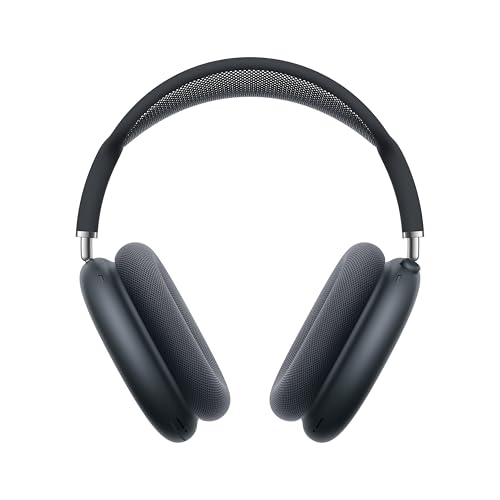
A full charge on AirPods Max 2 gives you up to 20 hours of listening with noise cancellation on, so you reach for the outlet less often than with a phone. When you do need to charge them, a standard 20 W USB-C power adapter is enough. A phone, tablet or laptop charger works too, as long as it has a USB-C port.
Apple doesn't list the headphones' charging power in watts. A 20 W adapter gives you plenty of headroom, though, so you don't need to buy anything special. If you already have a USB-C charger lying around, you most likely don't need to buy anything.
The headphones went on sale in early April 2026. One thing many buyers notice first is that there's no power adapter in the box. Below we cover what's in the box, what to buy, and what to watch for with the cable.
What's in the box and how long the headphones last
According to Apple, the set includes AirPods Max 2, a Smart Case, a USB-C cable and documentation. There's no power adapter. So you get the cable, but you need your own charger with a USB-C port to plug into the wall.
The Smart Case does more than protect the headphones in your bag. Once they're inside, they switch to an ultra-low-power state. That keeps the battery from draining when you're not using them.
Up to 20 hours of listening with noise cancellation covers a long trip or several days of commuting. Usually you only need to plug them in overnight once in a while.
Picture this: it's morning, the headphones show a low battery, and you're about to leave. If a charger is within reach, you plug in the cable and still have time to make coffee. If there's no USB-C adapter in the house, you're left with a cable and nothing to connect it to. That's why the charger should stay wherever you usually put the headphones down.
Fun fact: according to Apple, 5 minutes of charging gives you about 1.5 hours of listening.
Below we've gathered chargers and a USB-C cable, picked by one criterion: they suit headphones that charge over USB-C and have power to spare. In short: get a 20 W USB-C power adapter or use a charger you already have at home.
Chargers for AirPods Max 2 we recommend

1. Apple 20W USB-C Power Adapter
genuine Apple · 20 W · USB-C
Genuine Apple 20 W power adapter with a USB-C port. It charges the headphones and your phone too.
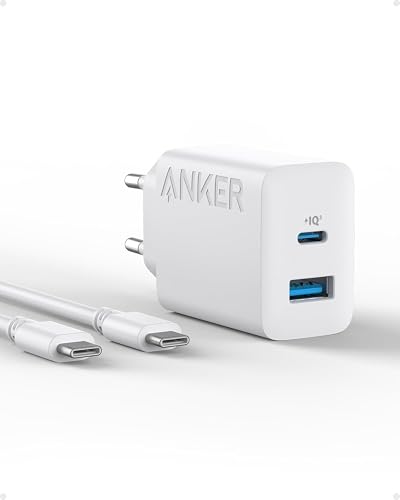
2. Anker 20W USB-C Charger
20 W · USB-C · compact
Small Anker 20 W charger with USB-C. It has plenty of power to spare for the headphones.
Will a more powerful charger do any harm, and what about wireless charging
A more powerful charger won't hurt your headphones. The device draws only as much current as it needs. The charger just offers extra headroom. So you can safely use the power adapter from your phone or laptop, and there's no risk of the headphones "getting too much".
The same goes for big multi-port chargers on your desk. If you have a free USB-C port, plug in the cable and you're done. A higher-wattage charger won't charge faster than the headphones allow, but you risk nothing.
Wireless charging is a different story. AirPods Max 2 don't charge wirelessly, and Apple's spec lists USB-C only. The induction pad you use for your phone won't work with these headphones.
If you see a charger in a store labeled "wireless" and want to check whether it fits, skip it. For these headphones, only the USB-C port and a cable matter.
Cable for charging and for wired listening
For charging alone, the USB-C to USB-C cable from the box is enough. It's good to have a second one as a spare: one stays in the bag with the headphones, the other sits by your desk or bed. That way you don't swap the cable between places, and you won't end up with dead headphones on a trip.
If you want to listen over a cable, the cable has to carry data. Cables that are charge-only may not work for this, and they look identical. When you buy one, check the seller's description to see whether the cable supports data transfer.
Fun fact: according to MacRumors, the USB-C cable from the box gives you lossless audio at 24-bit, 48 kHz.
The same cable also fits your phone or laptop with USB-C. If you use one cable for everything, remember to put it back in the headphone case after a trip.
If you're considering other Apple headphones, separate articles cover charging for AirPods 5 and AirPods Pro 3.
Frequently asked questions about charging AirPods Max 2
Do AirPods Max 2 come with a power adapter in the box?
No. According to Apple, the box contains the headphones, the Smart Case, a USB-C cable and documentation. You need to have your own power adapter or buy one.
How many watts do AirPods Max 2 need?
Apple doesn't give a charging power in watts. A standard 20 W USB-C power adapter leaves plenty of headroom and is more than enough for the headphones. A more powerful charger works too, because the headphones draw only what they need.
Do AirPods Max 2 charge wirelessly?
No. Apple's spec lists only USB-C charging. An induction pad won't work with these headphones.
Can you use AirPods Max 2 while they're charging over a cable?
Listening over a USB-C cable is possible as long as the cable carries data. Whether the headphones charge at the same time isn't covered in the available data, so check Apple's documentation. Charging with an ordinary charge-only cable, without data transfer, works fine, of course.
Will a laptop charger harm AirPods Max 2?
No. The headphones draw only as much current as they need, so a laptop or phone charger works without risk. It just needs a USB-C port and the right cable.
See also
- Best charger for AirPods Pro 3 - MagSafe, Qi or USB-C cable
- Best charger for AirPods 5 - USB-C, Qi or Apple Watch charger
Sources
- Apple: AirPods Max 2 tech specs - manufacturer page (support.apple.com)
- Apple: AirPods Max 2 technical specifications - manufacturer page (apple.com)
- 9to5Mac: AirPods Max 2 now available - industry article (9to5mac.com)
- MacRumors: AirPods Max 2 release date - industry article (macrumors.com)
- BGR: AirPods Max 2 review - industry article (bgr.com)
- T3: Apple AirPods Max 2 review - industry article (t3.com)

Leave a comment
This site is protected by hCaptcha and the hCaptcha Privacy Policy and Terms of Service apply.