









As an Amazon Associate I earn from qualifying purchases.
Quick answer: our top pick is Apple 20W USB-C Power Adapter (original Apple · 20 W · USB-C).
Best charger for AirPods 5? A 20 W USB-C power adapter is all you need
Which charger for AirPods 5? A standard 20 W USB-C power adapter with a USB-C cable. The case needs very little power, so such an adapter is more than enough, and you can use the same one for your phone.
If you have the version with the wireless case, there is a second option: a Qi-certified charger. The standard case charges only through the USB-C port.
The earbuds went on sale on September 18, 2026 (according to MacRumors). The box includes neither a cable nor a power adapter, so you need to have both of your own.

Two case versions and how to tell which one you have
AirPods 5 come in two versions. The standard case charges through USB-C. The AirPods 5 with Wireless Charging Case version charges through USB-C, an Apple Watch charger, or a Qi-certified charger.
The easiest way to check is the name on the box or in your order: look for the "with Wireless Charging Case" label. Without it, you have the standard case and a Qi pad won't help you.
They also differ in battery life, according to Apple's specifications. With noise cancellation, the standard version gives up to 4 hours on a single charge of the earbuds and up to 20 hours with the case. The wireless case version gives up to 5 hours, and up to 22 hours with the case. Both have IP57 water resistance, and 5 minutes in the case gives about an hour of listening.
Fun fact: the AirPods 5 case has a built-in speaker that helps you find it in the Find My app.
We have picked out 20 W USB-C power adapters and Qi pads. The adapters work with both case versions, while the pads fit only the wireless version.

AirPods 5 chargers we recommend
1. Apple 20W USB-C Power Adapter
original Apple · 20 W · USB-C
Original Apple 20 W power adapter with a USB-C port. It has plenty of power to spare for the AirPods 5 case, and the same adapter charges your iPhone too.
2. Anker 20W USB-C Charger
20 W · USB-C · compact
Small Anker 20 W charger with USB-C. Cheaper than the original Apple one, and more than enough for the earbud case and your phone.
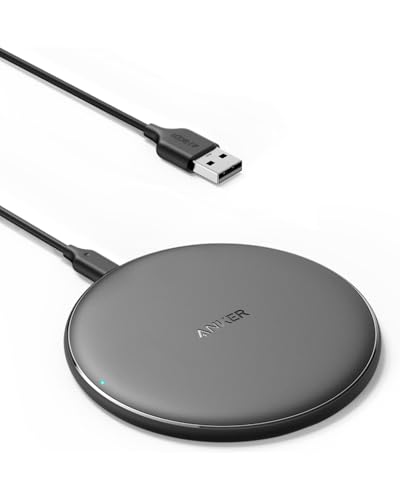
3. Anker 313 Qi Wireless Charging Pad 10W
Qi · 10 W · wireless case only
Flat, certified Qi pad. It charges the AirPods 5 only in the wireless case version; the standard case does not support it.

4. Anker Zolo 15W Magnetic Qi2 Charging Pad
Qi2 · iPhone and Qi case
Magnetic Qi2 pad for iPhone that, as a regular Qi charger, also charges the wireless case of the AirPods 5. For anyone who wants one pad for both phone and earbuds.
Apple Watch charger and Qi pads: what Apple doesn't promise
Apple lists three ways to charge the wireless case: USB-C, an Apple Watch charger, and a Qi charger. If you already have one of these chargers at home, you don't need to buy anything new.
A Qi pad is a flat disc you place the case on. It's important that it is Qi certified and that the case sits roughly in the center of the coil. If it's placed poorly, charging simply won't start.
In the AirPods 5 specifications, Apple mentions neither Qi2 nor MagSafe. So don't expect the case to snap onto the pad's magnets on its own, and don't look for those words in a product description as a condition of buying.
A Qi2 pad isn't a wrong choice, though. It charges the case like an ordinary Qi charger, so it works well if you want one pad for your phone and earbuds. In that case you're paying for a magnet that mostly benefits the iPhone.
How much power you need and whether your iPhone charger is enough
The case is small and draws very little energy, so the power of the adapter doesn't matter much here. A 20 W USB-C adapter works with room to spare, and more expensive, more powerful models won't charge your earbuds any faster.
An iPhone charger is enough if it has a USB-C port. Just connect a USB-C cable to the case and the adapter. An older charger with a USB-A port will work too, as long as you have a USB-A to USB-C cable.
The phone manufacturer's original adapter is a safe choice. A good replacement from a known brand will work too, as long as it has USB-C and is rated for 20 W. Avoid adapters with no markings or manufacturer details. In the US, look for UL or ETL certification.
Fun fact: you can charge the AirPods 5 wireless case on an Apple Watch charger, so a charger that came with your watch can replace a separate pad.
Most common questions about charging AirPods 5
Which charger for AirPods 5?
The simplest option is a 20 W USB-C adapter and a USB-C cable. That's enough for both case versions. With the wireless case, you can also use a Qi charger.
Do AirPods 5 charge wirelessly?
Yes, but only the AirPods 5 with Wireless Charging Case version. The standard case charges only through the USB-C port.
Will an Apple Watch charger charge AirPods 5?
Yes, if you have the wireless case. Apple lists it explicitly among the ways to charge this version. You can't charge the standard case this way.
Do AirPods 5 support MagSafe?
Apple doesn't list MagSafe in the AirPods 5 specifications, so there's no basis to expect it. You can charge the wireless case on a Qi charger, including a Qi2 pad, which then works like a regular Qi pad.
Is there a charger in the AirPods 5 box?
No. The box contains the earbuds, a USB-C charging case with a speaker, and documentation. You need to have your own USB-C cable and adapter.
Sources
- Apple: AirPods 5 technical specifications - manufacturer page (apple.com)
- Apple: AirPods 5 with Wireless Charging Case tech specs - manufacturer page (support.apple.com)
- MacRumors: AirPods 5 release date and pricing - industry article (macrumors.com)
- 9to5Mac: AirPods 5 vs AirPods 4 - industry article (9to5mac.com)
- T3: Apple AirPods 5 - industry article (t3.com)
- Apple: AirPods 5 with Wireless Charging Case, in the box - manufacturer page (support.apple.com)

Leave a comment
This site is protected by hCaptcha and the hCaptcha Privacy Policy and Terms of Service apply.