









How to add CarPlay and Android Auto to an older car?
You can add CarPlay and Android Auto to any older car in one of two ways: by purchasing a portable dashboard screen or by installing a new head unit in place of the factory stereo. There is also a third category of devices, namely wireless USB adapters, but these only work in cars that already have the factory system, just wired.
The choice depends on your budget and how much you want to modify your car's interior. If you value simplicity and low cost, a portable screen will do the job in a few minutes. If you prefer a factory dashboard look and better sound quality, a new 1 DIN or 2 DIN head unit will be a better choice.
For popular car models such as the Golf 5 and 6, Golf 7, Fiat Panda, Renault Clio, or Skoda Octavia II, we have prepared separate guides with installation details.
Portable screen for dashboard or windshield
A portable display is the fastest and most affordable way to get modern features in your car. You mount the device with a suction cup to the windshield or stick it to the dashboard. You plug the power directly into the cigarette lighter socket, so you do not have to disassemble the dashboard or cut any wires.
You can send audio from such a screen to the car's factory speakers in three ways: via Bluetooth, a built-in FM transmitter, or a traditional AUX cable. The biggest drawback of this solution is the dangling power cables and extra equipment obstructing part of the windshield or dashboard.
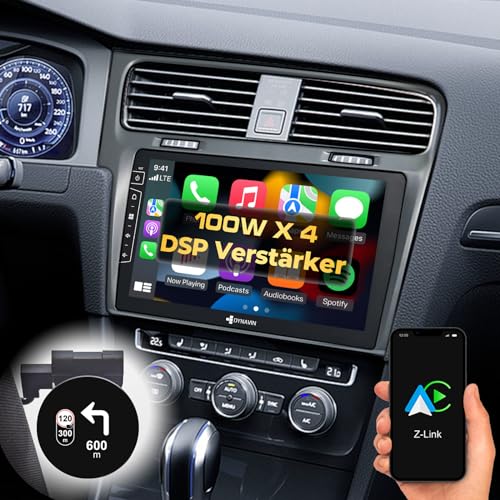
New head unit in place of the factory stereo
Replacing the factory stereo with a new head unit delivers the best visual results and the highest sound quality. You can choose from universal head units fitted with fascia adapter frames or dedicated Android head units shaped to match a specific car model. Apple notes that CarPlay can be added to your current car with an aftermarket receiver from well-known manufacturers such as Alpine, Blaupunkt, Clarion, JVC, Kenwood, Pioneer, and Sony.
Dedicated Android stereos are mostly built by Chinese brands, tempting buyers with large screens and low prices. However, their build quality can be inconsistent, so it is worth choosing only models with verified reviews. On the other hand, branded 2 DIN head units cost more, but guarantee stable manufacturer support and better sound.
Installing a new head unit yourself usually requires purchasing a few additional accessories. You will need a dedicated fascia trim frame, an adapter harness from the car's factory wiring to the ISO standard, an antenna adapter, and a CAN-bus module that allows you to retain steering wheel controls and proper ignition switching.
Fun fact: The abbreviation DIN comes from Deutsches Institut für Normung, the German institute that developed the ISO 7736 standard for car radio cavity dimensions, used in the automotive industry worldwide.
Wireless adapter for the USB port
Many drivers confuse wireless adapters with devices that add CarPlay from scratch. Such an adapter will not create the system on an old radio lacking the necessary software. It is a small USB dongle designed solely for cars that already feature factory CarPlay or Android Auto, but require plugging the phone in with a cable.
After plugging the adapter into the car's USB port, the phone connects to it automatically via a wireless connection as soon as you start the engine. This allows your phone to stay safely in your pocket or bag throughout the entire trip.
How to check what fits your car?
Before buying any equipment, measure your factory radio or the cavity in the center console. According to the ISO 7736 standard, the standard 1 DIN size measures 180 x 50 mm, while the larger 2 DIN format measures 180 x 100 mm. If your car has a narrow 1 DIN slot, a classic head unit with a large screen will only fit there if it features a specialized motorized flip-out or floating display.
Also check your car's factory menu by connecting your phone via cable to the USB port in the glove compartment or console. If no smartphone connectivity icon appears on the screen, your car does not have this system, and purchasing a wireless adapter alone will not change anything. In that case, your only options are an external screen or replacing the entire head unit.
Below, we have gathered proven devices across various price ranges that will let you comfortably run navigation and music in your car.
Recommended screens, head units and adapters
As an Amazon Associate I earn from qualifying purchases.
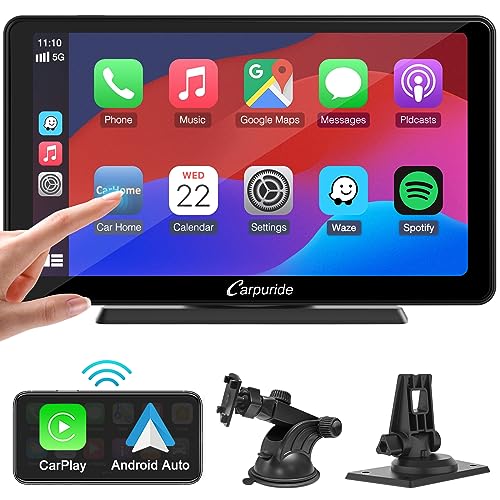
1. Carpuride 7" portable screen
dash screen · no install · 7 inch
The easiest way to get CarPlay in any car: a portable screen with wireless CarPlay and Android Auto that sits on the dash and runs off the 12 V socket. Sound goes to the car speakers over Bluetooth, FM or AUX.
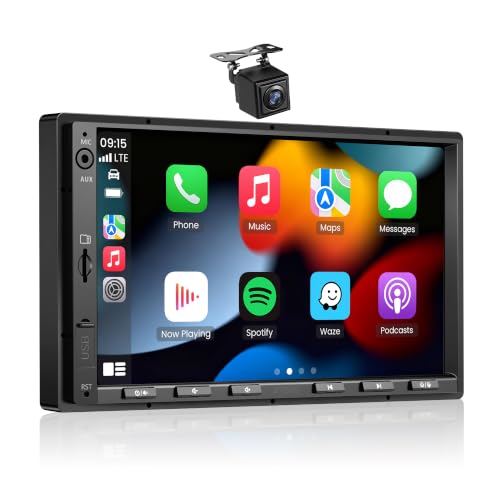
2. ATOTO F7 WE 7"
universal double DIN · 7 inch · wireless CarPlay
A cheaper universal double DIN unit with wireless CarPlay and Android Auto. It fits any car with a double DIN opening and, as with the big brands, needs a trim panel and an adapter.

3. Pioneer SPH-DA160DAB
brand name · double DIN · 6.8 inch · DAB+
A brand-name double DIN unit with CarPlay, Android Auto and DAB+ digital radio. Pioneer is on Apple's list of CarPlay head unit makers. Fitting it takes a trim panel and an adapter for your car.

4. JVC KW-M565DBT
brand name · double DIN · wireless CarPlay
A brand-name double DIN unit with a 6.8-inch screen that connects to CarPlay and Android Auto wirelessly. Good if the phone stays in your pocket rather than by the USB port.

5. AAWireless Two+
adapter · wireless CarPlay and Android Auto
For cars that already have factory wired CarPlay or Android Auto. The adapter plugs into the USB port and from then on the phone connects by itself, no cable. Works with iPhone and Android.
Frequently Asked Questions About CarPlay and Android Auto Installation
Can CarPlay be added to an old car?
Yes, CarPlay and Android Auto can be added to any old car. You can do this without any modifications using a portable screen plugged into the cigarette lighter or by replacing the existing radio with a modern universal or dedicated model.
Which is better: a portable screen or a new radio?
A portable screen is better if you are looking for low cost and zero modifications to your car's wiring. A new radio is a better choice when you expect clean, interference-free sound, a tidy dashboard, and a factory-look interior.
Does an Android radio have CarPlay?
Most modern Android-based multimedia head units support both CarPlay and Android Auto. However, before purchasing, it is worth checking the specifications to confirm whether a given model supports wireless connectivity or requires a wired connection.
What is the difference between 1 DIN and 2 DIN?
The difference comes down to the height of the mounting slot in the car's console according to the ISO 7736 standard. The 1 DIN standard measures 180 x 50 mm and refers to a traditional, slim radio, while the 2 DIN format measures 180 x 100 mm and accommodates a large touchscreen.
Will a wireless adapter work in a car without CarPlay?
No, a wireless adapter will not work in a car that does not have this system installed from the factory. This type of device is only designed to eliminate the cable in cars that already support factory wired CarPlay or Android Auto via a USB port.
Sources
- Apple: CarPlay - manufacturer page (apple.com)
- Pocket-lint: How to upgrade your car's old audio system to work with Android Auto and Apple CarPlay - industry article (pocket-lint.com)
- GearBrain: Top Apple CarPlay and Android Auto upgrades for your car - industry article (gearbrain.com)
- XDA Developers: Best aftermarket Android Auto head units - industry article (xda-developers.com)
- Wikipedia: Automotive head unit (DIN sizes) - industry article (en.wikipedia.org)

Leave a comment
This site is protected by hCaptcha and the hCaptcha Privacy Policy and Terms of Service apply.