









Which CarPlay head unit for a Renault Clio 3 or Clio 4?
The choice depends on the car generation: in the Clio 3, you have to replace the entire head unit with a model featuring a dedicated fascia trim, while in the Clio 4, check the factory system first, as a wireless adapter is often all you need. The Clio 3 never offered smartphone integration from the factory, so the only way to get maps and music from your phone is a new head unit.
In the Clio 4, the situation is different because newer models already have the appropriate software and a USB port. If your car does not support a wired connection, you can choose between a dedicated head unit with a large screen or a portable dashboard-mounted screen.
Installing a radio in Renault Clio 3: what to look out for
The Renault Clio 3 was produced between 2005 and 2012, although some versions were sold even longer. You will not find factory Apple CarPlay or Android Auto in any model year. If you want modern features, you will need to replace the factory player.
The mounting slot in the Clio 3 dashboard is not a standard size. A standard universal 2 DIN radio will not fit easily and requires purchasing a matching fascia adapter. Additionally, the factory audio controls, namely the steering wheel stalk, require a separate electronic interface to work with the new hardware.
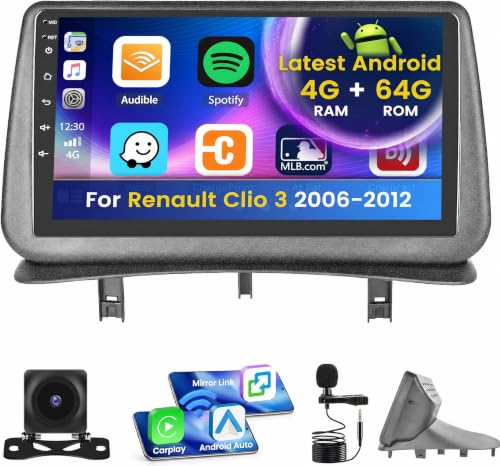
The easiest solution is to buy a head unit designed specifically for the Clio 3. Such multimedia stations come with a plastic panel that fits factory clips perfectly and a display with a diagonal size of, for example, 9 inches. The kit usually also includes a wiring harness that lets you retain steering wheel controls without soldering wires.
Factory systems in Renault Clio 4 and the USB cable test
The Renault Clio 4 rolled off production lines between 2012 and 2019. Three different audio setups were installed in this model: the basic R&GO radio, the MediaNav system with a 7-inch touchscreen, and the more advanced R-Link. What you have in your car determines how you can enable CarPlay.
Early versions of the MediaNav system do not support Android Auto or Apple CarPlay. They cannot be updated by flashing new software from a USB flash drive because, according to GPS R-Link service info, their processor is simply too weak. It was not until the new MediaNav Evolution version that factory smartphone integration was introduced.
Fun fact: The new MediaNav Evolution with Android Auto and Apple CarPlay support was officially announced at the Paris Motor Show in October 2018. Interestingly, this system debuted first in the Dacia Duster II, and only later arrived in the rest of the Renault group lineup.
To check if your Clio 4 supports smartphone connectivity, run a simple test. Connect your smartphone via cable to the factory USB port in the car. If Android Auto or CarPlay appears on the screen, your system is ready. In this case, you do not need to take anything apart; all you need is a small wireless adapter plugged into the USB port, which will automatically connect your phone to the car.
If nothing happens after plugging in the cable, two options remain. You can install a dedicated head unit with a 10-inch screen, although user reviews of these aftermarket units can be mixed. The second, much less invasive solution is an external portable screen.
For the roundup below, we selected devices tailored to the Clio 3 interior, proven wireless adapters for factory USB ports, and universal screens.
Recommended head units and adapters for the Renault Clio
As an Amazon Associate I earn from qualifying purchases.

1. AAWireless Two+
adapter · wireless CarPlay and Android Auto
For cars that already have factory wired CarPlay or Android Auto. The adapter plugs into the USB port and from then on the phone connects by itself, no cable. Works with iPhone and Android.

2. Carlinkit Mini Ultra 3
small adapter · wireless CarPlay and Android Auto
A cheaper, smaller wireless adapter for cars with factory wired CarPlay or Android Auto. Plug it into the USB port and forget the cable.
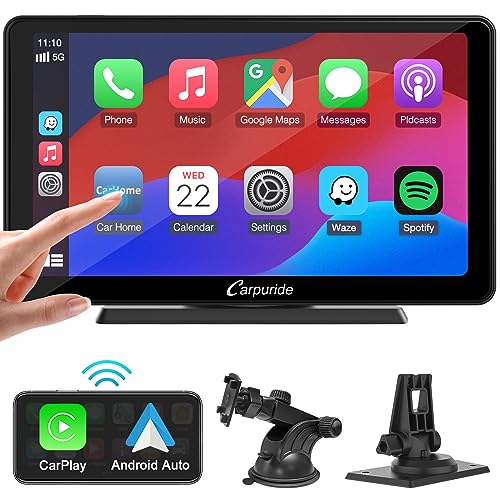
3. Carpuride 7" portable screen
dash screen · no install · 7 inch
The easiest way to get CarPlay in any car: a portable screen with wireless CarPlay and Android Auto that sits on the dash and runs off the 12 V socket. Sound goes to the car speakers over Bluetooth, FM or AUX.
Portable screen instead of replacing the radio
A portable touchscreen is a great solution for both the Clio 3 and older model years of the Clio 4. It solves the problem of non-standard trim fascias, weak processors in older radios, and troublesome dashboard disassembly. You mount the entire device on the windshield with a suction cup or place it on the dashboard.
You plug the device into the car cigarette lighter socket, so installation takes only a few minutes. The screen connects wirelessly to your smartphone, displaying navigation, messages, and music apps. You do not interfere with the vehicle's factory electrical system in the process.
You can send sound from the screen to the car's factory speakers in three ways. The most convenient option is a Bluetooth connection or the built-in FM transmitter, which you tune to an unused frequency on your standard radio. If you value signal stability, you can also use a standard AUX cable.
Frequently asked questions about Clio multimedia
Does the Renault Clio 4 have Android Auto?
It depends on the model year and the version of the installed head unit. Early MediaNav versions lacked this feature, and the system only gained Android Auto support after the MediaNav Evolution update announced in late 2018. The quickest way to check is to plug an Android phone into the factory USB port using a cable.
Can MediaNav be updated to CarPlay?
For older MediaNav units, such an update is impossible. First-generation devices have a processor that is too weak to handle the requirements of Apple CarPlay and Android Auto. Only the newer MediaNav Evolution hardware offers official support for these systems, as noted by Renault UK, among others, in their technical support materials.
Does a 2 DIN radio fit the Clio 3?
A standard 2 DIN radio does not fit directly into the factory opening in the Clio 3 dashboard. The recess in this model has a specific shape, so a dedicated mounting fascia is required to install a universal head unit. For this reason, many drivers choose ready-made multimedia head units integrated with a panel designed specifically for this model.
Does the steering wheel stalk work after replacing the radio in the Clio 3?
The stalk will work, but only if you use a suitable adapter. Factory steering column controls require a module that translates button signals into commands understood by the new player. Radios designed specifically for the Clio 3 usually include such a module in their installation kit.
What is better for the Clio 4: a new radio or a portable screen?
If your Clio 4 does not support wired CarPlay, a portable screen is a safer and cheaper choice. Dedicated 10-inch radios from China often have mediocre user reviews and require taking apart the center console. You power a portable screen from the cigarette lighter, keep the completely factory look of the dashboard, and can easily move it to another car.
Sources
- Renault UK: Media Nav Evolution FAQ (Android Auto and Apple CarPlay) - manufacturer page (renault.co.uk)
- GPS R-Link: MediaNav, a new version with Android Auto and Apple CarPlay - industry article (gps-rlink.com)
- GPS R-Link: Review of MediaNav Evolution with Android Auto and CarPlay - industry article (gps-rlink.com)
- Dynamic Sounds: Renault Clio double DIN stereo fitting kits - industry article (dynamicsounds.co.uk)
- Wikipedia: Automotive head unit (DIN sizes) - industry article (en.wikipedia.org)

Leave a comment
This site is protected by hCaptcha and the hCaptcha Privacy Policy and Terms of Service apply.