









How to get CarPlay in a Golf Mk7?
First, check if your car already has the factory App-Connect feature. If so, all you need is a small adapter plugged into the USB port to use CarPlay or Android Auto wirelessly. If your car lacks this feature, your options are installing a dedicated head unit designed for the Golf 7 or purchasing a portable display.
Drivers often assume that the lack of wireless connectivity means having to replace the entire head unit. However, with the seventh generation Golf, things are different, as many cars left the factory with a system ready to support smartphones via a USB cable. In this case, the upgrade takes literally a minute and costs a fraction of the price of a new unit.
Only when the car has an older system without App-Connect do you need to look for another solution. Then, you can choose between replacing the factory screen and using a portable display mounted on the dashboard or windshield.
How to check if your Golf has App-Connect
It all depends on the generation of the infotainment system installed in the car. The Golf 7 debuted on September 4, 2012, in Berlin. The earliest model years were equipped with the first-generation factory MIB system (MIB1), which did not support Apple CarPlay or Android Auto at all.
The situation changed in mid-2015, when the MIB II system debuted for the 2016 model year. It was from that point on that Volkswagen introduced App-Connect, integrating Apple CarPlay, Android Auto, and MirrorLink via a USB cable.
According to Volkswagen, the App-Connect feature works with Composition, Composition Colour, Composition Media, and Ready 2 Discover head units. Factory Discover Media and Discover Pro navigation systems also support this feature.
Checking your car's equipment is very simple. Grab your phone and a USB cable, then connect the smartphone to the factory USB port in the center console. If an App-Connect tile or the CarPlay or Android Auto icon appears in the radio menu, you already have the right foundation.
Fun fact: The Volkswagen Golf 7 debuted officially on September 4, 2012, during a gala premiere in Berlin. The German manufacturer states that a total of around 6.3 million units of this model rolled off the assembly lines.
Below, we have gathered tested accessories tailored to various Golf 7 trim levels, ranging from USB adapters to complete multimedia head units.
Recommended adapters and head units for the Golf Mk7
As an Amazon Associate I earn from qualifying purchases.

1. AAWireless Two+
adapter · wireless CarPlay and Android Auto
For cars that already have factory wired CarPlay or Android Auto. The adapter plugs into the USB port and from then on the phone connects by itself, no cable. Works with iPhone and Android.

2. Carlinkit Mini Ultra 3
small adapter · wireless CarPlay and Android Auto
A cheaper, smaller wireless adapter for cars with factory wired CarPlay or Android Auto. Plug it into the USB port and forget the cable.
3. Carpuride 7" portable screen
dash screen · no install · 7 inch
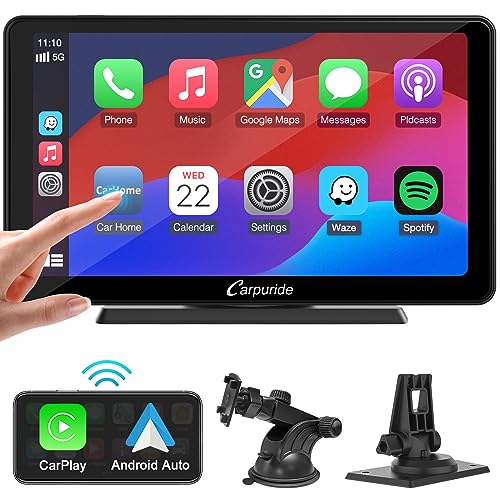
The easiest way to get CarPlay in any car: a portable screen with wireless CarPlay and Android Auto that sits on the dash and runs off the 12 V socket. Sound goes to the car speakers over Bluetooth, FM or AUX.
Wireless adapter for the factory USB port
In the Golf 7, the App-Connect feature works exclusively via cable from the factory. If you do not want to take your phone out of your pocket and plug it into a cable every time, a wireless adapter is the best choice.
A device of this type, such as from AAWireless or Carlinkit, plugs permanently into the factory USB port in the console. The module handles communication with the phone wirelessly, and the factory radio recognizes it just like a smartphone connected via cable.
This solution is intended for any driver whose car already has active App-Connect. It requires no dashboard disassembly, wire soldering, or visits to a mechanic.
Golf 7 without App-Connect: dedicated radio or portable screen
If your Golf has the MIB1 system or a radio without factory App-Connect, a USB adapter alone will not work. A standard adapter requires an active system in the radio and cannot generate this interface on its own.
Keep in mind that the factory radio in the Golf 7 is not a standard 2 DIN size. Universal head units available in stores do not fit the factory dashboard trim, so you need to choose equipment designed specifically for this car model.
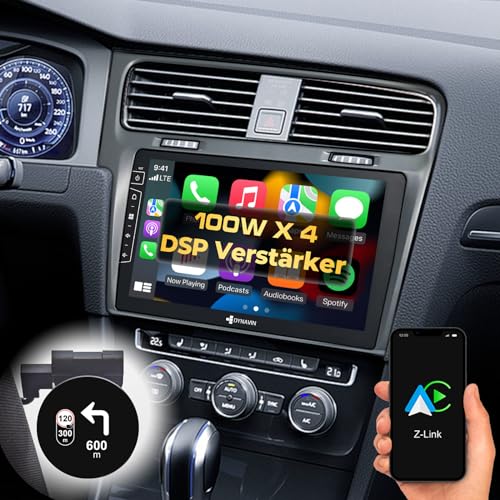
An interesting replacement option is a dedicated multimedia head unit, such as from Dynavin with a large 10.1-inch screen. It replaces the factory panel and blends seamlessly into the Golf 7 console, adding CarPlay, Android Auto, and navigation.
The simplest and non-invasive alternative remains an external portable screen, such as from Carpuride. You place it on the dashboard or mount it on the windshield, connect power from the cigarette lighter socket, and transmit audio to the factory speakers via an FM transmitter, Bluetooth, or an AUX port.
There is also an option to upgrade the factory equipment. Replacing the older MIB1 system with a newer MIB2 is offered by specialized car audio shops, allowing you to maintain a completely factory interior look.
Questions and answers about Golf 7 connectivity
From which model year does the Golf 7 have CarPlay?
Apple CarPlay became available in the Golf 7 in mid-2015, starting with the 2016 model year. That was when Volkswagen introduced MIB II units with the App-Connect feature.
How to check if my Golf 7 has App-Connect?
Connect your phone with a USB cable to the port in the vehicle center console. If an App-Connect tile appears in the radio menu, or the CarPlay or Android Auto interface launches, the car has this feature.
Does CarPlay work wirelessly in the Golf 7?
The factory App-Connect system in the Golf 7 works only via cable through the USB port. To use a wireless connection, you need to plug an external wireless adapter into this port.
Will a wireless adapter work in a Golf 7 without App-Connect?
No, a wireless adapter requires factory support for CarPlay or Android Auto in the car to function. In a car without App-Connect, the module will not enable these features.
Does a standard 2 DIN radio fit the Golf 7?
No, the factory dashboard opening in the Golf 7 is not a standard 2 DIN size. Only dedicated head units manufactured to match the specific shape of this model console, or portable screens, work in this car.
Sources
- Volkswagen: App-Connect - connect your phone and vehicle - manufacturer page (volkswagen.ie)
- Volkswagen Newsroom: Golf VII (2012-2019) - manufacturer page (volkswagen-newsroom.com)
- Android Authority: Select Volkswagen models to bring Android Auto and Apple CarPlay - industry article (androidauthority.com)
- MacRumors: Volkswagen adding CarPlay support in late 2015 - industry article (macrumors.com)
- TechRadar: Volkswagen will bring Android Auto and Apple CarPlay to its new cars in 2015 - industry article (techradar.com)
- Auto Express: Used Volkswagen Golf Mk7 (2013-2019) review - industry article (autoexpress.co.uk)

Leave a comment
This site is protected by hCaptcha and the hCaptcha Privacy Policy and Terms of Service apply.