









As an Amazon Associate I earn from qualifying purchases.
Quick answer: our top pick is AAWireless Two+ (adapter · wireless CarPlay and Android Auto).
Which CarPlay head unit for a Renault Captur?
The choice depends on the model year of your car and the system installed from the factory. If you own a first-generation Captur from 2013-2018 with standard MediaNav navigation, the best solution is to replace the factory unit with a dedicated head unit of an identical shape or purchase a portable screen. Older factory radios do not support smartphone connectivity, and this feature cannot be enabled via any update.
On the other hand, if you drive a late first-generation Captur with the newer MediaNav Evolution system, or you have a second-generation Captur, the situation is much simpler. In these cars, CarPlay works natively via a USB cable. In that case, you do not need to replace the radio; you only need to buy a small wireless adapter that plugs into the USB port.
How to identify the infotainment system in your Captur
The first-generation Renault Captur debuted at the Geneva Motor Show in 2013 and rolled off the line at the Spanish factory in Valladolid until 2019. In May 2017, the car underwent a facelift. Three main types of audio systems were installed in these model years: the basic R&GO radio, the MediaNav head unit with a 7-inch touchscreen, and the more advanced R-Link system.
Early MediaNav versions from 2013-2018 do not support CarPlay and cannot be upgraded to the newer standard. It was not until October 2018 that the new MediaNav Evolution version was announced, gaining native Apple CarPlay and Android Auto support, reaching cars in 2019. Interestingly, the post-facelift R-Link system from May 2017 received Android Auto support, but was left without Apple CarPlay support.
The simplest test is to connect your phone using an original USB cable to the port in the car's console. If the CarPlay or Android Auto menu immediately launches on the car display, your vehicle already has factory support and only needs the convenience of going wireless. If nothing happens on the screen, you have an older version of the system and need to replace the hardware.
Fun fact: In 2015, the Renault Captur was the fourteenth best-selling car in Europe, with 195,323 units delivered.
Below, you will find recommended devices that allow you to add modern smartphone features to your car.

Recommended head units and adapters for the Renault Captur
1. AAWireless Two+
adapter · wireless CarPlay and Android Auto
For cars that already have factory wired CarPlay or Android Auto. The adapter plugs into the USB port and from then on the phone connects by itself, no cable. Works with iPhone and Android.

2. Carlinkit Mini Ultra 3
small adapter · wireless CarPlay and Android Auto
A cheaper, smaller wireless adapter for cars with factory wired CarPlay or Android Auto. Plug it into the USB port and forget the cable.

3. Carpuride W701 Pro 7"
dash screen · no install · 7 inch
The easiest way to get CarPlay in any car: a portable screen with wireless CarPlay and Android Auto that sits on the dash and runs off the 12 V socket. Sound goes to the car speakers over Bluetooth, FM or AUX.
Replacing the head unit with a factory MediaNav-style radio
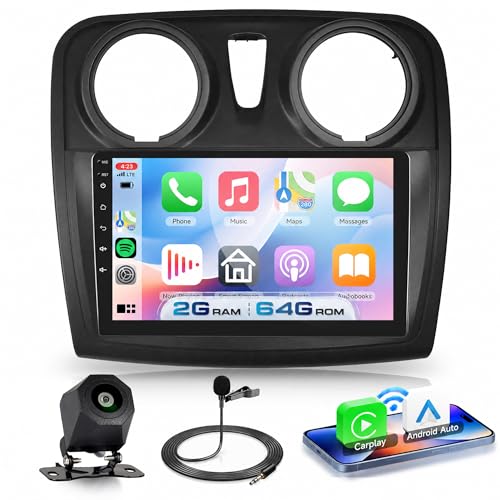
For owners of 2013-2018 models with the classic MediaNav, the best option is installing a dedicated aftermarket head unit. Renault designed these dashboards modularly, meaning the unit has the exact same shape and mounting points as the factory systems in Dacia Sandero, Duster, or Logan models. The replacement seamlessly fills the recess in the plastic dashboard trim.
A new radio in this form factor comes with built-in Android and full support for CarPlay and Android Auto. Thanks to retaining the proper wiring harness connectors, you keep full functionality of the factory steering wheel controls. Installation simply involves unplugging the old unit and connecting the dedicated plugs.
You get a modern touchscreen that responds quickly to input and lets you use phone navigation maps directly on the dashboard. This is the most durable and visually appealing solution for the first-generation Captur, as the interior looks exactly as if the car left the showroom with such navigation installed.
Captur II and the convenience of a wireless adapter
The second generation of the Renault Captur entered production in July 2019 and brought completely new electronics. Depending on the trim level, the car features either a horizontal 7-inch touchscreen or a large, vertical 9.3-inch display. In these cars, CarPlay and Android Auto work as standard via a USB cable.
Constantly plugging in your phone with a cable on short trips can be tedious. The solution is a miniature wireless adapter plugged permanently into the factory USB port in the glove compartment or center console. The device takes over the signal from your smartphone via Bluetooth and Wi-Fi, connecting in the background as soon as you turn on the ignition.
Thanks to the adapter, your phone can stay in your pocket or bag the entire time, while navigation and music start automatically on the factory 7-inch or 9.3-inch screen. You do not tamper with the vehicle's electrical system, you do not disassemble the dashboard, and you avoid risking warranty voidance.
A portable screen as an alternative without dismantling the dashboard
Replacing the built-in radio is not always desirable, especially if your Captur I has the R-Link system linked to vehicle settings or the basic R&GO radio. Dismantling the console then requires additional adapters and more work with the plastics. In this case, a portable screen becomes the simplest option.
This type of device mounts via a suction cup to the windshield or stands on a base directly on the dashboard. The entire unit is powered from a standard 12 V cigarette lighter socket, completely eliminating the need to remove any interior trim. The screen connects to your smartphone wirelessly, displaying the full CarPlay interface.
You can transmit audio from the portable display to the factory Renault speakers in three ways: via an AUX cable, through the built-in FM transmitter tuned to an unused radio frequency, or via Bluetooth. It is an excellent choice if you want to quickly gain eye-level map navigation without modifying the factory equipment.
Frequently asked questions about multimedia in the Captur
Does the 2016 Renault Captur have CarPlay?
From the factory, the 2016 Renault Captur does not feature Apple CarPlay support in any system version. MediaNav and R-Link units installed during that period did not offer connectivity with Apple phones. To use CarPlay in this model year, you must replace the factory radio with a dedicated aftermarket unit or install an external portable screen.
Can MediaNav in the Captur be updated to CarPlay?
Early MediaNav versions installed between 2013 and 2018 cannot be software-updated to support CarPlay. The limitation lies in the internal hardware of the older unit, which does not meet the requirements of this standard. CarPlay support only appeared with the new generation MediaNav Evolution introduced at the end of 2018.
Does a Dacia Sandero radio fit the Captur?
Yes, dedicated radios shaped like the factory MediaNav fit interchangeably between the Dacia Sandero, Duster, Logan, and the first-generation Renault Captur. This is because both manufacturers used the exact same housings and mounting brackets for their navigation displays. Before purchasing, just make sure that the wiring harness included in the kit matches the connectors for your model year.
Does the Captur II have wireless Android Auto?
The second-generation Renault Captur produced since July 2019 supports Android Auto and Apple CarPlay exclusively via a USB cable as standard. However, a wireless connection can easily be achieved by plugging a compact external wireless adapter into the USB port. After a one-time pairing, the phone connects to the car's system automatically.
What to choose for a Captur with R-Link: a new radio or a portable screen?
For higher-spec versions equipped with the R-Link system, a portable screen powered from the cigarette lighter socket is a much safer choice. The factory R-Link unit is often deeply integrated with the vehicle's onboard electronics, making its removal potentially problematic during installation. A portable display provides full access to CarPlay without interfering with the car's factory wiring.
See also
Sources
- Renault UK: Media Nav Evolution FAQ (Android Auto and Apple CarPlay) - manufacturer page (renault.co.uk)
- CAR Magazine: Renault Captur 2017 facelift review - industry article (carmagazine.co.uk)
- CarsGuide: Renault Captur 2019 pricing and spec confirmed - industry article (carsguide.com.au)
- Wikipedia: Renault Captur - industry article (en.wikipedia.org)
- GPS R-Link: MediaNav, a new version with Android Auto and Apple CarPlay - industry article (gps-rlink.com)

Leave a comment
This site is protected by hCaptcha and the hCaptcha Privacy Policy and Terms of Service apply.