








As an Amazon Associate I earn from qualifying purchases.
Quick answer: our top pick is AAWireless Two+ (adapter · wireless CarPlay and Android Auto).
How to get CarPlay in a Ford Focus Mk2 or Mk3?
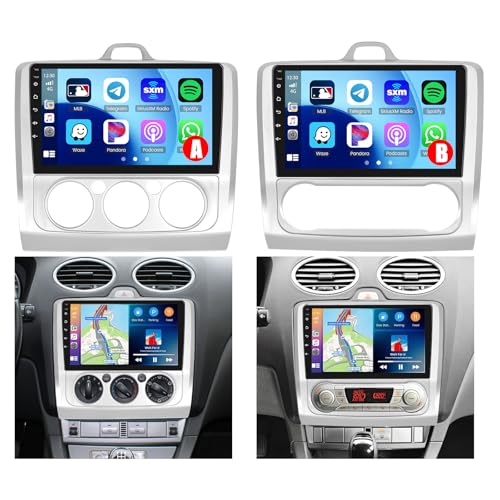
The way to get CarPlay and Android Auto in a Focus depends on the car's generation and the factory-installed radio. In the older Focus Mk2, a dedicated Android head unit works best, installed in place of the factory stereo using a matching fascia trim.
In the Focus Mk3, things look different. If you have a newer model with the SYNC 3 system, CarPlay works straight from the factory, but only via a USB cable connection. In that case, the most convenient solution is a small wireless adapter plugged into the console port.
If your Focus Mk3 has an older SYNC or SYNC 2 system, factory CarPlay cannot be enabled. Android head units for the Mk3 are available on the market, but none have met our rating threshold, so the most sensible choice remains a universal portable screen mounted on the dashboard or windshield.

How to check your Focus generation and SYNC system version?
The second-generation Focus (Mk2) was offered on the European market between 2004 and 2011. No version of this model left the factory with support for CarPlay or Android Auto, as these standards simply did not exist back then.
The third-generation Focus (Mk3) was produced from December 2010 until 2019, receiving a facelift in 2014. Pre-facelift models and those from the first few years after the facelift featured older multimedia versions: basic SYNC and SYNC 2. Neither of them supports smartphone integration via CarPlay or Android Auto.
The newer SYNC 3 system appeared in European cars only later in the production run. In January 2016, Motoring Research reported that European models were still using the older SYNC 2. Meanwhile, Pocket-lint announced the arrival of SYNC 3 with CarPlay and Android Auto support for July 2016.
You can identify the system version by the Apple CarPlay option in the settings (Settings, Preferences), which Ford specifies for SYNC 3. For the system to work, Ford requires an iPhone 5 or newer with CarPlay enabled on the phone. The simplest test is to connect your phone using an original cable to the USB port in the car. If your phone icons appear on the screen right away, your car already has factory support for this standard.
Fun fact: European units of the third-generation Ford Focus rolled off the production lines of, among others, the German plant in Saarlouis.
Below, we have gathered accessories that allow you to enable CarPlay or Android Auto in the Focus Mk2 and Mk3, depending on your car's equipment level.

Recommended head unit and adapters for the Ford Focus
1. AAWireless Two+
adapter · wireless CarPlay and Android Auto
For cars that already have factory wired CarPlay or Android Auto. The adapter plugs into the USB port and from then on the phone connects by itself, no cable. Works with iPhone and Android.
2. Carlinkit Mini Ultra 3
small adapter · wireless CarPlay and Android Auto
A cheaper, smaller wireless adapter for cars with factory wired CarPlay or Android Auto. Plug it into the USB port and forget the cable.

3. Carpuride W701 Pro 7"
dash screen · no install · 7 inch
The easiest way to get CarPlay in any car: a portable screen with wireless CarPlay and Android Auto that sits on the dash and runs off the 12 V socket. Sound goes to the car speakers over Bluetooth, FM or AUX.
Android Head Unit for Focus Mk2 and the Naming Trap
In the Focus Mk2, the only way to get modern maps on the dashboard is to replace the factory radio. You can easily find Android multimedia head units on the market that come complete with a plastic fascia perfectly molded for the factory opening in the dashboard and a CAN-bus module to retain steering wheel controls.
However, you need to be careful when ordering equipment from online stores. Many Asian sellers use misleading listing titles, combining phrases like "Mk2 Mk3 2004-2011". Always rely solely on the specified model years.
Equipment described with the 2004-2011 year range is intended for the European Focus Mk2. You will not be able to install it in the European Focus Mk3, which has been produced since December 2010. Such a unit in an Mk2 provides access to wireless CarPlay and Android Auto, completely refreshing the interior of the older car.
Wireless Adapter for SYNC 3 and a Display for the Older Mk3
According to official Ford data, the SYNC 3 system cannot connect to CarPlay wirelessly. Cordless connectivity was only introduced in the newer generation SYNC 4. Every time you get into a Focus Mk3 with SYNC 3, you are forced to plug in a cable.
The solution to this problem is a wireless adapter plugged directly into the car's factory USB port. The device takes over communication with the phone via Bluetooth and Wi-Fi, allowing the phone to stay in your pocket or bag the entire time. At the same time, the car retains full factory functionality of the screen and buttons.
What should you do if you have a Focus Mk3 from 2011-2016 with the SYNC or SYNC 2 system? Replacing the entire head unit with a Chinese Android radio can be risky, as the models available for the Mk3 dashboard failed to meet our rating threshold.
In this case, the most convenient and completely safe option is a portable external screen. You mount such a device with a suction cup on the windshield or on a dashboard stand and power it from the cigarette lighter socket. It connects wirelessly to your smartphone, and you transmit the audio to the factory Focus speakers via Bluetooth, an AUX cable, or the built-in FM transmitter.
Fun fact: More than five years passed between the market launch of the Focus Mk3 and the appearance of CarPlay support in Europe, because the first production years used basic software lacking advanced smartphone features.
Frequently Asked Questions About CarPlay in the Focus
Does the Ford Focus Mk3 have CarPlay?
Yes, but this applies only to models equipped with the newer SYNC 3 multimedia system, which became available in Europe starting in mid-2016. Early production models and versions with the older SYNC and SYNC 2 systems do not have factory support for this standard.
How to check if my Focus has SYNC 3?
Go to the settings menu and look for the Apple CarPlay Preferences entry, or simply connect your iPhone with a cable to the factory USB port and see if the system launches the phone interface.
Does SYNC 3 support wireless CarPlay?
No, Ford designed SYNC 3 exclusively for wired operation with a phone connected to the USB port. Wireless connectivity was not introduced until the SYNC 4 system, which is why you need an external adapter plugged into the USB port to drive without cables in SYNC 3.
Does the radio for the Focus Mk2 fit the Mk3?
No, the dashboards of both generations have completely different mounting opening shapes, different brackets, and distinct electrical wiring. If you see "Mk2 Mk3 2004-2011" in a listing title, look at the years: the radio fits only the European Focus Mk2 manufactured during that period.
Can a Focus Mk3 without SYNC 3 have CarPlay?
It can, but not through the car's factory features. Because dedicated Android radios for the Mk3 dashboard did not meet our rating threshold, the safest approach is to install a portable external screen powered by the cigarette lighter socket, which connects wirelessly to your phone and streams audio to the car's speakers.
See also
Sources
- Ford UK: How to connect SYNC 3 with Apple CarPlay - manufacturer page (ford.co.uk)
- Pocket-lint: Ford Sync 3 preview - Apple CarPlay, Android Auto - industry article (pocket-lint.com)
- Motoring Research: CES 2016 - Ford Sync gets Apple CarPlay, Android Auto at last - industry article (motoringresearch.com)
- Parkers: Ford Focus (2011-2018) used car buying guide - industry article (parkers.co.uk)
- Wikipedia: Ford Focus (third generation) - industry article (en.wikipedia.org)

Leave a comment
This site is protected by hCaptcha and the hCaptcha Privacy Policy and Terms of Service apply.