









Updated: 27.09.2026
As an Amazon Associate I earn from qualifying purchases.
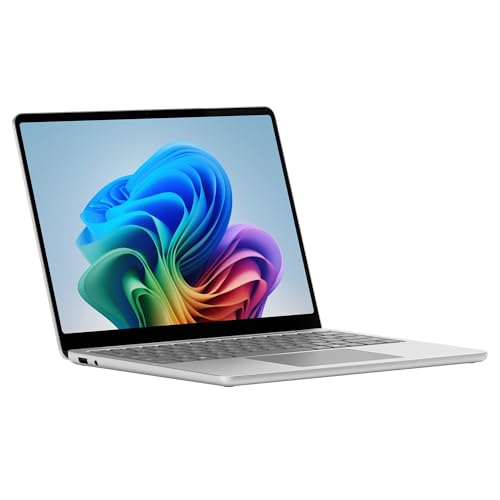
Quick answer: Which charger for Microsoft Surface Laptop 13? The simplest choice is Google 45W USB-C Charger 45 W - full charging speed (from 45 W USB-C PD). The minimum is 40 W - a weaker charger will not do. Cheaper alternatives below.

Which charger for Microsoft Surface Laptop 13? Practical power guide
Opening the box of your new laptop reveals only the machine and a USB-C to USB-C cable. Microsoft does not include a power adapter in the packaging across the EU, US, or other regions. To get powered up, you need a charger delivering at least 40W to operate without battery drain, while full fast-charging speed kicks in from 45W via USB-C Power Delivery (PD).
The laptop charges through either of its two USB-C 3.2 ports, giving you total flexibility on which side to plug in. Whether you just unboxed your computer without an adapter or simply need a second charger for your desk or travel bag, choosing the right option is straightforward once you know the exact power thresholds.
You do not need an overpriced branded brick to get top charging performance. When deciding which charger for Microsoft Surface Laptop 13 fits your daily routine, standard USB-C PD compatibility makes third-party options just as effective as official gear.
Specs and charging
The Microsoft Surface Laptop 13 specs that matter when choosing an adapter:
- Battery: 50 Wh
- Minimum adapter power (manufacturer): 40 W
- Full charging speed: from 45 W USB-C PD

Original Microsoft power brick or a third-party USB-C adapter?
An original adapter offers out-of-the-box certainty, but it is rarely the most practical choice. Modern Surface computers use universal USB-C Power Delivery protocols, meaning any reliable third-party USB-C PD charger matching the required wattage will charge the machine at the exact same speed as an original unit.
Sticking with an official single-port adapter makes sense if you only ever charge this laptop and prefer factory accessories. However, third-party alternatives offer significant everyday benefits: they frequently provide multiple ports to juice up your phone and laptop simultaneously, come in more compact travel designs, and cost noticeably less.
Can your existing phone or tablet charger handle this Surface?
Before purchasing new gear, it helps to check the small print on the chargers you already own at home. Here is how common chargers behave with this laptop:
- 20W phone charger (like standard iPhone plugs): Far below the 40W minimum. The laptop will either show a slow charger warning and discharge during use, or simply refuse to draw power entirely.
- 30W tablet adapter (like iPad plugs): Still falls short of the 40W threshold set by Microsoft. It might charge the 50 Wh battery slowly while the screen is off, but under active work, the battery will continue to deplete.
- 45W phone or laptop charger: Hits the full charging speed threshold via USB-C PD. It provides stable power for standard office tasks and charges the laptop efficiently.
- 65W laptop charger: The ideal sweet spot. Independent tests from Notebookcheck show the laptop draws up to 60W under heavy system load before settling around 40W, reaching a full charge in 131 minutes. A 65W brick ensures the laptop never throttles or dips into the battery under pressure.
Top chargers matched to how and where you work
If you want the most affordable way to hit full factory speed, the Google 45W USB-C Charger is the cheapest option that delivers 100% of the laptop's real-world charging rate. A similar single-port alternative is the Samsung 45W Power Adapter EP-T4511, providing reliable 45W delivery in a neat footprint.
For high-power single-port output with extra headroom, the Motorola TurboPower 68W easily covers the full 45W requirement and handles heavy laptop workloads. If you travel frequently or need to power your phone and laptop from a single wall outlet, multi-port options are far more convenient. The UGREEN Nexode 65W offers 3 ports to run several devices at once while supplying full speed to your Surface. Similarly, the Anker 735 (Nano II 65W) packs 3 charging ports into a compact build, making it a great all-in-one companion for mobile work.
| Charger | Power | Estimated speed |
|---|---|---|
| Google 45W USB-C Charger | 45 W | 100% |
| Samsung 45W Power Adapter EP-T4511 | 45 W | 100% |
| Motorola TurboPower 68W | 68 W | 100% |
| UGREEN Nexode 65W | 65 W | 100% |
| Anker 735 (Nano II 65W) | 65 W | 100% |

1. Google 45W USB-C Charger (45W GaN)
Cheapest at full speed
45W GaN charger. With the Microsoft Surface Laptop 13 it charges at up to about 45 W via USB PD (100% of the laptop's full charging speed, estimate based on specs and protocols).

2. Samsung 45W Power Adapter EP-T4511 (45W)
45W charger. With the Microsoft Surface Laptop 13 it charges at up to about 45 W via USB PD (100% of the laptop's full charging speed, estimate based on specs and protocols).

3. Motorola TurboPower 68W (68W GaN)
68W GaN charger. With the Microsoft Surface Laptop 13 it charges at up to about 45 W via USB PD (100% of the laptop's full charging speed, estimate based on specs and protocols).

4. UGREEN Nexode 65W (65W GaN)
3 ports - several devices at once
65W GaN charger. With the Microsoft Surface Laptop 13 it charges at up to about 45 W via USB PD (100% of the laptop's full charging speed, estimate based on specs and protocols).
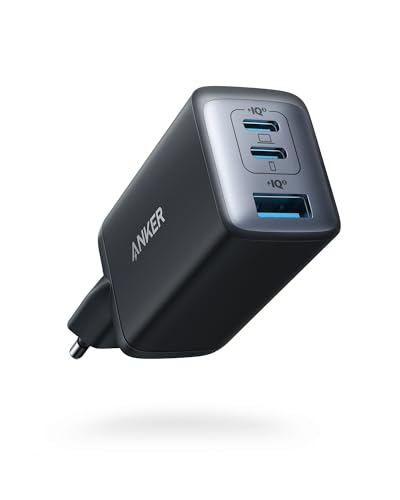
5. Anker 735 (Nano II 65W) (65W GaN)
3 ports - several devices at once
65W GaN charger. With the Microsoft Surface Laptop 13 it charges at up to about 45 W via USB PD (100% of the laptop's full charging speed, estimate based on specs and protocols).
Power pitfalls to watch out for before plugging in
Using an underpowered brick below 40W is the most common issue. Microsoft specifically notes that adapters under 40W may charge slowly or not at all; if you edit photos or run intensive software, the laptop will draw battery power even while plugged in.
Keep multi-port power sharing in mind when using dual or triple-port adapters. When you plug a smartphone into a secondary port on a 65W charger, the main port may drop its allocation to 45W or lower, which is why starting with a 65W base unit prevents the laptop from dropping below its critical operational threshold.
A truly universal package: Unlike older generations with proprietary magnetic bricks, this model ships worldwide without a wall adapter included in any region, providing only a USB-C to USB-C cable in the box.
Essential power facts for Microsoft Surface Laptop 13
Which charger for Microsoft Surface Laptop 13 delivers full speed?
Any reliable USB-C Power Delivery charger rated at 45W or higher provides full charging speed. Tests show the laptop can pull up to 60W during heavy system load, so a 65W adapter is recommended if you want extra headroom while working intensively.
Does the laptop include a wall charger in the box?
No, Microsoft does not bundle a wall charger with this laptop in the EU, the US, or other regions. The packaging includes only the laptop itself and a USB-C to USB-C charging cable.
Can I charge this laptop with a 20W smartphone plug?
No, a 20W charger is well below the manufacturer's 40W minimum requirement. Microsoft warns that chargers below 40W may charge extremely slowly or fail to charge the laptop at all, especially while the screen is on.
Which port should I use to plug in the power cable?
You can use either of the two USB-C 3.2 ports located on the laptop. Both ports support full USB-C Power Delivery input, allowing you to charge the battery from whichever side is most convenient.
Will using a 65W or 100W adapter damage the 50 Wh battery?
No, the laptop controls its own power intake through standard USB-C PD protocols. Connecting a 65W or 100W power brick is completely safe, as the computer will only pull the wattage it actually requires.
Sources
- Microsoft Surface Laptop 13 - support.microsoft.com - official manufacturer specifications (support.microsoft.com)
- Microsoft Surface Laptop 13 - notebookcheck.net - industry article (notebookcheck.net)
- Microsoft Surface Laptop 13 - windowscentral.com - industry article (windowscentral.com)
- Microsoft Surface Laptop 13 - thurrott.com - industry article (thurrott.com)
- Microsoft Surface Laptop 13 - tomshardware.com - industry article (tomshardware.com)


Leave a comment
This site is protected by hCaptcha and the hCaptcha Privacy Policy and Terms of Service apply.