









Updated: 27.09.2026
As an Amazon Associate I earn from qualifying purchases.
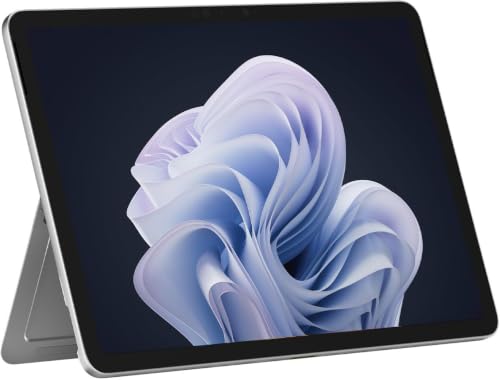
Quick answer: Which charger for Microsoft Surface Pro 12? The simplest choice is Google 45W USB-C Charger 45 W - full charging speed (from 45 W USB-C PD). The minimum is 27 W - a weaker charger will not do. Cheaper alternatives below.

Which charger for Microsoft Surface Pro 12? Finding the right wattage
If you are wondering which charger for Microsoft Surface Pro 12 to choose, you are not alone. Microsoft ships this 2-in-1 without a wall adapter in the box across all global markets, including Europe and the US. You only get a USB-C to USB-C cable with your purchase.
To reach full charging speed, this computer requires a USB-C Power Delivery (PD) charger of at least 45 W. The absolute minimum power input accepted by the hardware is 27 W. Anything below that threshold will struggle to keep up when the screen is on.
Whether you just unboxed your computer and realized you need a plug, or you simply want a lightweight travel brick for your bag, this guide breaks down the numbers so you buy only what you actually need.
Specs and charging
The Microsoft Surface Pro 12 specs that matter when choosing an adapter:
- Battery: 38 Wh
- Minimum adapter power (manufacturer): 27 W
- Full charging speed: from 45 W USB-C PD

Do you have to buy an official Microsoft power brick?
You do not need to buy an official Microsoft adapter to get optimal performance. The laptop uses standard USB Power Delivery protocols across both of its built-in USB-C 3.2 ports. Any reputable third-party USB-C PD power supply will charge the battery at identical speed.
An original Microsoft charger can be convenient if you want guaranteed styling match and single-device simplicity. For most people, however, a certified third-party adapter is the smarter buy. You save money, get a lighter footprint, and often gain extra ports to power your accessories alongside your computer.
Can you charge this laptop with your phone or tablet adapter?
Before purchasing another brick, check the power rating printed on the adapters you already own. Here is how the Surface Pro 12 behaves with common household chargers:
- Standard 20 W phone charger: Below the 27 W minimum. The laptop will either show a slow-charging warning or refuse to charge altogether, and the 38 Wh battery will continue to discharge while you work.
- 30 W tablet charger: Meets the minimum threshold. It can slowly replenish the battery while the laptop is sleeping or handling light tasks, but the charge percentage will stall under heavy workloads.
- 45 W USB-C charger: Hits the full-speed threshold. In independent testing by Notebookcheck, the laptop pulled a maximum of 44.5 W from the wall under full load before stabilizing around 25 W during sustained processor stress.
- 65 W or higher laptop charger: Completely safe and effective. The laptop negotiates only the power it needs (around 45 W), meaning a larger brick runs cool and never overloads the battery.
Top power supply picks for your 2-in-1 setup
If your priority is the lowest price for full-speed charging, Google 45W USB-C Charger hits the 45 W requirement reliably without extra bulk. Another dependable single-port option delivering that same 45 W output is Samsung 45W Power Adapter EP-T4511.
If you prefer an adapter with extra headroom for demanding work, Motorola TurboPower 68W supplies full speed to the computer with power to spare.
For working on the go, multi-port adapters are far more practical. Both UGREEN Nexode 65W and Anker 735 (Nano II 65W) feature 3 ports, allowing you to charge the laptop at full pace while keeping your phone and wireless earbuds topped up from a single wall outlet.
| Charger | Power | Estimated speed |
|---|---|---|
| Google 45W USB-C Charger | 45 W | 100% |
| Samsung 45W Power Adapter EP-T4511 | 45 W | 100% |
| Motorola TurboPower 68W | 68 W | 100% |
| UGREEN Nexode 65W | 65 W | 100% |
| Anker 735 (Nano II 65W) | 65 W | 100% |

1. Google 45W USB-C Charger (45W GaN)
Cheapest at full speed
45W GaN charger. With the Microsoft Surface Pro 12 it charges at up to about 45 W via USB PD (100% of the laptop's full charging speed, estimate based on specs and protocols).

2. Samsung 45W Power Adapter EP-T4511 (45W)
45W charger. With the Microsoft Surface Pro 12 it charges at up to about 45 W via USB PD (100% of the laptop's full charging speed, estimate based on specs and protocols).

3. Motorola TurboPower 68W (68W GaN)
68W GaN charger. With the Microsoft Surface Pro 12 it charges at up to about 45 W via USB PD (100% of the laptop's full charging speed, estimate based on specs and protocols).

4. UGREEN Nexode 65W (65W GaN)
3 ports - several devices at once
65W GaN charger. With the Microsoft Surface Pro 12 it charges at up to about 45 W via USB PD (100% of the laptop's full charging speed, estimate based on specs and protocols).
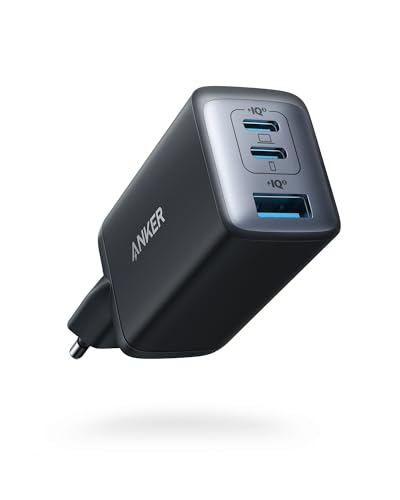
5. Anker 735 (Nano II 65W) (65W GaN)
3 ports - several devices at once
65W GaN charger. With the Microsoft Surface Pro 12 it charges at up to about 45 W via USB PD (100% of the laptop's full charging speed, estimate based on specs and protocols).
Charging bottlenecks and practical power traps to avoid
The primary pitfall with this model is using a charger rated below 27 W. Unlike some smaller gadgets that slowly trickle-charge from weak sources, this machine will actively drain its battery if you try to work while connected to a standard phone brick.
Watch out for power splitting on multi-port chargers. A 65 W multi-port block shares its capacity among active outputs. If plugging in your phone drops the laptop port from 45 W down to 30 W, your charging rate will slow down noticeably.
Both USB-C 3.2 ports on the chassis support charging. You can plug your power source into whichever side is more convenient on your desk without sacrificing charging speed.
A universal package change: Microsoft eliminated the wall charger from the box worldwide for this generation, providing only a USB-C to USB-C cable whether you buy the computer in North America, the UK, or continental Europe.
Common questions about powering the Surface Pro 12
Which charger for Microsoft Surface Pro 12 provides the fastest charging speed?
Any USB-C Power Delivery (PD) charger delivering 45 W or higher unlocks full charging speed. Independent tests show the laptop draws around 44.5 W at peak load, so buying an adapter beyond 45 W will not charge the battery any faster.
Is a power adapter included in the box?
No, Microsoft does not include a wall adapter in the box in any region. You will find the laptop and a standard USB-C to USB-C cable, meaning you need to supply your own wall plug.
What happens if I use a charger with less than 27 W?
The manufacturer specifies 27 W as the minimum required power input. If your charger provides less than that, the laptop may show a slow-charging warning, and the 38 Wh battery will drain while you use the device.
Can a 65 W or 100 W charger damage the battery?
No, modern USB-C PD adapters communicate directly with the computer to negotiate the correct voltage and current. The laptop only takes in the power it can handle (around 45 W), making higher-wattage chargers entirely safe.
Can I charge the computer through either USB-C port?
Yes, both built-in USB-C 3.2 ports accept power input. You can connect your 45 W or higher USB-C PD power supply to either port with identical charging performance.
Sources
- Microsoft Surface Pro 12 - learn.microsoft.com - official manufacturer specifications (learn.microsoft.com)
- Microsoft Surface Pro 12 - notebookcheck.net - industry article (notebookcheck.net)
- Microsoft Surface Pro 12 - trustedreviews.com - industry article (trustedreviews.com)
- Microsoft Surface Pro 12 - itpro.com - industry article (itpro.com)
- Microsoft Surface Pro 12 - theshortcut.com - industry article (theshortcut.com)

Leave a comment
This site is protected by hCaptcha and the hCaptcha Privacy Policy and Terms of Service apply.