









As an Amazon Associate I earn from qualifying purchases.
Quick answer: Which charger for Microsoft Surface Laptop 8? The simplest choice is INIU 65W 3-Port Charger 65 W - full charging speed (from 65 W USB-C PD). Cheaper alternatives below.

Which charger for Microsoft Surface Laptop 8? Start with 65 W USB-C PD
In the US, the Surface Laptop 8 ships with a charger in the box: a 39 W Surface Connect adapter. That is a proprietary plug, not USB-C. Full-speed charging starts at 65 W over USB-C PD (Power Delivery, the standard USB-C fast-charging protocol).
So if you're asking which charger for Microsoft Surface Laptop 8 to buy on top of the bundled one, the answer is a USB-C PD charger rated 65 W or more. The laptop has Surface Connect plus two USB-C ports with USB4, so you can charge through either kind of port. Microsoft doesn't say the two charge equally fast, so I won't promise that.
This guide is for you if you want a second charger for work or travel, or a USB-C charger that also handles your phone. The battery is 66 Wh, so a proper charger matters if you're away from your desk a lot.

Specs and charging
The Microsoft Surface Laptop 8 specs that matter when choosing an adapter:
- Battery: 66 Wh
- Full charging speed: from 65 W USB-C PD

Is the Microsoft adapter worth it, or will a third-party charger do?
The charger in your US box is the original, and it's the simplest option if you only ever charge at one desk. You plug it in and don't think about it. But it's 39 W over Surface Connect, which is a different thing from the 65 W USB-C PD threshold for full speed.
A good USB-C PD charger rated at 65 W or more reaches that threshold. If you want full-speed charging, 65 W is a sensible choice.
A third-party charger makes the most sense when you want a few ports, such as laptop plus phone from one outlet, or a spare for your bag. Price is the other reason. All five chargers below are USB-C PD units, and each is listed at about 65 W with this laptop, which is 100% of the realistic maximum.
Already own a charger? What each one will do for your Surface
Here's how the chargers you may already have compare with the 65 W full-speed threshold:
- iPhone charger (20 W): well below 65 W, so you won't get full speed. Microsoft doesn't publish a minimum, so I can't tell you how it behaves while you work.
- iPad or Android phone charger: same rule. Anything under 65 W is under the full-speed threshold, and I have no figures for how the laptop copes below it.
- Older USB-C laptop charger: if it's USB-C PD and rated 65 W or higher, it meets the threshold. Check the label.
- The 39 W Surface Connect charger from the box: it's your baseline. It isn't a USB-C PD charger at 65 W, so don't treat it as the full-speed reference.
Five 65 W-plus chargers, matched to how you use your laptop
If you want the original, use the 39 W Surface Connect charger from the box. It's the easiest choice, but it isn't a 65 W USB-C PD unit.
For the cheapest way to hit full speed, look at the INIU 65W 3-Port Charger (65 W). It has three ports, so your phone can charge alongside the laptop. The UGREEN Nexode 65W (65 W) is another 3-port option at the same wattage.
If you want one charger for laptop, phone and more, the UGREEN Nexode 100W (100 W) has four ports, and the Baseus Enerfill 100W (100 W) has three. For a travel bag, the Anker Nano Charger 70W 3-Port (B121A) (70 W) also covers laptop plus phone from one outlet. All five are listed at about 65 W with this laptop.
| Charger | Power | Estimated speed |
|---|---|---|
| INIU 65W 3-Port Charger | 65 W | 100% |
| UGREEN Nexode 65W | 65 W | 100% |
| Baseus Enerfill 100W | 100 W | 100% |
| Anker Nano Charger 70W 3-Port (B121A) | 70 W | 100% |
| UGREEN Nexode 100W | 100 W | 100% |

1. INIU 65W 3-Port Charger (65W GaN)
Cheapest at full speed · 3 ports - several devices at once
65W GaN charger. With the Microsoft Surface Laptop 8 it charges at up to about 65 W via USB PD (100% of the laptop's full charging speed, estimate based on specs and protocols).

2. UGREEN Nexode 65W (65W GaN)
3 ports - several devices at once
65W GaN charger. With the Microsoft Surface Laptop 8 it charges at up to about 65 W via USB PD (100% of the laptop's full charging speed, estimate based on specs and protocols).

3. Baseus Enerfill 100W (100W GaN)
3 ports - several devices at once
100W GaN charger. With the Microsoft Surface Laptop 8 it charges at up to about 65 W via USB PD (100% of the laptop's full charging speed, estimate based on specs and protocols).
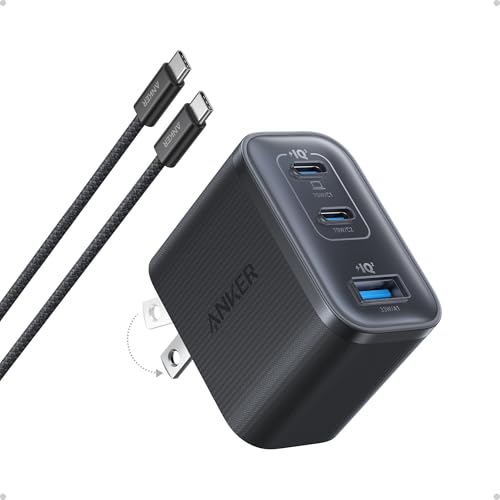
4. Anker Nano Charger 70W 3-Port (B121A) (70W GaN)
3 ports - several devices at once
70W GaN charger. With the Microsoft Surface Laptop 8 it charges at up to about 65 W via USB PD (100% of the laptop's full charging speed, estimate based on specs and protocols).

5. UGREEN Nexode 100W (100W GaN)
4 ports - several devices at once
100W GaN charger. With the Microsoft Surface Laptop 8 it charges at up to about 65 W via USB PD (100% of the laptop's full charging speed, estimate based on specs and protocols).
Three power-related catches to know before you buy
The bundled charger is not USB-C. The 39 W adapter in the US box uses Surface Connect. For USB-C PD charging at 65 W you need to buy a separate charger.
65 W is a threshold, not a cap. Microsoft doesn't publish a maximum input power. Don't read 65 W as the most the laptop can draw. It's the point where full-speed charging starts.
Multi-port chargers can split their power. When you plug a phone into a second port, the laptop may get less than the headline wattage. Keep the laptop on the highest-power port and check the charger's label for how the ports share.
Fun fact: Buyers outside North America get a different adapter. The box includes a 39 W Surface Connect charger in North America, while the 15-inch model in Australia ships with a 65 W one.
Surface Laptop 8 charging: your questions answered
Does the Surface Laptop 8 come with a charger in the US?
Yes. In the US the box includes a 39 W Surface Connect charger. It isn't a USB-C charger.
Which charger for Microsoft Surface Laptop 8 gives full-speed charging?
Full speed starts at 65 W over USB-C PD. Any quality USB-C PD charger rated 65 W or higher reaches that threshold. The laptop has two USB-C ports with USB4, plus Surface Connect.
Will my iPhone charger work with the Surface Laptop 8?
A 20 W iPhone charger is well below the 65 W full-speed threshold, so you won't get full speed. Microsoft doesn't publish a minimum power, so I can't say how it behaves under load. Use a 65 W USB-C PD charger for regular charging.
Can I use a 100 W charger with it?
Yes. The Baseus Enerfill 100W and UGREEN Nexode 100W are both listed at about 65 W with this laptop, which is 100% of the realistic maximum. The extra headroom helps when you charge other devices from the same charger.
Is a third-party charger okay instead of the Microsoft one?
A USB-C PD charger rated 65 W or higher reaches the full-speed threshold. The five chargers above are all listed at about 65 W with this laptop. The original is simpler if you want one adapter and no research.
See also
- Which charger for Microsoft Surface Pro 12 - original adapter or alternative?
- Which charger for Microsoft Surface Laptop 13 - 5 recommended USB-C adapters
- Which charger for Microsoft Surface Pro 13 (2026) - an adapter for the desk and travel
Sources
- Microsoft Surface Laptop 8 - microsoft.com - official manufacturer specifications (microsoft.com)
- Microsoft Surface Laptop 8 - tomshardware.com - industry article (tomshardware.com)
- Microsoft Surface Laptop 8 - rtings.com - industry article (rtings.com)
- Microsoft Surface Laptop 8 - windowscentral.com - industry article (windowscentral.com)
- Microsoft Surface Laptop 8 - drwindows.de - industry article (drwindows.de)

Leave a comment
This site is protected by hCaptcha and the hCaptcha Privacy Policy and Terms of Service apply.